Compare commits
2 Commits
01e93719fb
...
735ea54f80
| Author | SHA1 | Date | |
|---|---|---|---|

|
735ea54f80 | ||
|
|
91884751e8 |
186
1 - Inbox/Every Claude Code Hack I Know (March 2026).md
Normal file
186
1 - Inbox/Every Claude Code Hack I Know (March 2026).md
Normal file
@@ -0,0 +1,186 @@
|
|||||||
|
---
|
||||||
|
title: "Every Claude Code Hack I Know (March 2026)"
|
||||||
|
source: "https://x.com/mvanhorn/article/2035857346602340637"
|
||||||
|
author:
|
||||||
|
- "[[Matt Van Horn (@mvanhorn)]]"
|
||||||
|
published: 2026-03-23
|
||||||
|
created: 2026-03-26
|
||||||
|
description:
|
||||||
|
tags:
|
||||||
|
- "clippings"
|
||||||
|
---
|
||||||
|
[@kevinrose](https://x.com/@kevinrose) asked what IDE to use. My reply got the most engagement out of 128 answers: "No IDE. Just plan.md files and voice." Here's everything I meant by that.
|
||||||
|
|
||||||
|

|
||||||
|
|
||||||
|
## 1\. The Moment You Have an Idea, It's /ce:plan or /ce:brainstorm
|
||||||
|
|
||||||
|
The single most important thing I've learned: the moment I have an idea, it's /ce:plan.
|
||||||
|
|
||||||
|
Not "let me think about this." Not "let me start coding." /ce:plan. Every time. A crazy product idea? /ce:plan. Someone posts a bug on GitHub? Copy the issue URL, paste it, /ce:plan. Error in your terminal? Screenshot it with Cmd+Shift+4, paste it directly into Claude Code with Ctrl+V, /ce:plan fix this. Claude Code accepts images - screenshots of bugs, error messages, design mockups, Slack conversations - and writes a plan from them.
|
||||||
|
|
||||||
|
Here's what happens under the hood when you run it. /ce:plan launches multiple research agents in parallel. One analyzes your codebase - reads your files, finds patterns, checks your conventions. Another searches your docs/solutions/ for learnings from past bugs. If the topic warrants it, more agents research external best practices and framework docs. All simultaneously.
|
||||||
|
|
||||||
|
Then it consolidates and writes a structured plan.md: what's wrong, what approach to take, which files to touch, acceptance criteria with checkboxes, patterns to follow from your own code. Not generic advice. Grounded in your codebase, your conventions, your history.
|
||||||
|
|
||||||
|
/ce:work takes that plan and builds it. Breaks it into tasks, implements each one, runs tests, checks off criteria. Context gets lost? Start a new session, point it at the plan, pick up where you left off. The plan is the checkpoint that survives everything.
|
||||||
|
|
||||||
|
Traditional dev is 80% coding, 20% planning. This flips it. As [@jarodtaylor](https://x.com/@jarodtaylor) put it: "If you spend 80% of your time planning it with Opus and then let subagents swarm on it..." The thinking happens in the plan. The execution is mechanical.
|
||||||
|
|
||||||
|
Compound Engineering is the plugin that makes this real. From [@EveryInc](https://x.com/@EveryInc):
|
||||||
|
|
||||||
|
/plugin marketplace add EveryInc/compound-engineering-plugin
|
||||||
|
|
||||||
|
I became a superfan. Then I became a contributor, the #3 contributor on GitHub, 21 commits, behind only the core team. [@kevinrose](https://x.com/@kevinrose) introduced me to it a few weeks ago.
|
||||||
|
|
||||||
|
I have 70 plan files and 263 commits on /last30days. The gap is early commits before I had this discipline. My rule now: unless it's literally a one-line change, there's always a plan.md first.
|
||||||
|
|
||||||
|
## 2\. Get Voice-Pilled
|
||||||
|
|
||||||
|
I couldn't stand voice notes before LLMs. Apple's built-in dictation made me want to throw my phone. But voice-to-LLM is different. The transcription doesn't have to be perfect because Claude Code understands context. It guesses what the mic got wrong. You can mumble, trail off, restart a sentence. Voice finally works because the listener is smart enough to fill in the gaps.
|
||||||
|
|
||||||
|
Monologue ([@usemonologue](https://x.com/@usemonologue), from Every - same company that makes Compound Engineering) pipes speech into whatever app is focused. You talk, it types into Claude Code. WhisperFlow is great too. Pick one. I bought a gooseneck microphone for the office.
|
||||||
|
|
||||||
|
I'm dictating this right now from Full Self-Driving in my Tesla, dropping off my kids. This paragraph was spoken, not typed.
|
||||||
|
|
||||||
|
## 3\. Run Four to Six Sessions at Once
|
||||||
|
|
||||||
|
This is how I actually spend my day. Four to six Ghostty windows, each running a separate Claude Code session. One is writing a plan. One is building from a different plan. One is running /last30days research. One is fixing a bug I found while testing the last thing.
|
||||||
|
|
||||||
|
While /ce:plan spins up research agents in one window, I switch to another window and /ce:work a plan that's already written. While that builds, the third window gets a new bug pasted in. By the time I cycle back to the first window, the plan is done and waiting in Zed.
|
||||||
|
|
||||||
|
This is why bypass permissions (next section) is non-negotiable. If every session asks "Allow?" on every action, you can't context-switch. They all need to run autonomously. Check in, react, move on. GitHub is there if you break or ruin everything.
|
||||||
|
|
||||||
|
This is also why my MacBook dies in about an hour. Six Claude sessions in parallel. Just ordered the new MacBook Pro.
|
||||||
|
|
||||||
|
## 4\. Three Settings That Change Everything
|
||||||
|
|
||||||
|
Claude Code's default mode asks permission for every edit, every command. You need three config changes.
|
||||||
|
|
||||||
|
**"Dangerously skip permissions"** (yes, that's what it's actually called). ~/.claude/settings.json:
|
||||||
|
|
||||||
|
{ "permissions": { "allow": \[ "WebSearch", "WebFetch", "Bash", "Read", "Write", "Edit", "Glob", "Grep", "Task", "TodoWrite" \], "deny": \[\], "defaultMode": "bypassPermissions" }, "skipDangerousModePermissionPrompt": true }
|
||||||
|
|
||||||
|
skipDangerousModePermissionPrompt: true is the key. Without it, Claude asks you to confirm every session. You can also Shift+Tab to toggle it. Credit: [@danshapiro](https://x.com/@danshapiro) (Glowforge founder, author of Hot Seat). When I set up a friend's Claude Code, the AI actively tried to stop him from enabling this. You have to be direct. It's your computer.
|
||||||
|
|
||||||
|
**Sound when Claude finishes.** Add to the same file:
|
||||||
|
|
||||||
|
{ "hooks": { "Stop": \[ { "hooks": \[ { "type": "command", "command": "afplay /System/Library/Sounds/Blow.aiff" } \] } \] } }
|
||||||
|
|
||||||
|
Walk away. Come back when you hear the sound. With four to six sessions running, you need to know which one just finished. Credit to Myk Melez.
|
||||||
|
|
||||||
|
**Zed autosave.** In Zed settings (Cmd+,):
|
||||||
|
|
||||||
|
{ "autosave": { "after\_delay": { "milliseconds": 500 } } }
|
||||||
|
|
||||||
|
This is the Google Docs-like trick. Zed saves every 500 milliseconds. Claude Code watches the filesystem. When Claude edits a file, changes appear in Zed instantly. When you type in Zed, Claude sees it within a second. Ghostty on one half, Zed on the other, both looking at the same file. It feels like collaborating on a Google Doc except one collaborator is an AI.
|
||||||
|
|
||||||
|

|
||||||
|
|
||||||
|
## 5\. Research Before You Plan
|
||||||
|
|
||||||
|
Before I /ce:plan , I often run /last30days on it first.
|
||||||
|
|
||||||
|
I was deciding between Vercel's agent-browser and Playwright. Instead of reading docs, I ran /last30days Vercel agent browser vs Playwright. In a few minutes: 78 Reddit threads, 76 X posts, 22 YouTube videos, 15 HN stories. Agent-browser uses 82-93% less context tokens. Playwright dumps 13,700 tokens just for tool definitions. [@rauchg](https://x.com/@rauchg)'s post got 964 likes.
|
||||||
|
|
||||||
|
Fed the entire output into /ce:plan integrate agent-browser. The plan came out grounded in what the community actually knows right now, not six-month-old training data.
|
||||||
|
|
||||||
|
/last30days is open source (4.5K stars, [github.com/mvanhorn/last30days-skill](https://github.com/mvanhorn/last30days-skill)). It searches Reddit, X, YouTube, TikTok, Instagram, HN, Polymarket, and the web in parallel. I do this for everything. Before I pick a library, before I build a feature, before I write this article. I ran /last30days Compound Engineering to get fresh community quotes for section 1. Research, plan, build. That's the real loop.
|
||||||
|
|
||||||
|

|
||||||
|
|
||||||
|
## 6\. Turn Any Meeting into a Plan.md
|
||||||
|
|
||||||
|
I had lunch with a potential candidate. We discussed a new product idea that wasn't being worked on at the company. We also talked about food, restaurants, kids. An hour and a half of normal conversation with product brainstorming woven through it.
|
||||||
|
|
||||||
|
I had Granola running. After lunch, I pasted the full transcript - ninety minutes mixed with tangents about sushi - into Claude Code: /ce:plan turn this into a product proposal.
|
||||||
|
|
||||||
|
Here's what made it magic: Claude Code already knows where our product code lives on GitHub. It also has access to my company strategy folder - every prior strategy plan.md I've written. So when it processed the Granola transcript, it wasn't just extracting ideas from lunch conversation. It was cross-referencing against our actual codebase and every strategic decision we've made before. Granola context + codebase + prior strategy plans = gold.
|
||||||
|
|
||||||
|
One-shotted an incredible proposal. Goals, user stories, technical approach, milestones. Ignored the parts about restaurants. Sent it to the candidate that evening.
|
||||||
|
|
||||||
|
He's now working with us full time on that product.
|
||||||
|
|
||||||
|
Granola now has MCP support, so I use it directly inside Claude Code. No more copy-pasting. Every meeting's context flows straight into the plan.
|
||||||
|
|
||||||
|
## 7\. Use Plan Files for Everything, Not Just Code
|
||||||
|
|
||||||
|
I was writing a strategy doc for my company. Claude Code and the markdown file open side by side. Talked into Monologue: "Give me three approaches for the go-to-market. Outline the pros and cons of each."
|
||||||
|
|
||||||
|
Three options appeared in Zed. "Option two is closest but the language in option one is better. Combine them." Updated instantly. "Now address the biggest risk." Added. "Second paragraph is too long." Shortened.
|
||||||
|
|
||||||
|
Claude Code pulls in our GitHub, so it understands the current product. It also has access to all my prior strategy plan.md files. When I'm writing new positioning, it has the full context of every strategic decision I've made before. That compounding context is what makes each plan better than the last.
|
||||||
|
|
||||||
|
Strategy docs, product specs, competitive analysis, this article. Same workflow. Talk, plan, iterate.
|
||||||
|
|
||||||
|
## 8\. Run a Mac Mini for Remote Claude Code
|
||||||
|
|
||||||
|
I have a Mac Mini set up for OpenClaw, but there are two other things I've done with it:
|
||||||
|
|
||||||
|
**Telegram from your phone.** Claude Code has a Telegram integration. I message my Mac Mini from my phone via Telegram. At dinner, think of a bug, type /ce:plan fix the timeout issue into Telegram. Plan is waiting in Zed when I'm back at a screen. Claude Code even uses my OpenClaw AgentMail to email me plan files when I'm away.
|
||||||
|
|
||||||
|
**tmux on airplane flights.** Credit: Nathan Smith. Claude Code doesn't handle airplane wifi well. Connection drops, session dies and it does not even tell you. But tmux into your Mac Mini first and the session runs on that machine. Your laptop is just a window. WiFi drops for 20 minutes over the Atlantic? Reconnect. Session is exactly where you left it and it did work.
|
||||||
|
|
||||||
|
Shipped features the entire flight back from Europe.
|
||||||
|
|
||||||
|
## I Also Use This Workflow for Open Source
|
||||||
|
|
||||||
|
If you look at my GitHub profile ([github.com/mvanhorn](https://github.com/mvanhorn)), here are some of the projects I've been merged into recently, all with plan.md files before any lines of code were written:
|
||||||
|
|
||||||
|
- **Python** - defaultdict repr infinite recursion, man page text wrapping
|
||||||
|
- **OpenCV** - HoughCircles return type, YAML parser heap-overflow
|
||||||
|
- **Vercel Agent Browser** - Appium v3 vendor prefix, WebSocket fallback, batch command workflows (#5 contributor)
|
||||||
|
- **OpenClaw** - browser relay, rate limit UX, iMessage delivery, Codex sandbox detection, voice calls
|
||||||
|
- **Zed** - [$ZED](https://x.com/search?q=%24ZED&src=cashtag_click)\_LANGUAGE task variable, Reveal in Finder tab context menu, git panel starts\_open setting
|
||||||
|
- **Paperclip** - SPA routing, plugin domain events, promptfoo eval framework (#3 contributor)
|
||||||
|
- **Compound Engineering** - plan gating, serial review mode, skills migration, NTFS colon handling (#3 contributor)
|
||||||
|
|
||||||
|
## My Wife Is Mad at Me
|
||||||
|
|
||||||
|
I carry my laptop everywhere. Four to six Ghostty tabs plus Zed. She is not thrilled. The Mac Mini + Telegram helps. But when I want multiple plans evolving in parallel in real time, I need the laptop. She really wants me to stop bringing it to school drop off.
|
||||||
|
|
||||||
|
Sorry, sweetie.
|
||||||
|
|
||||||
|
## This Article Was Written with This Workflow
|
||||||
|
|
||||||
|
This is a markdown file in Zed. Claude Code is running in Ghostty. I talked into Monologue: "the theme is wrong, rewrite the opening." "Add the Granola story." "Don't call Zed my IDE." Claude rewrites. Changes appear in Zed. I react. Seven complete rewrites.
|
||||||
|
|
||||||
|
That's everything I know. A voice app, a plan file plugin, three config changes, four to six parallel sessions, a Mac Mini, and meetings that turn into product proposals. No IDE. No code. Talk, plan, build. From a desk, from a couch, from a car.
|
||||||
|
|
||||||
|
## Bonus: When You Run Out of Tokens
|
||||||
|
|
||||||
|
This kind of efficiency will blow through your $200/month Claude Max plan. Four to six parallel Opus sessions all day adds up.
|
||||||
|
|
||||||
|
The answer: also get the $200/month Codex plan. Install the Codex CLI, and Compound Engineering can build with Codex credits instead. I just shipped /ce:work --codex to Compound Engineering - it merged today - that delegates implementation to Codex when Claude credits run low.
|
||||||
|
|
||||||
|
Some friends use Codex for code reviews of Claude Code work and vice versa. Others prefer Codex's code output but call it from Claude Code for orchestration. The two plans complement each other. Claude for planning, Codex for heavy implementation.
|
||||||
|
|
||||||
|
I also have a "night-night" mode I run to work while I sleep but explaining that is for another time.
|
||||||
|
|
||||||
|
## Bonus 2: The Disney World Play-by-Play
|
||||||
|
|
||||||
|
To show this workflow soup to nuts on something that isn't code, here's a real example from today. I was at the soccer field watching my kids game. Another parent and I were talking about Disney World trips. I pulled out my laptop and showed her.
|
||||||
|
|
||||||
|
**Step 1:** /last30days Disney World. Two minutes later, the full picture. 66 Reddit threads (11,804 upvotes), 34 X posts, 8 YouTube videos. Price shock is the dominant conversation - an $8,500 trip report on r/DisneyPlanning hit 183 comments. Six rides closed in March alone. Buzz Lightyear reopens April 8 with new blasters. Rock 'n' Roller Coaster is becoming a Muppets ride. DinoLand is demolished.
|
||||||
|
|
||||||
|
**Step 2:** "What will be open / not open in Pairl April 16th to be specific" (typos and all - CC doesn't care). Claude checked the refurbishment calendar, cross-referenced the last30days data, gave me the full open/closed list.
|
||||||
|
|
||||||
|
**Step 3:** /ce:plan I'm going to be at Disney World for one day. I want to do at least three parks, maybe four, probably four, because I'm crazy. I want to do Guardians at Epcot, do a few rides at Hollywood Studios, do a few rides at World, do the Everest ride at Animal Kingdom, and at least one Avatar ride. Plus: "What is the strategy to get all the Genie Plus and the other things to make this work? Also, one week before, don't I have to look up something? What do I buy when? Help me set the reminders. I don't care about food. I do not have a hotel. happy to pay the $25 for one time pass"
|
||||||
|
|
||||||
|
Claude's research agents spun up, cross-referenced with the last30days data, and wrote a structured plan.md: park order (AK -> HS -> Epcot -> MK), exact Lightning Lane booking strategy, three alarm reminders for April 13/14/15 at 7:00 AM, which rides need Single Pass ($14-22 each) vs Multi Pass, height requirements for my kids.
|
||||||
|
|
||||||
|
**Step 4:** Opened the plan in Zed. Reviewed it. Said for the other parent to make her plan "So I'm going on a trip to Disney World, and I'm doing three days in the parks. Tell me the most efficient routes, what passes to get, what extras to have... it's an eight and five-year-old." Claude wrote a new 305-line plan with Rider Switch protocols, day-by-day itineraries, and a "measure your 5-year-old in shoes this week" warning.
|
||||||
|
|
||||||
|
**Step 5:** "csn you pushCan you publish this last one on a Vercel site in light mode? That's easy to see." (More typos. Still doesn't matter.) Claude built a clean HTML page and deployed it.
|
||||||
|
|
||||||
|
Live at [disney-plan-ebon.vercel.app](https://disney-plan-ebon.vercel.app/)
|
||||||
|
|
||||||
|
**Step 6:** Dropped the .md file into OpenClaw via Telegram. Said "can you make a plan to add all these reminders to YOU with dobel safeties in case you mess up day before / calendar etc." OpenClaw read the plan, set up calendar events on my work calendar AND cron job backups that ping me on Telegram. Double coverage for every critical booking window. Apr 13 at 3:50 AM PT: "BUY Multi Pass NOW." Apr 16 at 3:50 AM: "BUY Single Passes NOW." Both 10 minutes before the 7 AM ET window opens. Auto-delete after firing.
|
||||||
|
|
||||||
|

|
||||||
|
|
||||||
|
Voice to research to plan to website to automated reminders. At a soccer field.
|
||||||
|
|
||||||
|
That's the workflow. It works for code, strategy, open source, articles, and apparently Disney World.
|
||||||
|
|
||||||
|
/last30days is open source. 4.5K stars. 70 plan files and counting. [@slashlast30days - github.com/mvanhorn/last30days-skill](https://github.com/mvanhorn/last30days-skill) [Compound Engineering: @EveryInc](https://github.com/EveryInc/compound-engineering-plugin) Monologue: [@usemonologue](https://x.com/@usemonologue) (from Every) Granola: [granola.ai](https://granola.ai/) (now with MCP) Ghostty: [ghostty.org](https://ghostty.org/) Zed: [zed.dev](https://zed.dev/)
|
||||||
@@ -0,0 +1,244 @@
|
|||||||
|
---
|
||||||
|
title: "Harness design for long-running application development"
|
||||||
|
source: "https://www.anthropic.com/engineering/harness-design-long-running-apps"
|
||||||
|
author:
|
||||||
|
published:
|
||||||
|
created: 2026-03-26
|
||||||
|
description: "Anthropic is an AI safety and research company that's working to build reliable, interpretable, and steerable AI systems."
|
||||||
|
tags:
|
||||||
|
- "clippings"
|
||||||
|
---
|
||||||
|
*Written by Prithvi Rajasekaran, a member of our [Labs](https://www.anthropic.com/news/introducing-anthropic-labs) team.*
|
||||||
|
|
||||||
|
|
||||||
|
|
||||||
|
Over the past several months I’ve been working on two interconnected problems: getting Claude to produce high-quality frontend designs, and getting it to build complete applications without human intervention. This work originated with earlier efforts on our [frontend design skill](https://github.com/anthropics/claude-code/blob/main/plugins/frontend-design/skills/frontend-design/SKILL.md) and [long-running coding agent harness](https://www.anthropic.com/engineering/effective-harnesses-for-long-running-agents), where my colleagues and I were able to improve Claude’s performance well above baseline through prompt engineering and harness design—but both eventually hit ceilings.
|
||||||
|
|
||||||
|
To break through, I sought out novel AI engineering approaches that held across two quite different domains, one defined by subjective taste, the other by verifiable correctness and usability. Taking inspiration from [Generative Adversarial Networks](https://en.wikipedia.org/wiki/Generative_adversarial_network) (GANs), I designed a multi-agent structure with a **generator** and **evaluator** agent. Building an evaluator that graded outputs reliably—and with taste—meant first developing a set of criteria that could turn subjective judgments like “is this design good?” into concrete, gradable terms.
|
||||||
|
|
||||||
|
I then applied these techniques to long-running autonomous coding, carrying over two lessons from our earlier harness work: decomposing the build into tractable chunks, and using structured artifacts to hand off context between sessions. The final result was a three-agent architecture—planner, generator, and evaluator—that produced rich full-stack applications over multi-hour autonomous coding sessions.
|
||||||
|
|
||||||
|
## Why naive implementations fall short
|
||||||
|
|
||||||
|
We've previously shown that harness design has a substantial impact on the effectiveness of long running agentic coding. In an earlier [experiment](https://www.anthropic.com/engineering/effective-harnesses-for-long-running-agents), we used an initializer agent to decompose a product spec into a task list, and a coding agent that implemented the tasks one feature at a time before handing off artifacts to carry context across sessions. The broader developer community has converged on similar insights, with approaches like the " [Ralph Wiggum](https://ghuntley.com/ralph/) " method using hooks or scripts to keep agents in continuous iteration cycles.
|
||||||
|
|
||||||
|
But some problems remained persistent. For more complex tasks, the agent still tends to go off the rails over time. While decomposing this issue, we observed two common failure modes with agents executing these sorts of tasks.
|
||||||
|
|
||||||
|
First is that models tend to lose coherence on lengthy tasks as the context window fills (see our post on [context engineering](https://www.anthropic.com/engineering/effective-context-engineering-for-ai-agents)). Some models also exhibit "context anxiety," in which they begin wrapping up work prematurely as they approach what they believe is their context limit. Context resets—clearing the context window entirely and starting a fresh agent, combined with a structured handoff that carries the previous agent's state and the next steps—addresses both these issues.
|
||||||
|
|
||||||
|
This differs from compaction, where earlier parts of the conversation are summarized in place so the same agent can keep going on a shortened history. While compaction preserves continuity, it doesn't give the agent a clean slate, which means context anxiety can still persist. A reset provides a clean slate, at the cost of the handoff artifact having enough state for the next agent to pick up the work cleanly. In our earlier testing, we found Claude Sonnet 4.5 exhibited context anxiety strongly enough that compaction alone wasn't sufficient to enable strong long task performance, so context resets became essential to the harness design. This solves the core issue, but adds orchestration complexity, token overhead, and latency to each harness run.
|
||||||
|
|
||||||
|
A second issue, which we haven’t previously addressed, is self-evaluation. When asked to evaluate work they've produced, agents tend to respond by confidently praising the work—even when, to a human observer, the quality is obviously mediocre. This problem is particularly pronounced for subjective tasks like design, where there is no binary check equivalent to a verifiable software test. Whether a layout feels polished or generic is a judgment call, and agents reliably skew positive when grading their own work.
|
||||||
|
|
||||||
|
However, even on tasks that do have verifiable outcomes, agents still sometimes exhibit poor judgment that impedes their performance while completing the task. Separating the agent doing the work from the agent judging it proves to be a strong lever to address this issue. The separation doesn't immediately eliminate that leniency on its own; the evaluator is still an LLM that is inclined to be generous towards LLM-generated outputs. But tuning a standalone evaluator to be skeptical turns out to be far more tractable than making a generator critical of its own work, and once that external feedback exists, the generator has something concrete to iterate against.
|
||||||
|
|
||||||
|
## Frontend design: making subjective quality gradable
|
||||||
|
|
||||||
|
I started by experimenting on frontend design, where the self-evaluation issue was most visible. Absent any intervention, Claude normally gravitates toward safe, predictable layouts that are technically functional but visually unremarkable.
|
||||||
|
|
||||||
|
Two insights shaped the harness I built for frontend design. First, while aesthetics can’t be fully reduced to a score—and individual tastes will always vary—they can be improved with grading criteria that encode design principles and preferences. "Is this design beautiful?" is hard to answer consistently, but "does this follow our principles for good design?" gives Claude something concrete to grade against. Second, by separating frontend generation from frontend grading, we can create a feedback loop that drives the generator toward stronger outputs.
|
||||||
|
|
||||||
|
With this in mind, I wrote four grading criteria that I gave to both the generator and evaluator agents in their prompts:
|
||||||
|
|
||||||
|
- **Design quality:** Does the design feel like a coherent whole rather than a collection of parts? Strong work here means the colors, typography, layout, imagery, and other details combine to create a distinct mood and identity.
|
||||||
|
- **Originality:** Is there evidence of custom decisions, or is this template layouts, library defaults, and AI-generated patterns? A human designer should recognize deliberate creative choices. Unmodified stock components—or telltale signs of AI generation like purple gradients over white cards—fail here.
|
||||||
|
- **Craft:** Technical execution: typography hierarchy, spacing consistency, color harmony, contrast ratios. This is a competence check rather than a creativity check. Most reasonable implementations do fine here by default; failing means broken fundamentals.
|
||||||
|
- **Functionality:** Usability independent of aesthetics. Can users understand what the interface does, find primary actions, and complete tasks without guessing?
|
||||||
|
|
||||||
|
I emphasized design quality and originality over craft and functionality. Claude already scored well on craft and functionality by default, as the required technical competence tended to come naturally to the model. But on design and originality, Claude often produced outputs that were bland at best. The criteria explicitly penalized highly generic “AI slop” patterns, and by weighting design and originality more heavily it pushed the model toward more aesthetic risk-taking.
|
||||||
|
|
||||||
|
I calibrated the evaluator using few-shot examples with detailed score breakdowns. This ensured the evaluator’s judgment aligned with my preferences, and reduced score drift across iterations.
|
||||||
|
|
||||||
|
I built the loop on the [Claude Agent SDK](https://platform.claude.com/docs/en/agent-sdk/overview), which kept the orchestration straightforward. A generator agent first created an HTML/CSS/JS frontend based on a user prompt. I gave the evaluator the Playwright MCP, which let it interact with the live page directly before scoring each criterion and writing a detailed critique. In practice, the evaluator would navigate the page on its own, screenshotting and carefully studying the implementation before producing its assessment. That feedback flowed back to the generator as input for the next iteration. I ran 5 to 15 iterations per generation, with each iteration typically pushing the generator in a more distinctive direction as it responded to the evaluator's critique. Because the evaluator was actively navigating the page rather than scoring a static screenshot, each cycle took real wall-clock time. Full runs stretched up to four hours. I also instructed the generator to make a strategic decision after each evaluation: refine the current direction if scores were trending well, or pivot to an entirely different aesthetic if the approach wasn't working.
|
||||||
|
|
||||||
|
Across runs, the evaluator's assessments improved over iterations before plateauing, with headroom still remaining. Some generations refined incrementally. Others took sharp aesthetic turns between iterations.
|
||||||
|
|
||||||
|
The wording of the criteria steered the generator in ways I didn't fully anticipate. Including phrases like "the best designs are museum quality" pushed designs toward a particular visual convergence, suggesting that the prompting associated with the criteria directly shaped the character of the output.
|
||||||
|
|
||||||
|
While scores generally improved over iterations, the pattern was not always cleanly linear. Later implementations tended to be better as a whole, but I regularly saw cases where I preferred a middle iteration over the last one. Implementation complexity also tended to increase across rounds, with the generator reaching for more ambitious solutions in response to the evaluator’s feedback. Even on the first iteration, outputs were noticeably better than a baseline with no prompting at all, suggesting the criteria and associated language themselves steered the model away from generic defaults before any evaluator feedback led to further refinement.
|
||||||
|
|
||||||
|
In one notable example, I prompted the model to create a website for a Dutch art museum. By the ninth iteration, it had produced a clean, dark-themed landing page for a fictional museum. The page was visually polished but largely in line with my expectations. Then, on the tenth cycle, it scrapped the approach entirely and reimagined the site as a spatial experience: a 3D room with a checkered floor rendered in CSS perspective, artwork hung on the walls in free-form positions, and doorway-based navigation between gallery rooms instead of scroll or click. It was the kind of creative leap that I hadn't seen before from a single-pass generation.
|
||||||
|
|
||||||
|
## Scaling to full-stack coding
|
||||||
|
|
||||||
|
With these findings in hand, I applied this GAN-inspired pattern to full-stack development. The generator-evaluator loop maps naturally onto the software development lifecycle, where code review and QA serve the same structural role as the design evaluator.
|
||||||
|
|
||||||
|
### The architecture
|
||||||
|
|
||||||
|
In our earlier [long-running harness](https://www.anthropic.com/engineering/effective-harnesses-for-long-running-agents), we had solved for coherent multi-session coding with an initializer agent, a coding agent that worked one feature at a time, and context resets between sessions. Context resets were a key unlock: the harness used Sonnet 4.5, which exhibited the “context anxiety” tendency mentioned earlier. Creating a harness that worked well across context resets was key to keeping the model on task. Opus 4.5 largely removed that behavior on its own, so I was able to drop context resets from this harness entirely. The agents were run as one continuous session across the whole build, with the [Claude Agent SDK](https://platform.claude.com/docs/en/agent-sdk/overview) 's automatic compaction handling context growth along the way.
|
||||||
|
|
||||||
|
For this work I built on the foundation from the original harness with a three-agent system, with each agent addressing a specific gap I'd observed in prior runs. The system contained the following agent personas:
|
||||||
|
|
||||||
|
**Planner:** Our previous long-running harness required the user to provide a detailed spec upfront. I wanted to automate that step, so I created a planner agent that took a simple 1-4 sentence prompt and expanded it into a full product spec. I prompted it to be ambitious about scope and to stay focused on product context and high level technical design rather than detailed technical implementation. This emphasis was due to the concern that if the planner tried to specify granular technical details upfront and got something wrong, the errors in the spec would cascade into the downstream implementation. It seemed smarter to constrain the agents on the deliverables to be produced and let them figure out the path as they worked. I also asked the planner to find opportunities to weave AI features into the product specs. (See example in the Appendix at the bottom.)
|
||||||
|
|
||||||
|
**Generator:** The one-feature-at-a-time approach from the earlier harness worked well for scope management. I applied a similar model here, instructing the generator to work in sprints, picking up one feature at a time from the spec. Each sprint implemented the app with a React, Vite, FastAPI, and SQLite (later PostgreSQL) stack, and the generator was instructed to self-evaluate its work at the end of each sprint before handing off to QA. It also had git for version control.
|
||||||
|
|
||||||
|
**Evaluator:** Applications from earlier harnesses often looked impressive but still had real bugs when you actually tried to use them. To catch these, the evaluator used the Playwright MCP to click through the running application the way a user would, testing UI features, API endpoints, and database states. It then graded each sprint against both the bugs it had found and a set of criteria modeled on the frontend experiment, adapted here to cover product depth, functionality, visual design, and code quality. Each criterion had a hard threshold, and if any one fell below it, the sprint failed and the generator got detailed feedback on what went wrong.
|
||||||
|
|
||||||
|
Before each sprint, the generator and evaluator negotiated a sprint contract: agreeing on what "done" looked like for that chunk of work before any code was written. This existed because the product spec was intentionally high-level, and I wanted a step to bridge the gap between user stories and testable implementation. The generator proposed what it would build and how success would be verified, and the evaluator reviewed that proposal to make sure the generator was building the right thing. The two iterated until they agreed.
|
||||||
|
|
||||||
|
Communication was handled via files: one agent would write a file, another agent would read it and respond either within that file or with a new file that the previous agent would read in turn. The generator then built against the agreed-upon contract before handing the work off to QA. This kept the work faithful to the spec without over-specifying implementation too early.
|
||||||
|
|
||||||
|
### Running the harness
|
||||||
|
|
||||||
|
For the first version of this harness, I used Claude Opus 4.5, running user prompts against both the full harness and a single-agent system for comparison. I used Opus 4.5 since this was our best coding model when I began these experiments.
|
||||||
|
|
||||||
|
I wrote the following prompt to generate a retro video game maker:
|
||||||
|
|
||||||
|
> *Create a 2D retro game maker with features including a level editor, sprite editor, entity behaviors, and a playable test mode.*
|
||||||
|
|
||||||
|
The table below shows the harness type, length it ran for, and the total cost.
|
||||||
|
|
||||||
|
| **Harness** | **Duration** | **Cost** |
|
||||||
|
| --- | --- | --- |
|
||||||
|
| Solo | 20 min | $9 |
|
||||||
|
| Full harness | 6 hr | $200 |
|
||||||
|
|
||||||
|
The harness was over 20x more expensive, but the difference in output quality was immediately apparent.
|
||||||
|
|
||||||
|
I was expecting an interface where I could construct a level and its component parts (sprites, entities, tile layout) then hit play to actually play the level. I started by opening the solo run’s output, and the initial application seemed in line with those expectations.
|
||||||
|
|
||||||
|
As I clicked through, however, issues started to emerge. The layout wasted space, with fixed-height panels leaving most of the viewport empty. The workflow was rigid. Trying to populate a level prompted me to create sprites and entities first, but nothing in the UI guided me toward that sequence. More to the point, the actual game was broken. My entities appeared on screen but nothing responded to input. Digging into the code revealed that the wiring between entity definitions and the game runtime was broken, with no surface indication of where.
|
||||||
|
|
||||||
|
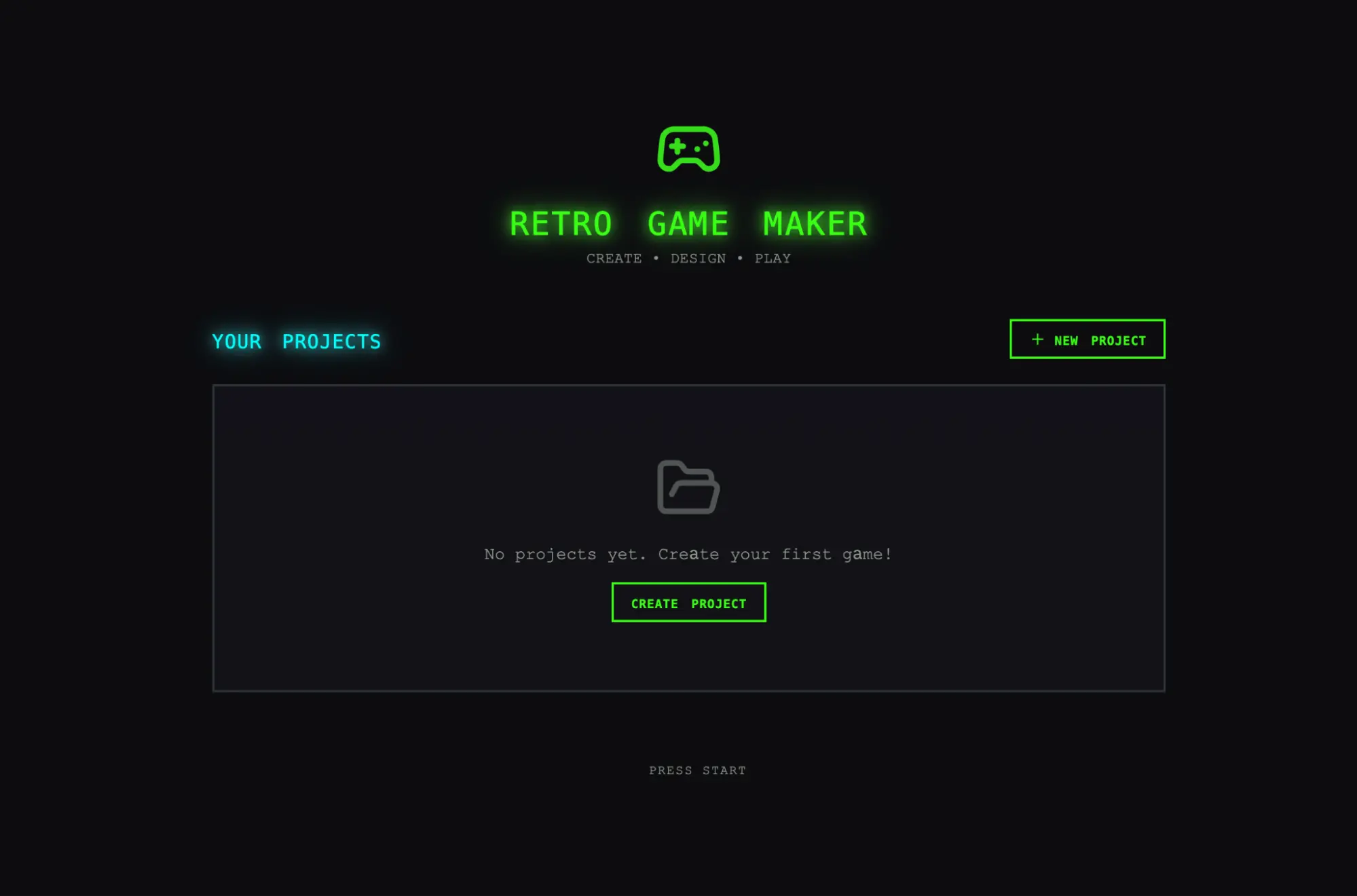
|
||||||
|
|
||||||
|
Initial screen when opening the app created by the solo harness.
|
||||||
|
|
||||||
|
|
||||||
|
|
||||||
|
After evaluating the solo run, I turned my attention to the harness run. This run started from the same one-sentence prompt, but the planner step expanded that prompt into a 16-feature spec spread across ten sprints. It went well beyond what the solo run attempted. In addition to the core editors and play mode, the spec called for a sprite animation system, behavior templates, sound effects and music, an AI-assisted sprite generator and level designer, and game export with shareable links. I gave the planner access to our [frontend design skill](https://github.com/anthropics/claude-code/blob/main/plugins/frontend-design/skills/frontend-design/SKILL.md), which it read and used to create a visual design language for the app as part of the spec. For each sprint, the generator and evaluator negotiated a contract defining the specific implementation details for the sprint, and the testable behaviors that would be tested to verify completion.
|
||||||
|
|
||||||
|
The app immediately showed more polish and smoothness than the solo run. The canvas used the full viewport, the panels were sized sensibly, and the interface had a consistent visual identity that tracked the design direction from the spec. Some of the clunkiness I'd seen in the solo run did remain—the workflow still didn't make it clear that you should build sprites and entities before trying to populate a level, and I had to figure that out by poking around. This read as a gap in the base model’s product intuition rather than something the harness was designed to address, though it did suggest a place where targeted iteration inside the harness could help to further improve output quality.
|
||||||
|
|
||||||
|
Working through the editors, the new run's advantages over solo became more apparent. The sprite editor was richer and more fully featured, with cleaner tool palettes, a better color picker, and more usable zoom controls.
|
||||||
|
|
||||||
|
Because I'd asked the planner to weave AI features into its specs, the app also came with a built-in Claude integration that let me generate different parts of the game through prompting. This significantly sped up the workflow.
|
||||||
|
|
||||||
|
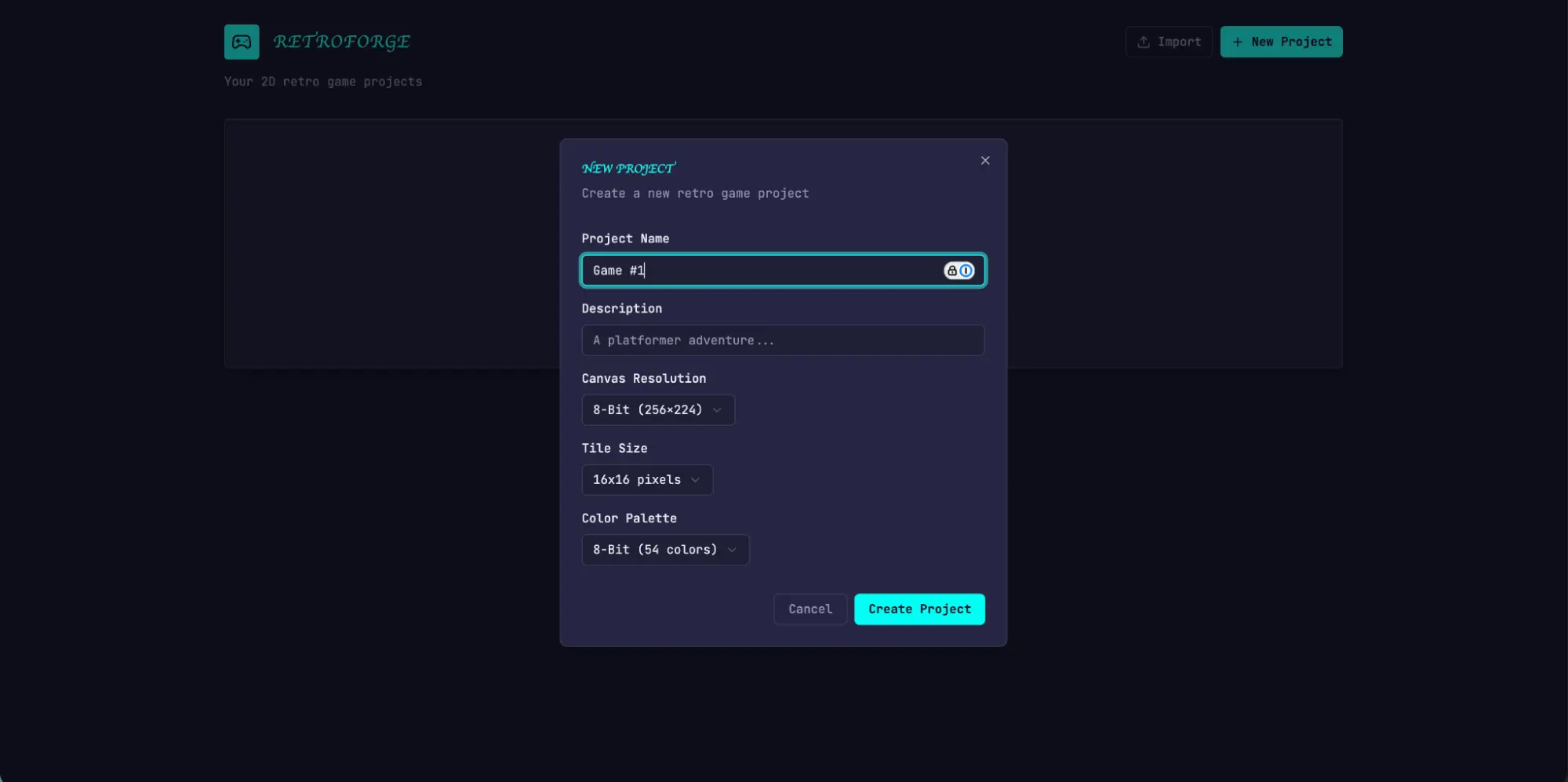
|
||||||
|
|
||||||
|
Initial screen: Creating a new game, in the app built with the full harness
|
||||||
|
|
||||||
|
The biggest difference was in play mode. I was actually able to move my entity and play the game. The physics had some rough edges—my character jumped onto a platform but ended up overlapping with it, which felt intuitively wrong—but the core thing worked, which the solo run did not manage. After moving around a bit, I did hit some limitations with the AI’s game level construction. There was a large wall that I wasn’t able to jump past, so I was stuck. This suggested there were some common sense improvements and edge cases that the harness could handle to further refine the app.
|
||||||
|
|
||||||
|
Reading through the logs, it was clear that the evaluator kept the implementation in line with the spec. Each sprint, it walked through the sprint contract's test criteria and exercised the running application through Playwright, filing bugs against anything that diverged from expected behavior. The contracts were granular—Sprint 3 alone had 27 criteria covering the level editor—and the evaluator's findings were specific enough to act on without extra investigation. The table below shows several examples of issues our evaluator identified:
|
||||||
|
|
||||||
|
| **Contract criterion** | **Evaluator finding** |
|
||||||
|
| --- | --- |
|
||||||
|
| Rectangle fill tool allows click-drag to fill a rectangular area with selected tile | **FAIL** — Tool only places tiles at drag start/end points instead of filling the region. `fillRectangle` function exists but isn't triggered properly on mouseUp. |
|
||||||
|
| User can select and delete placed entity spawn points | **FAIL** — Delete key handler at `LevelEditor.tsx:892` requires both `selection` and `selectedEntityId ` to be set, but clicking an entity only sets `selectedEntityId`. Condition should be `selection \|\| (selectedEntityId && activeLayer === 'entity')`. |
|
||||||
|
| User can reorder animation frames via API | **FAIL** — `PUT /frames/reorder` route defined after `/{frame_id}` routes. FastAPI matches 'r `eorder` ' as a frame\_id integer and returns 422: "unable to parse string as an integer." |
|
||||||
|
|
||||||
|
Getting the evaluator to perform at this level took work. Out of the box, Claude is a poor QA agent. In early runs, I watched it identify legitimate issues, then talk itself into deciding they weren't a big deal and approve the work anyway. It also tended to test superficially, rather than probing edge cases, so more subtle bugs often slipped through. The tuning loop was to read the evaluator's logs, find examples where its judgment diverged from mine, and update the QAs prompt to solve for those issues. It took several rounds of this development loop before the evaluator was grading in a way that I found reasonable. Even then, the harness output showed the limits of the model’s QAing capabilities: small layout issues, interactions that felt unintuitive in places, and undiscovered bugs in more deeply nested features that the evaluator hadn't exercised thoroughly. There was clearly more verification headroom to capture with further tuning. But compared to the solo run, where the central feature of the application simply didn't work, the lift was obvious.
|
||||||
|
|
||||||
|
### Iterating on the harness
|
||||||
|
|
||||||
|
The first set of harness results was encouraging, but it was also bulky, slow, and expensive. The logical next step was to find ways to simplify the harness without degrading its performance. This was partly common sense and partly a function of a more general principle: every component in a harness encodes an assumption about what the model can't do on its own, and those assumptions are worth stress testing, both because they may be incorrect, and because they can quickly go stale as models improve. Our blog post [Building Effective Agents](https://www.anthropic.com/research/building-effective-agents) frames the underlying idea as "find the simplest solution possible, and only increase complexity when needed," and it's a pattern that shows up consistently for anyone maintaining an agent harness.
|
||||||
|
|
||||||
|
In my first attempt to simplify, I cut the harness back radically and tried a few creative new ideas, but I wasn't able to replicate the performance of the original. It also became difficult to tell which pieces of the harness design were actually load-bearing, and in what ways. Based on that experience, I moved to a more methodical approach, removing one component at a time and reviewing what impact it had on the final result.
|
||||||
|
|
||||||
|
As I was going through these iteration cycles, we also released Opus 4.6, which provided further motivation to reduce harness complexity. There was good reason to expect 4.6 would need less scaffolding than 4.5 did. From our [launch blog:](https://www.anthropic.com/news/claude-opus-4-6) "\[Opus 4.6\] plans more carefully, sustains agentic tasks for longer, can operate more reliably in larger codebases, and has better code review and debugging skills to catch its own mistakes." It also improved substantially on long-context retrieval. These were all capabilities the harness had been built to supplement.
|
||||||
|
|
||||||
|
### Removing the sprint construct
|
||||||
|
|
||||||
|
I started by removing the sprint construct entirely. The sprint structure had helped to decompose work into chunks for the model to work coherently. Given the improvements in Opus 4.6, there was good reason to believe that the model could natively handle the job without this sort of decomposition.
|
||||||
|
|
||||||
|
I kept both the planner and evaluator, as each continued to add obvious value. Without the planner, the generator under-scoped: given the raw prompt, it would start building without first speccing its work, and end up creating a less feature-rich application than the planner did.
|
||||||
|
|
||||||
|
With the sprint construct removed, I moved the evaluator to a single pass at the end of the run rather than grading per sprint. Since the model was much more capable, it changed how load-bearing the evaluator was for certain runs, with its usefulness depending on where the task sat relative to what the model could do reliably on its own. On 4.5, that boundary was close: our builds were at the edge of what the generator could do well solo, and the evaluator caught meaningful issues across the build. On 4.6, the model's raw capability increased, so the boundary moved outward. Tasks that used to need the evaluator's check to be implemented coherently were now often within what the generator handled well on its own, and for tasks within that boundary, the evaluator became unnecessary overhead. But for the parts of the build that were still at the edge of the generator’s capabilities, the evaluator continued to give real lift.
|
||||||
|
|
||||||
|
The practical implication is that the evaluator is not a fixed yes-or-no decision. It is worth the cost when the task sits beyond what the current model does reliably solo.
|
||||||
|
|
||||||
|
Alongside the structural simplification, I also added prompting to improve how the harness built AI features into each app, specifically getting the generator to build a proper agent that could drive the app's own functionality through tools. That took real iteration, since the relevant knowledge is recent enough that Claude's training data covers it thinly. But with enough tuning, the generator was building agents correctly.
|
||||||
|
|
||||||
|
### Results from the updated harness
|
||||||
|
|
||||||
|
To put the updated harness to the test, I used the following prompt to generate a Digital Audio Workstation (DAW), a music production program for composing, recording, and mixing songs:
|
||||||
|
|
||||||
|
> *Build a fully featured DAW in the browser using the Web Audio API.*
|
||||||
|
|
||||||
|
The run was still lengthy and expensive, at about 4 hours and $124 in token costs.
|
||||||
|
|
||||||
|
Most of the time went to the builder, which ran coherently for over two hours without the sprint decomposition that Opus 4.5 had needed.
|
||||||
|
|
||||||
|
| **Agent & Phase** | **Duration** | **Cost** |
|
||||||
|
| --- | --- | --- |
|
||||||
|
| Planner | 4.7 min | $0.46 |
|
||||||
|
| Build (Round 1) | 2 hr 7 min | $71.08 |
|
||||||
|
| QA (Round 1) | 8.8 min | $3.24 |
|
||||||
|
| Build (Round 2) | 1 hr 2 min | $36.89 |
|
||||||
|
| QA (Round 2) | 6.8 min | $3.09 |
|
||||||
|
| Build (Round 3) | 10.9 min | $5.88 |
|
||||||
|
| QA (Round 3) | 9.6 min | $4.06 |
|
||||||
|
| **Total V2 Harness** | **3 hr 50 min** | **$124.70** |
|
||||||
|
|
||||||
|
As with the previous harness, the planner expanded the one-line prompt into a full spec. From the logs, I could see the generator model did a good job planning the app and the agent design, wiring the agent up, and testing it before handing off to QA.
|
||||||
|
|
||||||
|
That being said, the QA agent still caught real gaps. In its first-round feedback, it noted:
|
||||||
|
|
||||||
|
> This is a strong app with excellent design fidelity, solid AI agent, and good backend. The main failure point is Feature Completeness — while the app looks impressive and the AI integration works well, several core DAW features are display-only without interactive depth: clips can't be dragged/moved on the timeline, there are no instrument UI panels (synth knobs, drum pads), and no visual effect editors (EQ curves, compressor meters). These aren't edge cases — they're the core interactions that make a DAW usable, and the spec explicitly calls for them.
|
||||||
|
|
||||||
|
In its second round feedback, it again caught several functionality gaps:
|
||||||
|
|
||||||
|
> Remaining gaps:
|
||||||
|
> \- Audio recording is still stub-only (button toggles but no mic capture)
|
||||||
|
> \- Clip resize by edge drag and clip split not implemented
|
||||||
|
> \- Effect visualizations are numeric sliders, not graphical (no EQ curve)
|
||||||
|
|
||||||
|
The generator was still liable to miss details or stub features when left to its own devices, and the QA still added value in catching those last mile issues for the generator to fix.
|
||||||
|
|
||||||
|
Based on the prompt, I was expecting a program where I could create melodies, harmonies, and drum patterns, arrange them into a song, and get help from an integrated agent along the way. The video below shows the result.
|
||||||
|
|
||||||
|
The app is far from a professional music production program, and the agent's song composition skills could clearly use a lot of work. Additionally, Claude can’t actually hear, which made the QA feedback loop less effective with respect to musical taste.
|
||||||
|
|
||||||
|
But the final app had all the core pieces of a functional music production program: a working arrangement view, mixer, and transport running in the browser. Beyond that, I was able to put together a short song snippet entirely through prompting: the agent set the tempo and key, laid down a melody, built a drum track, adjusted mixer levels, and added reverb. The core primitives for song composition were present, and the agent could drive them autonomously, using tools to create a simple production from end to end. You might say it’s not pitch-perfect yet—but it’s getting there.
|
||||||
|
|
||||||
|
## What comes next
|
||||||
|
|
||||||
|
As models continue to improve, we can roughly expect them to be capable of working for longer, and on more complex tasks. In some cases, that will mean the scaffold surrounding the model matters less over time, and developers can wait for the next model and see certain problems solve themselves. On the other hand, the better the models get, the more space there is to develop harnesses that can achieve complex tasks beyond what the model can do at baseline.
|
||||||
|
|
||||||
|
With this in mind, there are a few lessons from this work worth carrying forward. It is always good practice to experiment with the model you're building against, read its traces on realistic problems, and tune its performance to achieve your desired outcomes. When working on more complex tasks, there is sometimes headroom from decomposing the task and applying specialized agents to each aspect of the problem. And when a new model lands, it is generally good practice to re-examine a harness, stripping away pieces that are no longer load-bearing to performance and adding new pieces to achieve greater capability that may not have been possible before.
|
||||||
|
|
||||||
|
From this work, my conviction is that the space of interesting harness combinations doesn't shrink as models improve. Instead, it moves, and the interesting work for AI engineers is to keep finding the next novel combination.
|
||||||
|
|
||||||
|
## Acknowledgements
|
||||||
|
|
||||||
|
Special thanks to Mike Krieger, Michael Agaby, Justin Young, Jeremy Hadfield, David Hershey, Julius Tarng, Xiaoyi Zhang, Barry Zhang, Orowa Sidker, Michael Tingley, Ibrahim Madha, Martina Long, and Canyon Robbins for their contributions to this work.
|
||||||
|
|
||||||
|
Thanks also to Jake Eaton, Alyssa Leonard, and Stef Sequeira for their help shaping the post.
|
||||||
|
|
||||||
|
## Appendix
|
||||||
|
|
||||||
|
Example plan generated by planner agent.
|
||||||
|
|
||||||
|
```
|
||||||
|
RetroForge - 2D Retro Game Maker
|
||||||
|
|
||||||
|
Overview
|
||||||
|
RetroForge is a web-based creative studio for designing and building 2D retro-style video games. It combines the nostalgic charm of classic 8-bit and 16-bit game aesthetics with modern, intuitive editing tools—enabling anyone from hobbyist creators to indie developers to bring their game ideas to life without writing traditional code.
|
||||||
|
|
||||||
|
The platform provides four integrated creative modules: a tile-based Level Editor for designing game worlds, a pixel-art Sprite Editor for crafting visual assets, a visual Entity Behavior system for defining game logic, and an instant Playable Test Mode for real-time gameplay testing. By weaving AI assistance throughout (powered by Claude), RetroForge accelerates the creative process—helping users generate sprites, design levels, and configure behaviors through natural language interaction.
|
||||||
|
|
||||||
|
RetroForge targets creators who love retro gaming aesthetics but want modern conveniences. Whether recreating the platformers, RPGs, or action games of their childhood, or inventing entirely new experiences within retro constraints, users can prototype rapidly, iterate visually, and share their creations with others.
|
||||||
|
|
||||||
|
Features
|
||||||
|
1. Project Dashboard & Management
|
||||||
|
The Project Dashboard is the home base for all creative work in RetroForge. Users need a clear, organized way to manage their game projects—creating new ones, returning to works-in-progress, and understanding what each project contains at a glance.
|
||||||
|
|
||||||
|
User Stories: As a user, I want to:
|
||||||
|
|
||||||
|
- Create a new game project with a name and description, so that I can begin designing my game
|
||||||
|
- See all my existing projects displayed as visual cards showing the project name, last modified date, and a thumbnail preview, so that I can quickly find and continue my work
|
||||||
|
- Open any project to enter the full game editor workspace, so that I can work on my game
|
||||||
|
- Delete projects I no longer need, with a confirmation dialog to prevent accidents, so that I can keep my workspace organized
|
||||||
|
- Duplicate an existing project as a starting point for a new game, so that I can reuse my previous work
|
||||||
|
|
||||||
|
Project Data Model: Each project contains:
|
||||||
|
|
||||||
|
Project metadata (name, description, created/modified timestamps)
|
||||||
|
Canvas settings (resolution: e.g., 256x224, 320x240, or 160x144)
|
||||||
|
Tile size configuration (8x8, 16x16, or 32x32 pixels)
|
||||||
|
Color palette selection
|
||||||
|
All associated sprites, tilesets, levels, and entity definitions
|
||||||
|
|
||||||
|
...
|
||||||
|
```
|
||||||
@@ -0,0 +1,232 @@
|
|||||||
|
---
|
||||||
|
title: "epiral/bb-sites: Community fetch recipes for bb-browser — pre-built adapters for Reddit, Twitter, GitHub, and more"
|
||||||
|
source: "https://github.com/epiral/bb-sites"
|
||||||
|
author:
|
||||||
|
- "[[GitHub]]"
|
||||||
|
published:
|
||||||
|
created: 2026-03-26
|
||||||
|
description: "Community fetch recipes for bb-browser — pre-built adapters for Reddit, Twitter, GitHub, and more - epiral/bb-sites"
|
||||||
|
tags:
|
||||||
|
- "clippings"
|
||||||
|
---
|
||||||
|
## bb-sites
|
||||||
|
|
||||||
|
Community site adapters for [bb-browser](https://github.com/epiral/bb-browser) — turning websites into CLI commands.
|
||||||
|
|
||||||
|
Each site adapter is a JS function that runs inside your browser via `bb-browser eval`. The browser is already logged in — no API keys, no cookie extraction, no anti-bot bypass.
|
||||||
|
|
||||||
|
[English](https://github.com/epiral/bb-sites/blob/main/README.md) · [中文](https://github.com/epiral/bb-sites/blob/main/README.zh-CN.md)
|
||||||
|
|
||||||
|
> **95 adapters** across **35 platforms** — and growing.
|
||||||
|
|
||||||
|
## Quick Start
|
||||||
|
|
||||||
|
```
|
||||||
|
bb-browser site update # install/update site adapters
|
||||||
|
bb-browser site list # list available commands
|
||||||
|
bb-browser site reddit/me # run a command
|
||||||
|
bb-browser site reddit/thread <url> # run with args
|
||||||
|
```
|
||||||
|
|
||||||
|
## Available Adapters
|
||||||
|
|
||||||
|
### 🔍 Search Engines
|
||||||
|
|
||||||
|
| Platform | Command | Description |
|
||||||
|
| --- | --- | --- |
|
||||||
|
| Google | `google/search` | Google search |
|
||||||
|
| Baidu | `baidu/search` | Baidu search |
|
||||||
|
| Bing | `bing/search` | Bing search |
|
||||||
|
| DuckDuckGo | `duckduckgo/search` | DuckDuckGo search (HTML lite) |
|
||||||
|
| Sogou | `sogou/weixin` | Sogou WeChat article search |
|
||||||
|
|
||||||
|
### 📰 News & Media
|
||||||
|
|
||||||
|
| Platform | Command | Description |
|
||||||
|
| --- | --- | --- |
|
||||||
|
| BBC | `bbc/news` | BBC News headlines (RSS) or search |
|
||||||
|
| Reuters | `reuters/search` | Reuters news search |
|
||||||
|
| Toutiao | `toutiao/search`, `toutiao/hot` | Toutiao (今日头条) search & trending |
|
||||||
|
| Eastmoney | `eastmoney/news` | Eastmoney (东方财富) financial news |
|
||||||
|
|
||||||
|
| Platform | Commands | Description |
|
||||||
|
| --- | --- | --- |
|
||||||
|
| Twitter/X | `twitter/user`, `twitter/thread`, `twitter/search`, `twitter/tweets`, `twitter/notifications` | User profile, tweet threads, search, timeline, notifications |
|
||||||
|
| Reddit | `reddit/me`, `reddit/posts`, `reddit/thread`, `reddit/context` | User info, posts, discussion trees, comment chains |
|
||||||
|
| Weibo | `weibo/me`, `weibo/hot`, `weibo/feed`, `weibo/user`, `weibo/user_posts`, `weibo/post`, `weibo/comments` | Full Weibo (微博) support — profile, trending, timeline, posts, comments |
|
||||||
|
| Hupu | `hupu/hot` | Hupu (虎扑) hot posts |
|
||||||
|
|
||||||
|
### 💻 Tech & Dev
|
||||||
|
|
||||||
|
| Platform | Commands | Description |
|
||||||
|
| --- | --- | --- |
|
||||||
|
| GitHub | `github/me`, `github/repo`, `github/issues`, `github/issue-create`, `github/pr-create`, `github/fork` | User info, repos, issues, PRs, forks |
|
||||||
|
| Hacker News | `hackernews/top`, `hackernews/thread` | Top stories, post + comment tree |
|
||||||
|
| Stack Overflow | `stackoverflow/search` | Search questions |
|
||||||
|
| CSDN | `csdn/search` | CSDN tech article search |
|
||||||
|
| cnblogs | `cnblogs/search` | cnblogs (博客园) tech article search |
|
||||||
|
| npm | `npm/search` | Search npm packages |
|
||||||
|
| PyPI | `pypi/search`, `pypi/package` | Search & get Python package details |
|
||||||
|
| arXiv | `arxiv/search` | Search academic papers |
|
||||||
|
| Dev.to | `devto/search` | Search Dev.to articles |
|
||||||
|
| V2EX | `v2ex/hot`, `v2ex/latest`, `v2ex/topic` | Hot/latest topics, topic detail + replies |
|
||||||
|
|
||||||
|
### 🎬 Entertainment
|
||||||
|
|
||||||
|
| Platform | Commands | Description |
|
||||||
|
| --- | --- | --- |
|
||||||
|
| YouTube | `youtube/search`, `youtube/video`, `youtube/comments`, `youtube/channel`, `youtube/feed`, `youtube/transcript` | Search, video details, comments, channels, feed, transcripts |
|
||||||
|
| Bilibili | `bilibili/me`, `bilibili/popular`, `bilibili/ranking`, `bilibili/search`, `bilibili/video`, `bilibili/comments`, `bilibili/feed`, `bilibili/history`, `bilibili/trending` | Full B站 support — 9 adapters |
|
||||||
|
| IMDb | `imdb/search` | IMDb movie search |
|
||||||
|
| Genius | `genius/search` | Song/lyrics search |
|
||||||
|
| Douban | `douban/search`, `douban/movie`, `douban/movie-hot`, `douban/movie-top`, `douban/top250`, `douban/comments` | Douban (豆瓣) movies — search, details, rankings, Top 250, reviews |
|
||||||
|
| Qidian | `qidian/search` | Qidian (起点中文网) novel search |
|
||||||
|
|
||||||
|
### 💼 Jobs & Career
|
||||||
|
|
||||||
|
| Platform | Commands | Description |
|
||||||
|
| --- | --- | --- |
|
||||||
|
| BOSS Zhipin | `boss/search`, `boss/detail` | BOSS直聘 job search & JD details |
|
||||||
|
| LinkedIn | `linkedin/profile`, `linkedin/search` | LinkedIn profile & post search |
|
||||||
|
|
||||||
|
### 💰 Finance
|
||||||
|
|
||||||
|
| Platform | Commands | Description |
|
||||||
|
| --- | --- | --- |
|
||||||
|
| Eastmoney | `eastmoney/stock`, `eastmoney/news` | 东方财富 stock quotes & financial news |
|
||||||
|
| Yahoo Finance | `yahoo-finance/quote` | Stock quotes (AAPL, TSLA, etc.) |
|
||||||
|
|
||||||
|
### 📱 Digital & Products
|
||||||
|
|
||||||
|
| Platform | Command | Description |
|
||||||
|
| --- | --- | --- |
|
||||||
|
| GSMArena | `gsmarena/search` | Phone specs search |
|
||||||
|
| Product Hunt | `producthunt/today` | Today's top products |
|
||||||
|
|
||||||
|
### 📚 Knowledge & Reference
|
||||||
|
|
||||||
|
| Platform | Commands | Description |
|
||||||
|
| --- | --- | --- |
|
||||||
|
| Wikipedia | `wikipedia/search`, `wikipedia/summary` | Search & page summaries |
|
||||||
|
| Zhihu | `zhihu/me`, `zhihu/hot`, `zhihu/question`, `zhihu/search` | 知乎 — user info, trending, Q&A, search |
|
||||||
|
| Open Library | `openlibrary/search` | Book search |
|
||||||
|
|
||||||
|
### 🌐 Lifestyle & Travel
|
||||||
|
|
||||||
|
| Platform | Command | Description |
|
||||||
|
| --- | --- | --- |
|
||||||
|
| Youdao | `youdao/translate` | 有道翻译 — translation & dictionary |
|
||||||
|
| Ctrip | `ctrip/search` | 携程 — destination & attraction search |
|
||||||
|
|
||||||
|
| Platform | Commands | Description |
|
||||||
|
| --- | --- | --- |
|
||||||
|
| Jike | `jike/feed`, `jike/search` | 即刻 — recommended feed & search |
|
||||||
|
| Xiaohongshu | `xiaohongshu/me`, `xiaohongshu/feed`, `xiaohongshu/search`, `xiaohongshu/note`, `xiaohongshu/comments`, `xiaohongshu/user_posts` | 小红书 — full support via Pinia store actions |
|
||||||
|
|
||||||
|
> All Xiaohongshu (小红书) adapters use **Pinia Store Actions** — calling the page's own Vue store functions, which go through the complete signing + interceptor chain. Zero reverse engineering needed.
|
||||||
|
|
||||||
|
## Usage Examples
|
||||||
|
|
||||||
|
```
|
||||||
|
# Search the web
|
||||||
|
bb-browser site google/search "bb-browser"
|
||||||
|
bb-browser site duckduckgo/search "Claude Code"
|
||||||
|
|
||||||
|
# Social media
|
||||||
|
bb-browser site twitter/search "claude code"
|
||||||
|
bb-browser site twitter/tweets plantegg
|
||||||
|
bb-browser site reddit/thread https://reddit.com/r/programming/comments/...
|
||||||
|
bb-browser site weibo/hot
|
||||||
|
|
||||||
|
# Tech research
|
||||||
|
bb-browser site github/repo epiral/bb-browser
|
||||||
|
bb-browser site hackernews/top 10
|
||||||
|
bb-browser site stackoverflow/search "python async await"
|
||||||
|
bb-browser site arxiv/search "large language model"
|
||||||
|
bb-browser site npm/search "react state management"
|
||||||
|
|
||||||
|
# Entertainment
|
||||||
|
bb-browser site youtube/transcript dQw4w9WgXcQ
|
||||||
|
bb-browser site bilibili/search 编程
|
||||||
|
bb-browser site douban/top250
|
||||||
|
|
||||||
|
# Finance
|
||||||
|
bb-browser site yahoo-finance/quote AAPL
|
||||||
|
bb-browser site eastmoney/stock 贵州茅台
|
||||||
|
|
||||||
|
# Jobs
|
||||||
|
bb-browser site boss/search "AI agent"
|
||||||
|
bb-browser site linkedin/search "AI agent"
|
||||||
|
|
||||||
|
# Translate
|
||||||
|
bb-browser site youdao/translate hello
|
||||||
|
```
|
||||||
|
|
||||||
|
## Writing a Site Adapter
|
||||||
|
|
||||||
|
Run `bb-browser guide` for the full development workflow, or read [SKILL.md](https://github.com/epiral/bb-sites/blob/main/SKILL.md).
|
||||||
|
|
||||||
|
```
|
||||||
|
/* @meta
|
||||||
|
{
|
||||||
|
"name": "platform/command",
|
||||||
|
"description": "What this adapter does",
|
||||||
|
"domain": "www.example.com",
|
||||||
|
"args": {
|
||||||
|
"query": {"required": true, "description": "Search query"}
|
||||||
|
},
|
||||||
|
"readOnly": true,
|
||||||
|
"example": "bb-browser site platform/command value1"
|
||||||
|
}
|
||||||
|
*/
|
||||||
|
|
||||||
|
async function(args) {
|
||||||
|
if (!args.query) return {error: 'Missing argument: query'};
|
||||||
|
const resp = await fetch('/api/search?q=' + encodeURIComponent(args.query), {credentials: 'include'});
|
||||||
|
if (!resp.ok) return {error: 'HTTP ' + resp.status, hint: 'Not logged in?'};
|
||||||
|
return await resp.json();
|
||||||
|
}
|
||||||
|
```
|
||||||
|
|
||||||
|
## Contributing
|
||||||
|
|
||||||
|
```
|
||||||
|
# Option A: with gh CLI
|
||||||
|
gh repo fork epiral/bb-sites --clone
|
||||||
|
cd bb-sites && git checkout -b feat-mysite
|
||||||
|
# add adapter files
|
||||||
|
git push -u origin feat-mysite
|
||||||
|
gh pr create
|
||||||
|
|
||||||
|
# Option B: with bb-browser (no gh needed)
|
||||||
|
bb-browser site github/fork epiral/bb-sites
|
||||||
|
git clone https://github.com/YOUR_USER/bb-sites && cd bb-sites
|
||||||
|
git checkout -b feat-mysite
|
||||||
|
# add adapter files
|
||||||
|
git push -u origin feat-mysite
|
||||||
|
bb-browser site github/pr-create epiral/bb-sites --title "feat(mysite): add adapters" --head "YOUR_USER:feat-mysite"
|
||||||
|
```
|
||||||
|
|
||||||
|
## Private Adapters
|
||||||
|
|
||||||
|
Put private adapters in `~/.bb-browser/sites/`. They override community adapters with the same name.
|
||||||
|
|
||||||
|
```
|
||||||
|
~/.bb-browser/
|
||||||
|
├── sites/ # Your private adapters (priority)
|
||||||
|
│ └── internal/
|
||||||
|
│ └── deploy.js
|
||||||
|
└── bb-sites/ # This repo (bb-browser site update)
|
||||||
|
├── reddit/
|
||||||
|
├── twitter/
|
||||||
|
├── github/
|
||||||
|
├── youtube/
|
||||||
|
├── bilibili/
|
||||||
|
├── zhihu/
|
||||||
|
├── weibo/
|
||||||
|
├── douban/
|
||||||
|
├── xiaohongshu/
|
||||||
|
├── google/
|
||||||
|
├── ... # 35 platform directories
|
||||||
|
└── qidian/
|
||||||
|
```
|
||||||
@@ -0,0 +1,67 @@
|
|||||||
|
---
|
||||||
|
title: "slavingia/skills: Claude Code skills based on The Minimalist Entrepreneur by Sahil Lavingia"
|
||||||
|
source: "https://github.com/slavingia/skills"
|
||||||
|
author:
|
||||||
|
- "[[GitHub]]"
|
||||||
|
published:
|
||||||
|
created: 2026-03-26
|
||||||
|
description: "Claude Code skills based on The Minimalist Entrepreneur by Sahil Lavingia - slavingia/skills"
|
||||||
|
tags:
|
||||||
|
- "clippings"
|
||||||
|
---
|
||||||
|
## The Minimalist Entrepreneur — Claude Code Skills
|
||||||
|
|
||||||
|
Claude Code skills based on [The Minimalist Entrepreneur](https://www.minimalistentrepreneur.com/) by Sahil Lavingia.
|
||||||
|
|
||||||
|
## Installation
|
||||||
|
|
||||||
|
In Claude Code:
|
||||||
|
|
||||||
|
```
|
||||||
|
/plugin marketplace add slavingia/skills
|
||||||
|
/plugin install minimalist-entrepreneur
|
||||||
|
```
|
||||||
|
|
||||||
|
That's it — Claude Code will fetch the repo and register all 10 skills automatically.
|
||||||
|
|
||||||
|
Alternative: install from a local clone
|
||||||
|
```
|
||||||
|
git clone https://github.com/slavingia/skills.git ~/.claude/plugins/skills
|
||||||
|
```
|
||||||
|
|
||||||
|
Then in Claude Code:
|
||||||
|
|
||||||
|
```
|
||||||
|
/plugin marketplace add ~/.claude/plugins/skills
|
||||||
|
/plugin install minimalist-entrepreneur
|
||||||
|
```
|
||||||
|
|
||||||
|
## Skills
|
||||||
|
|
||||||
|
| Skill | Command | When to use |
|
||||||
|
| --- | --- | --- |
|
||||||
|
| **Find Community** | `/find-community` | Looking for a business idea, trying to find your community |
|
||||||
|
| **Validate Idea** | `/validate-idea` | Testing if a business idea is worth pursuing |
|
||||||
|
| **MVP** | `/mvp` | Ready to build your first product, struggling with scope |
|
||||||
|
| **Processize** | `/processize` | Have a product idea, want to deliver value by hand before writing code |
|
||||||
|
| **First Customers** | `/first-customers` | Have a product, need to find your first 100 customers |
|
||||||
|
| **Pricing** | `/pricing` | Setting prices, considering price changes |
|
||||||
|
| **Marketing Plan** | `/marketing-plan` | Have product-market fit, ready to scale with content |
|
||||||
|
| **Grow Sustainably** | `/grow-sustainably` | Making decisions about spending, hiring, or scaling |
|
||||||
|
| **Company Values** | `/company-values` | Defining culture, preparing to hire |
|
||||||
|
| **Minimalist Review** | `/minimalist-review` | Gut-checking any business decision |
|
||||||
|
|
||||||
|
## The Minimalist Entrepreneur Journey
|
||||||
|
|
||||||
|
The skills follow the book's progression:
|
||||||
|
|
||||||
|
1. **Community** — Start by finding your people
|
||||||
|
2. **Validate** — Make sure the problem is worth solving
|
||||||
|
3. **Build** — Ship a manual process, then productize it
|
||||||
|
4. **Processize** — Turn your product idea into a manual process you can deliver today
|
||||||
|
5. **Sell** — Get to 100 customers one by one
|
||||||
|
6. **Price** — Charge something from day one
|
||||||
|
7. **Market** — Build an audience through content
|
||||||
|
8. **Grow** — Stay profitable, grow sustainably
|
||||||
|
9. **Culture** — Build the house you want to live in
|
||||||
|
10. **Review** — Apply minimalist principles to every decision
|
||||||
@@ -0,0 +1,131 @@
|
|||||||
|
---
|
||||||
|
title: "zarazhangrui/follow-builders: AI builders digest — monitors top AI builders on X and YouTube podcasts, remixes their content into digestible summaries. Follow builders, not influencers."
|
||||||
|
source: "https://github.com/zarazhangrui/follow-builders?tab=readme-ov-file"
|
||||||
|
author:
|
||||||
|
- "[[GitHub]]"
|
||||||
|
published:
|
||||||
|
created: 2026-03-26
|
||||||
|
description: "AI builders digest — monitors top AI builders on X and YouTube podcasts, remixes their content into digestible summaries. Follow builders, not influencers. - zarazhangrui/follow-builders"
|
||||||
|
tags:
|
||||||
|
- "clippings"
|
||||||
|
---
|
||||||
|
**English** | [中文](https://github.com/zarazhangrui/follow-builders/blob/main/README.zh-CN.md)
|
||||||
|
|
||||||
|
## Follow Builders, Not Influencers
|
||||||
|
|
||||||
|
An AI-powered digest that tracks the top builders in AI — researchers, founders, PMs, and engineers who are actually building things — and delivers curated summaries of what they're saying.
|
||||||
|
|
||||||
|
**Philosophy:** Follow people who build products and have original opinions, not influencers who regurgitate information.
|
||||||
|
|
||||||
|
## What You Get
|
||||||
|
|
||||||
|
A daily or weekly digest delivered to your preferred messaging app (Telegram, Discord, WhatsApp, etc.) with:
|
||||||
|
|
||||||
|
- Summaries of new podcast episodes from top AI podcasts
|
||||||
|
- Key posts and insights from 25 curated AI builders on X/Twitter
|
||||||
|
- Full articles from official AI company blogs (Anthropic Engineering, Claude Blog)
|
||||||
|
- Links to all original content
|
||||||
|
- Available in English, Chinese, or bilingual
|
||||||
|
|
||||||
|
## Quick Start
|
||||||
|
|
||||||
|
1. Install the skill in your agent (OpenClaw or Claude Code)
|
||||||
|
2. Say "set up follow builders" or invoke `/follow-builders`
|
||||||
|
3. The agent walks you through setup conversationally — no config files to edit
|
||||||
|
|
||||||
|
The agent will ask you:
|
||||||
|
|
||||||
|
- How often you want your digest (daily or weekly) and what time
|
||||||
|
- What language you prefer
|
||||||
|
- How you want it delivered (Telegram, email, or in-chat)
|
||||||
|
|
||||||
|
No API keys needed — all content is fetched centrally. Your first digest arrives immediately after setup.
|
||||||
|
|
||||||
|
## Changing Settings
|
||||||
|
|
||||||
|
Your delivery preferences are configurable through conversation. Just tell your agent:
|
||||||
|
|
||||||
|
- "Switch to weekly digests on Monday mornings"
|
||||||
|
- "Change language to Chinese"
|
||||||
|
- "Make the summaries shorter"
|
||||||
|
- "Show me my current settings"
|
||||||
|
|
||||||
|
The source list (builders and podcasts) is curated centrally and updates automatically — you always get the latest sources without doing anything.
|
||||||
|
|
||||||
|
## Customizing the Summaries
|
||||||
|
|
||||||
|
The skill uses plain-English prompt files to control how content is summarized. You can customize them two ways:
|
||||||
|
|
||||||
|
**Through conversation (recommended):** Tell your agent what you want — "Make summaries more concise," "Focus on actionable insights," "Use a more casual tone." The agent updates the prompts for you.
|
||||||
|
|
||||||
|
**Direct editing (power users):** Edit the files in the `prompts/` folder:
|
||||||
|
|
||||||
|
- `summarize-podcast.md` — how podcast episodes are summarized
|
||||||
|
- `summarize-tweets.md` — how X/Twitter posts are summarized
|
||||||
|
- `summarize-blogs.md` — how blog posts are summarized
|
||||||
|
- `digest-intro.md` — the overall digest format and tone
|
||||||
|
- `translate.md` — how English content is translated to Chinese
|
||||||
|
|
||||||
|
These are plain English instructions, not code. Changes take effect on the next digest.
|
||||||
|
|
||||||
|
## Default Sources
|
||||||
|
|
||||||
|
### Podcasts (5)
|
||||||
|
|
||||||
|
- [Latent Space](https://www.youtube.com/@LatentSpacePod)
|
||||||
|
- [Training Data](https://www.youtube.com/playlist?list=PLOhHNjZItNnMm5tdW61JpnyxeYH5NDDx8)
|
||||||
|
- [No Priors](https://www.youtube.com/@NoPriorsPodcast)
|
||||||
|
- [Unsupervised Learning](https://www.youtube.com/@RedpointAI)
|
||||||
|
- [Data Driven NYC](https://www.youtube.com/@DataDrivenNYC)
|
||||||
|
|
||||||
|
### AI Builders on X (25)
|
||||||
|
|
||||||
|
[Andrej Karpathy](https://x.com/karpathy), [Swyx](https://x.com/swyx), [Josh Woodward](https://x.com/joshwoodward), [Kevin Weil](https://x.com/kevinweil), [Peter Yang](https://x.com/petergyang), [Nan Yu](https://x.com/thenanyu), [Madhu Guru](https://x.com/realmadhuguru), [Amanda Askell](https://x.com/AmandaAskell), [Cat Wu](https://x.com/_catwu), [Thariq](https://x.com/trq212), [Google Labs](https://x.com/GoogleLabs), [Amjad Masad](https://x.com/amasad), [Guillermo Rauch](https://x.com/rauchg), [Alex Albert](https://x.com/alexalbert__), [Aaron Levie](https://x.com/levie), [Ryo Lu](https://x.com/ryolu_), [Garry Tan](https://x.com/garrytan), [Matt Turck](https://x.com/mattturck), [Zara Zhang](https://x.com/zarazhangrui), [Nikunj Kothari](https://x.com/nikunj), [Peter Steinberger](https://x.com/steipete), [Dan Shipper](https://x.com/danshipper), [Aditya Agarwal](https://x.com/adityaag), [Sam Altman](https://x.com/sama), [Claude](https://x.com/claudeai)
|
||||||
|
|
||||||
|
### Official Blogs (2)
|
||||||
|
|
||||||
|
- [Anthropic Engineering](https://www.anthropic.com/engineering) — technical deep-dives from the Anthropic team
|
||||||
|
- [Claude Blog](https://claude.com/blog) — product announcements and updates from Claude
|
||||||
|
|
||||||
|
## Installation
|
||||||
|
|
||||||
|
### OpenClaw
|
||||||
|
|
||||||
|
```
|
||||||
|
# From ClawhHub (coming soon)
|
||||||
|
clawhub install follow-builders
|
||||||
|
|
||||||
|
# Or manually
|
||||||
|
git clone https://github.com/zarazhangrui/follow-builders.git ~/skills/follow-builders
|
||||||
|
cd ~/skills/follow-builders/scripts && npm install
|
||||||
|
```
|
||||||
|
|
||||||
|
### Claude Code
|
||||||
|
|
||||||
|
```
|
||||||
|
git clone https://github.com/zarazhangrui/follow-builders.git ~/.claude/skills/follow-builders
|
||||||
|
cd ~/.claude/skills/follow-builders/scripts && npm install
|
||||||
|
```
|
||||||
|
|
||||||
|
## Requirements
|
||||||
|
|
||||||
|
- An AI agent (OpenClaw, Claude Code, or similar)
|
||||||
|
- Internet connection (to fetch the central feed)
|
||||||
|
|
||||||
|
That's it. No API keys needed. All content (blog articles + YouTube transcripts + X/Twitter posts) is fetched centrally and updated daily.
|
||||||
|
|
||||||
|
## How It Works
|
||||||
|
|
||||||
|
1. A central feed is updated daily with the latest content from all sources (blog articles via web scraping, YouTube transcripts via Supadata, X/Twitter via official API)
|
||||||
|
2. Your agent fetches the feed — one HTTP request, no API keys
|
||||||
|
3. Your agent remixes the raw content into a digestible summary using your preferences
|
||||||
|
4. The digest is delivered to your messaging app (or shown in-chat)
|
||||||
|
|
||||||
|
See [examples/sample-digest.md](https://github.com/zarazhangrui/follow-builders/blob/main/examples/sample-digest.md) for what the output looks like.
|
||||||
|
|
||||||
|
## Privacy
|
||||||
|
|
||||||
|
- No API keys are sent anywhere — all content is fetched centrally
|
||||||
|
- If you use Telegram/email delivery, those keys are stored locally in `~/.follow-builders/.env`
|
||||||
|
- The skill only reads public content (public blog posts, public YouTube videos, public X posts)
|
||||||
|
- Your configuration, preferences, and reading history stay on your machine
|
||||||
459
2 - Projects/Billo Release Agent.md
Normal file
459
2 - Projects/Billo Release Agent.md
Normal file
@@ -0,0 +1,459 @@
|
|||||||
|
---
|
||||||
|
created: "2026-03-24"
|
||||||
|
type: project
|
||||||
|
status: active
|
||||||
|
deadline: ""
|
||||||
|
tags: [langgraph, python, devops, automation]
|
||||||
|
---
|
||||||
|
|
||||||
|
# Billo Release Agent
|
||||||
|
|
||||||
|
## 目标
|
||||||
|
|
||||||
|
将现有的 Claude Code release workflow skill 转换为独立的 LangGraph Python 服务,实现:
|
||||||
|
- Azure DevOps webhook 自动触发(替代手动粘贴 PR URL)
|
||||||
|
- LangGraph `interrupt()` 实现 human-in-the-loop 审批
|
||||||
|
- PostgreSQL 持久化状态(替代 JSON 文件)
|
||||||
|
- 多线程并发处理(每个 PR/release 独立 thread)
|
||||||
|
- Slack 通知 + 审批按钮
|
||||||
|
|
||||||
|
## 架构
|
||||||
|
|
||||||
|
```
|
||||||
|
Azure DevOps PR Webhook → FastAPI → LangGraph Agent → Azure DevOps / Jira / Slack / Claude API
|
||||||
|
↑
|
||||||
|
Slack Button / API (human approval resume)
|
||||||
|
↑
|
||||||
|
PostgreSQL (checkpointer + store)
|
||||||
|
```
|
||||||
|
|
||||||
|
## 代码位置
|
||||||
|
|
||||||
|
- 项目目录: `/c/Users/yaoji/git/Billo/billo-release-agent/`
|
||||||
|
- 源代码: `src/release_agent/`
|
||||||
|
- 测试: `tests/`
|
||||||
|
- 原始 skill: `/c/Users/yaoji/git/Billo/release-workflow/.claude/skills/billo-release-workflow/SKILL.md`
|
||||||
|
|
||||||
|
## 项目结构
|
||||||
|
|
||||||
|
```
|
||||||
|
billo-release-agent/
|
||||||
|
├── pyproject.toml
|
||||||
|
├── Dockerfile
|
||||||
|
├── docker-compose.yml
|
||||||
|
├── src/release_agent/
|
||||||
|
│ ├── main.py # FastAPI app + lifespan + task management
|
||||||
|
│ ├── config.py # pydantic-settings (所有环境变量)
|
||||||
|
│ ├── state.py # ReleaseState TypedDict (LangGraph state)
|
||||||
|
│ ├── exceptions.py # 异常层级
|
||||||
|
│ ├── branch_parser.py # 纯函数:从 branch 提取 ticket ID
|
||||||
|
│ ├── versioning.py # 纯函数:版本号计算
|
||||||
|
│ ├── models/ # Pydantic 数据模型
|
||||||
|
│ │ ├── pr.py, ticket.py, release.py, pipeline.py
|
||||||
|
│ │ ├── webhook.py, review.py, jira.py
|
||||||
|
│ ├── tools/ # 外部服务客户端
|
||||||
|
│ │ ├── azdo.py, jira.py, slack.py, claude_review.py
|
||||||
|
│ │ ├── _http.py, _retry.py # 共享 helpers
|
||||||
|
│ ├── graph/ # LangGraph 图定义
|
||||||
|
│ │ ├── dependencies.py # ToolClients, StagingStore
|
||||||
|
│ │ ├── routing.py # 6 个纯函数路由
|
||||||
|
│ │ ├── pr_completed.py # 12 nodes + graph builder
|
||||||
|
│ │ ├── release.py # 14 nodes + graph builder
|
||||||
|
│ │ └── full_cycle.py # subgraph 组合
|
||||||
|
│ └── api/ # FastAPI 路由
|
||||||
|
│ ├── models.py # HTTP request/response 模型
|
||||||
|
│ ├── dependencies.py # Depends() 注入
|
||||||
|
│ ├── webhooks.py, approvals.py, status.py
|
||||||
|
└── tests/ # 647 tests, 99.11% coverage
|
||||||
|
├── test_*.py # Phase 1 单元测试
|
||||||
|
├── tools/test_*.py # Phase 2 客户端测试
|
||||||
|
├── graph/test_*.py # Phase 3 图测试
|
||||||
|
└── api/test_*.py # Phase 4 API 测试
|
||||||
|
```
|
||||||
|
|
||||||
|
## 实施阶段
|
||||||
|
|
||||||
|
### Phase 1: Foundation (已完成 2026-03-23)
|
||||||
|
|
||||||
|
项目结构、Pydantic models、config、versioning、branch parser。
|
||||||
|
|
||||||
|
**成果:**
|
||||||
|
- 152 tests → review 后 152 tests, 100% coverage
|
||||||
|
- 文件: branch_parser.py, versioning.py, config.py, state.py
|
||||||
|
- Models: pr.py, ticket.py, release.py, pipeline.py, webhook.py
|
||||||
|
|
||||||
|
**Review 修复:**
|
||||||
|
- `postgres_dsn` 改为 `SecretStr`
|
||||||
|
- `import re` 移到模块级别预编译
|
||||||
|
- `ReleasePipelineStage` 添加 approval_id/requires_approval 一致性验证
|
||||||
|
- `WebhookResource.status` 改用 `Literal`
|
||||||
|
- 去除重复测试
|
||||||
|
|
||||||
|
### Phase 2: Service Clients (已完成 2026-03-24)
|
||||||
|
|
||||||
|
4 个外部服务客户端 + 异常体系 + 共享 HTTP helpers。
|
||||||
|
|
||||||
|
**成果:**
|
||||||
|
- 364 tests, 99.6% coverage
|
||||||
|
- 新增: exceptions.py, models/review.py, models/jira.py
|
||||||
|
- 客户端: tools/azdo.py, tools/jira.py, tools/slack.py, tools/claude_review.py
|
||||||
|
- 共享: tools/_http.py, tools/_retry.py
|
||||||
|
|
||||||
|
**关键设计:**
|
||||||
|
- httpx.AsyncClient 注入实现可测试性
|
||||||
|
- 自定义异常层级: ServiceError → AuthenticationError / NotFoundError / RateLimitError / ServiceUnavailableError
|
||||||
|
- 指数退避重试装饰器 `with_retry`
|
||||||
|
- Claude tool_use 实现结构化 code review 输出
|
||||||
|
- Jira 两步转换逻辑(先 Dev in Progress 再 code review)
|
||||||
|
|
||||||
|
**Review 修复:**
|
||||||
|
- bare `except Exception` 改为 `(ValueError, KeyError)`
|
||||||
|
- retry 装饰器 implicit None return path 修复
|
||||||
|
- ClaudeReviewer client 参数添加类型标注
|
||||||
|
- 401/403 错误传递 detail 信息
|
||||||
|
- Jira errorMessages 格式支持
|
||||||
|
|
||||||
|
### Phase 3: LangGraph Graphs (已完成 2026-03-24)
|
||||||
|
|
||||||
|
3 个 graph + 依赖注入 + routing + staging store。
|
||||||
|
|
||||||
|
**成果:**
|
||||||
|
- 520 tests (155 new), 99.42% coverage
|
||||||
|
- 文件: graph/dependencies.py, graph/routing.py, graph/pr_completed.py, graph/release.py, graph/full_cycle.py
|
||||||
|
- state.py 扩展 17 个新字段
|
||||||
|
|
||||||
|
**关键设计:**
|
||||||
|
- `ToolClients` frozen dataclass 通过 `config["configurable"]["clients"]` 注入
|
||||||
|
- `StagingStore` Protocol + `JsonFileStagingStore` 文件实现(后续迁移 PostgreSQL)
|
||||||
|
- 专用 interrupt 节点(非 inline interrupt)
|
||||||
|
- Subgraph 组合: full_cycle 包含 pr_completed + release 两个子图
|
||||||
|
- 6 个纯函数路由: is_pr_already_merged, is_review_approved, has_ticket, should_continue_to_release, has_pipelines, has_pending_approvals
|
||||||
|
- 错误处理: 非关键节点 catch ReleaseAgentError 追加到 errors,关键节点 re-raise
|
||||||
|
|
||||||
|
**Graph: PR Completed (12 nodes):**
|
||||||
|
```
|
||||||
|
parse_webhook → fetch_pr_details → [已merge?]
|
||||||
|
├─ 是 → move_jira_ready_for_stage
|
||||||
|
└─ 否 → move_jira_code_review → run_code_review → evaluate_review
|
||||||
|
├─ approve → interrupt_confirm_merge → merge_pr
|
||||||
|
└─ request_changes → notify_request_changes → END
|
||||||
|
→ move_jira_ready_for_stage → add_jira_pr_link → calculate_version → update_staging → END
|
||||||
|
```
|
||||||
|
|
||||||
|
**Graph: Release (14 nodes):**
|
||||||
|
```
|
||||||
|
load_staging → interrupt_confirm_release → create_release_pr → interrupt_confirm_merge_release
|
||||||
|
→ merge_release_pr → move_tickets_to_done → send_slack_notification → archive_release
|
||||||
|
→ list_pipelines → [有 pipeline?]
|
||||||
|
├─ 是 → interrupt_confirm_trigger → trigger_pipelines → check_release_approvals → END
|
||||||
|
└─ 否 → END
|
||||||
|
```
|
||||||
|
|
||||||
|
**5 个 interrupt 点:**
|
||||||
|
1. Code review 通过后 → confirm merge
|
||||||
|
2. 创建 release PR 前 → confirm create
|
||||||
|
3. Merge release PR 前 → confirm merge
|
||||||
|
4. 触发 build pipeline 前 → confirm trigger
|
||||||
|
5. Approve release stage → confirm approve (per stage)
|
||||||
|
|
||||||
|
### Phase 4: API Layer + Deployment (已完成 2026-03-24)
|
||||||
|
|
||||||
|
FastAPI 应用 + Docker 部署配置。
|
||||||
|
|
||||||
|
**成果:**
|
||||||
|
- 647 tests (127 new), 99.11% coverage
|
||||||
|
- 文件: main.py, api/models.py, api/dependencies.py, api/webhooks.py, api/approvals.py, api/status.py
|
||||||
|
- 部署: Dockerfile, docker-compose.yml
|
||||||
|
|
||||||
|
**API Endpoints:**
|
||||||
|
|
||||||
|
| Method | Path | 用途 |
|
||||||
|
|--------|------|------|
|
||||||
|
| POST | `/webhooks/azdo` | Azure DevOps PR webhook 接收 |
|
||||||
|
| POST | `/approvals/{thread_id}` | 恢复中断的 graph(human approval) |
|
||||||
|
| GET | `/approvals/pending` | 列出等待审批的 threads |
|
||||||
|
| GET | `/status` | 健康检查 |
|
||||||
|
| GET | `/releases/{repo}` | 列出 repo 的所有版本 |
|
||||||
|
| GET | `/staging` | 当前 staging 状态 |
|
||||||
|
| POST | `/manual/pr/{pr_id}` | 手动触发 PR 处理(webhook 备用) |
|
||||||
|
| POST | `/manual/release` | 手动触发 release |
|
||||||
|
|
||||||
|
**关键设计:**
|
||||||
|
- Singleton compiled graphs 存储在 `app.state` 启动时编译一次
|
||||||
|
- `agent_threads` PostgreSQL 表追踪线程状态(running/interrupted/completed/error)
|
||||||
|
- `asyncio.create_task` + checkpointer 实现后台执行和崩溃恢复
|
||||||
|
- Webhook 密钥通过 `X-Webhook-Secret` header + `hmac.compare_digest` 验证
|
||||||
|
- FastAPI dependencies 通过 `request.app.state` + `Depends()` 注入
|
||||||
|
- 优雅关闭:等待 30 秒后取消剩余 background tasks
|
||||||
|
|
||||||
|
**Review 修复(3 CRITICAL):**
|
||||||
|
- `webhook_secret` 改为必填(移除空默认值),防止未配置时绕过认证
|
||||||
|
- `submit_approval` 从 DB 查找 `graph_name` 后再 resume(原来硬编码 pr_completed)
|
||||||
|
- `_resume_graph` 异常捕获后返回 ApprovalResponse 而非泄漏 500 错误
|
||||||
|
|
||||||
|
**部署配置:**
|
||||||
|
- Dockerfile: Python 3.12-slim, non-root user, uv 安装依赖
|
||||||
|
- docker-compose: agent + postgres:16-alpine, health check, pgdata volume
|
||||||
|
- 需要的环境变量: AZDO_PAT, ANTHROPIC_API_KEY, POSTGRES_DSN, JIRA_EMAIL, JIRA_API_TOKEN, SLACK_WEBHOOK_URL, WEBHOOK_SECRET
|
||||||
|
|
||||||
|
### Phase 5: Migration + Hardening (已完成 2026-03-24)
|
||||||
|
|
||||||
|
数据迁移、PostgreSQL Store、operator 认证、文档。
|
||||||
|
|
||||||
|
**成果:**
|
||||||
|
- 760 tests (113 new), 99.22% coverage
|
||||||
|
- 新增: graph/postgres_staging_store.py, scripts/migrate_json_to_db.py, .env.example, README.md
|
||||||
|
- StagingStore Protocol 改为 async,所有调用点添加 await
|
||||||
|
|
||||||
|
**关键设计:**
|
||||||
|
- `PostgresStagingStore` 使用 psycopg3 async pool,JSONB 存储 tickets
|
||||||
|
- `archive()` 使用显式事务(`conn.transaction()`)确保 INSERT + DELETE 原子性
|
||||||
|
- `staging_releases` 表 (per-repo upsert) + `archived_releases` 表 (repo+version unique)
|
||||||
|
- Operator token 认证: `require_operator_token` dependency 应用于 POST /approvals, POST /manual/* 端点
|
||||||
|
- 迁移脚本: 纯函数提取 + dry-run 模式,从 JSON 文件读取插入 PostgreSQL
|
||||||
|
- `JsonFileStagingStore` 保留作为本地开发 fallback
|
||||||
|
|
||||||
|
**Review 修复(1 HIGH):**
|
||||||
|
- `archive()` 添加 `async with conn.transaction()` 包裹 INSERT + DELETE
|
||||||
|
|
||||||
|
## 技术栈
|
||||||
|
|
||||||
|
| 组件 | 技术 |
|
||||||
|
|------|------|
|
||||||
|
| Agent 框架 | LangGraph |
|
||||||
|
| Web 框架 | FastAPI + uvicorn |
|
||||||
|
| HTTP 客户端 | httpx (async) |
|
||||||
|
| AI Code Review | Claude Code CLI (`claude -p`) — 使用 subscription 额度 |
|
||||||
|
| 数据库 | PostgreSQL (checkpointer + store) |
|
||||||
|
| 验证 | Pydantic v2 + pydantic-settings |
|
||||||
|
| 数据库驱动 | psycopg3 + psycopg_pool (async PostgreSQL) |
|
||||||
|
| 测试 | pytest + pytest-asyncio + httpx.MockTransport + FastAPI TestClient |
|
||||||
|
| 部署 | Docker Compose on homelab |
|
||||||
|
|
||||||
|
## 外部服务集成
|
||||||
|
|
||||||
|
| 服务 | 用途 | 认证方式 |
|
||||||
|
|------|------|---------|
|
||||||
|
| Azure DevOps | PR 管理、Pipeline 触发 | PAT (Basic auth) |
|
||||||
|
| Jira | Ticket 状态流转 | Email + API token (Basic auth) |
|
||||||
|
| Slack | Release 通知、审批请求 | Incoming Webhook |
|
||||||
|
| Claude Code CLI | 自动 Code Review | Subscription (非 API Key) |
|
||||||
|
|
||||||
|
## Azure DevOps Pipeline 映射
|
||||||
|
|
||||||
|
| Repo | Build Pipeline ID | Release Pipeline | Release ID |
|
||||||
|
|------|------------------|-----------------|------------|
|
||||||
|
| Billo.Platform.Payment | 41 | Billo Payment | 37 |
|
||||||
|
| Billo.Platform.Payment (Scheduler) | 51 | Billo Payment Scheduler | 47 |
|
||||||
|
| Billo.Platform.Document.DocumentAnalyser | 75 | DocumentAnalyser | 58 |
|
||||||
|
|
||||||
|
## Release Pipeline Approve 配置
|
||||||
|
|
||||||
|
| Pipeline | Sandbox | Production |
|
||||||
|
|----------|---------|------------|
|
||||||
|
| Billo Payment | Project Admins approve | Release Admins approve |
|
||||||
|
| DocumentAnalyser | 自动 | Release Admins approve |
|
||||||
|
|
||||||
|
## Jira Workflow 状态流转
|
||||||
|
|
||||||
|
```
|
||||||
|
IN PROGRESS → CODE REVIEW → WAITING FOR TEST → IN TEST
|
||||||
|
→ READY FOR STAGE → DEPLOYED IN STAGE → IN PRODUCTION → CLOSED
|
||||||
|
```
|
||||||
|
|
||||||
|
注意: CODE REVIEW 只能从 IN PROGRESS 转入。
|
||||||
|
|
||||||
|
## 已完成总览
|
||||||
|
|
||||||
|
| Phase | 状态 | Tests | Coverage |
|
||||||
|
|-------|------|-------|----------|
|
||||||
|
| 1. Foundation | Done | 152 | 100% |
|
||||||
|
| 2. Service Clients | Done | +212 = 364 | 99.6% |
|
||||||
|
| 3. LangGraph Graphs | Done | +156 = 520 | 99.4% |
|
||||||
|
| 4. API + Deploy | Done | +127 = 647 | 99.1% |
|
||||||
|
| 5. Migration + Hardening | Done | +113 = 760 | 99.2% |
|
||||||
|
| Final Code Review + Fix | Done | +12 = 772 | 98.4% |
|
||||||
|
| 6. Slack + CI/CD | Done | +193 = 965 | 96.6% |
|
||||||
|
| 7. PR Polling + Auto Ticket | Done | +96 = 1061 | 96.0% |
|
||||||
|
|
||||||
|
## Code Review 方案变更 (2026-03-24)
|
||||||
|
|
||||||
|
原方案通过 Anthropic API 直接调用 Claude,改为 Claude Code CLI subprocess:
|
||||||
|
|
||||||
|
| 项目 | 之前 | 之后 |
|
||||||
|
|------|------|------|
|
||||||
|
| 调用方式 | `anthropic.AsyncAnthropic` API | `claude -p` subprocess |
|
||||||
|
| 计费 | API Key (按 token 计费) | Subscription 额度 |
|
||||||
|
| 代码理解 | 只能看传入的 diff 文本 | 可自主 Read/Glob/Grep 整个 codebase |
|
||||||
|
| 结构化输出 | tool_use schema | `--json-schema` + `--output-format json` |
|
||||||
|
| 依赖 | ANTHROPIC_API_KEY | `claude` CLI 在 PATH + REPOS_BASE_DIR |
|
||||||
|
|
||||||
|
关键配置:`.env` 中设置 `REPOS_BASE_DIR=/c/Users/yaoji/git/Billo`,Claude Code 在对应 repo 目录下执行 review。
|
||||||
|
|
||||||
|
### Phase 6: Slack Interactive + CI/CD (已完成 2026-03-24)
|
||||||
|
|
||||||
|
Slack 按钮审批 + CI/CD 自动触发/轮询/审批。
|
||||||
|
|
||||||
|
**成果:**
|
||||||
|
- 965 tests (+193 new), 96.55% coverage
|
||||||
|
- 新增: models/build.py, graph/polling.py, graph/ci_nodes.py, api/slack_interactions.py
|
||||||
|
- SlackClient 改为双模式 (webhook fallback + Web API)
|
||||||
|
|
||||||
|
**Slack 交互流程:**
|
||||||
|
```
|
||||||
|
Graph interrupt → Slack 消息 [Approve] [Cancel] 按钮
|
||||||
|
→ 用户点击按钮 → POST /slack/interactions
|
||||||
|
→ 验证签名 (HMAC-SHA256 + 5 分钟重放保护)
|
||||||
|
→ 提取 thread_id + decision → _resume_graph
|
||||||
|
→ 更新 Slack 消息显示结果
|
||||||
|
```
|
||||||
|
|
||||||
|
**CI/CD 流程:**
|
||||||
|
```
|
||||||
|
PR merge → develop:
|
||||||
|
merge_pr → trigger_ci_build(develop) → poll_ci_build → notify_ci_result → END
|
||||||
|
|
||||||
|
Release merge → main:
|
||||||
|
merge_release_pr → trigger_ci_build(main) → poll_ci_build
|
||||||
|
→ ci_passed: wait_for_cd → approval loop (Sandbox → Production)
|
||||||
|
→ ci_failed: notify_failure → END
|
||||||
|
```
|
||||||
|
|
||||||
|
**新增配置:**
|
||||||
|
- `SLACK_BOT_TOKEN` — Slack App Bot Token (xoxb-...)
|
||||||
|
- `SLACK_SIGNING_SECRET` — Slack 签名密钥 (必须非空)
|
||||||
|
- `SLACK_CHANNEL_ID` — 发送消息的频道
|
||||||
|
- `CI_POLL_INTERVAL_SECONDS` — CI 轮询间隔 (默认 30s)
|
||||||
|
- `CI_POLL_MAX_WAIT_SECONDS` — CI 最大等待时间 (默认 30min)
|
||||||
|
|
||||||
|
**Review 修复(2 CRITICAL + 4 HIGH):**
|
||||||
|
- 添加 5 分钟时间戳重放攻击防护
|
||||||
|
- 空 signing_secret 返回 503 而非静默跳过
|
||||||
|
- Decision 值白名单校验
|
||||||
|
- CI 分支逻辑修正:develop for PR, main for release
|
||||||
|
- ci_build_id 类型验证
|
||||||
|
|
||||||
|
### Phase 7: PR Polling + Auto-Create Jira Ticket (已完成 2026-03-24)
|
||||||
|
|
||||||
|
定时扫描所有 repo 的 active PRs + 无 ticket 时自动创建 Jira ticket。
|
||||||
|
|
||||||
|
**成果:**
|
||||||
|
- 1061 tests (+96 new), 95.96% coverage
|
||||||
|
- 新增: services/pr_dedup.py, services/pr_poller.py
|
||||||
|
- 修改: azdo.py (list_active_prs), jira.py (create_issue + _text_to_adf), claude_review.py (generate_ticket_content), routing.py (route_after_fetch), pr_completed.py (auto_create_ticket node)
|
||||||
|
|
||||||
|
**PR 轮询流程:**
|
||||||
|
```
|
||||||
|
每 5 分钟 → 扫描 WATCHED_REPOS 所有 active PRs (target=develop)
|
||||||
|
→ 对比 agent_threads 去重
|
||||||
|
→ 合成 webhook payload → 触发 pr_completed graph
|
||||||
|
```
|
||||||
|
|
||||||
|
**自动创建 Jira Ticket 流程:**
|
||||||
|
```
|
||||||
|
fetch_pr_details → route_after_fetch (3-way routing)
|
||||||
|
├─ merged → calculate_version (跳过 review)
|
||||||
|
├─ active_with_ticket → move_jira_code_review (正常流程)
|
||||||
|
└─ active_no_ticket → auto_create_ticket
|
||||||
|
→ Claude CLI 生成 summary + description
|
||||||
|
→ Jira create_issue (ALLPOST project)
|
||||||
|
→ 设置 ticket_id + has_ticket=True
|
||||||
|
→ move_jira_code_review (继续正常流程)
|
||||||
|
```
|
||||||
|
|
||||||
|
**新增配置:**
|
||||||
|
- `WATCHED_REPOS` — 逗号分隔的 repo 列表
|
||||||
|
- `PR_POLL_INTERVAL_SECONDS=300` — 轮询间隔
|
||||||
|
- `PR_POLL_ENABLED=False` — 轮询开关
|
||||||
|
- `DEFAULT_JIRA_PROJECT=ALLPOST` — 自动创建 ticket 的项目
|
||||||
|
|
||||||
|
**Review 修复(1 CRITICAL + 2 HIGH):**
|
||||||
|
- schedule_fn 参数签名不匹配导致轮询静默失败 → 修正为只传 initial_state
|
||||||
|
- dedup SQL 未强制 (pr_id, repo_name) 配对 → 改用 unnest 配对查询
|
||||||
|
- run_graph_in_background 缺失 repos_base_dir + default_jira_project → 已补全
|
||||||
|
|
||||||
|
## Final Code Review 修复 (2026-03-24)
|
||||||
|
|
||||||
|
全面 code review 发现 3 CRITICAL + 8 HIGH 问题,已全部修复:
|
||||||
|
|
||||||
|
| # | 严重级 | 问题 | 修复 |
|
||||||
|
|---|--------|------|------|
|
||||||
|
| 1 | CRITICAL | AzDoClient 构造函数参数不匹配,启动崩溃 | 传入正确的 `base_url`, `vsrm_base_url`, `vsrm_http_client` |
|
||||||
|
| 2 | CRITICAL | 空 webhook_secret 绕过认证 | 空 expected 拒绝所有请求 |
|
||||||
|
| 3 | CRITICAL | docker-compose 默认密码 `secret` | 改为 `${POSTGRES_PASSWORD:?must be set}` |
|
||||||
|
| 4 | HIGH | `graph_name` 未存储到 agent_threads | `_upsert_thread` 新增 `graph_name`, `repo_name`, `pr_id` 参数 |
|
||||||
|
| 5 | HIGH | 无 httpx 超时设置 | 添加 `timeout=30.0` |
|
||||||
|
| 6 | HIGH | httpx.AsyncClient 未关闭 | lifespan shutdown 关闭所有 HTTP 客户端 |
|
||||||
|
| 7 | HIGH | 错误处理泄漏内部信息 | `_generic_error_handler` 返回固定消息 |
|
||||||
|
| 8 | HIGH | Approvals 返回 200+error body | 改为 HTTPException(404/400) |
|
||||||
|
|
||||||
|
额外修复:
|
||||||
|
- `anthropic_api_key` 改为可选(CLI 用 subscription 不需要)
|
||||||
|
- docker-compose: `WEBHOOK_SECRET` 必填, agent health check, `REPOS_BASE_DIR` 环境变量
|
||||||
|
- `_run_graph` 添加 `logger.exception` 日志
|
||||||
|
|
||||||
|
## 后续优化(非阻塞)
|
||||||
|
|
||||||
|
- [ ] `get_pr_diff` 目前只返回文件名,需增强为实际 diff 内容(Claude Code CLI 可自主读取,优先级降低)
|
||||||
|
- [ ] `list_build_pipelines` 需要按 repo 过滤 API 请求
|
||||||
|
- [ ] `@with_retry` 装饰器尚未应用到客户端方法
|
||||||
|
- [ ] Jira fallback transition name 应可配置而非硬编码
|
||||||
|
- [ ] `check_release_approvals` 是 stub,需实现实际 approval gate 检测
|
||||||
|
- [ ] `last_merge_source_commit` 始终为 None,需从 AzDo API 获取
|
||||||
|
- [ ] interrupt 节点不检查返回值,任何 resume 都会继续执行(需加 post-interrupt routing)
|
||||||
|
- [ ] `archive_release` 使用 `date.today()` 不可测试,应注入
|
||||||
|
- [ ] `_upsert_thread` 从 webhooks.py 提取到共享 `api/db.py` 消除循环引用
|
||||||
|
- [ ] Dockerfile 改为多阶段构建
|
||||||
|
- [ ] CLI prompt 超过 100K 字符时可能超 OS ARG_MAX,应改为 stdin pipe
|
||||||
|
- [ ] `PostgresStagingStore.save` 并发竞争(需 SELECT FOR UPDATE 或应用锁)
|
||||||
|
- [ ] 关闭超时 30s 可能不够 Claude CLI 的 300s 超时
|
||||||
|
|
||||||
|
## 运行环境:WSL (推荐)
|
||||||
|
|
||||||
|
在 Windows 上直接运行有两个问题:
|
||||||
|
1. psycopg async 需要 SelectorEventLoop,Windows 默认 ProactorEventLoop 不兼容
|
||||||
|
2. Claude CLI subprocess 在 Windows uvicorn 里返回空 stdout
|
||||||
|
|
||||||
|
**解决方案:在 WSL Ubuntu 里运行 app,PostgreSQL 在 Docker**
|
||||||
|
|
||||||
|
```bash
|
||||||
|
# WSL 启动命令
|
||||||
|
cd /mnt/c/Users/yaoji/git/Billo/billo-release-agent
|
||||||
|
docker compose up -d db
|
||||||
|
uv run uvicorn release_agent.main:app --host 0.0.0.0 --port 8080
|
||||||
|
```
|
||||||
|
|
||||||
|
关键 .env 配置:
|
||||||
|
- `CLAUDE_CMD=claude` (不是 claude.cmd)
|
||||||
|
- `REPOS_BASE_DIR=/mnt/c/Users/yaoji/git/Billo` (或克隆到 WSL 原生 fs 更快)
|
||||||
|
|
||||||
|
## 集成测试结果 (2026-03-24)
|
||||||
|
|
||||||
|
**已验证通过:**
|
||||||
|
- App 启动 + /status health check
|
||||||
|
- Azure DevOps API (get_pr, list_active_prs, iterations/changes)
|
||||||
|
- PR 信息解析 (repo_name, ticket_id, branch)
|
||||||
|
- Graph 完整流程执行 (parse → fetch → route → review → notify)
|
||||||
|
- 数据库读写 (agent_threads)
|
||||||
|
- Claude CLI ticket generation (WSL 下成功返回 structured JSON)
|
||||||
|
- Claude CLI code review 启动 (WSL 下成功调用)
|
||||||
|
- RunnableConfig 类型修复(消除 LangGraph 警告)
|
||||||
|
- URL 编码修复(project name 含空格)
|
||||||
|
- AzDo iterations/changes API(替代不存在的 diffs endpoint)
|
||||||
|
|
||||||
|
**待解决:**
|
||||||
|
- Claude CLI code review 在 WSL+/mnt/c 下极慢(10+ 分钟,跨文件系统 I/O)
|
||||||
|
- Graph 没有 checkpointer(interrupt 不持久化)
|
||||||
|
- CI poll 在无 pipeline 环境下会超时
|
||||||
|
|
||||||
|
## 部署步骤
|
||||||
|
|
||||||
|
1. `cp .env.example .env` 并填写所有 REQUIRED 变量
|
||||||
|
2. `docker compose up -d db` 只启动 PostgreSQL
|
||||||
|
3. 在 WSL 里: `uv run uvicorn release_agent.main:app --port 8080`
|
||||||
|
4. 运行迁移: `python scripts/migrate_json_to_db.py --source ../release-workflow/releases`
|
||||||
|
5. 可选: 配置 Azure DevOps Service Hook / Cloudflare Tunnel
|
||||||
|
|
||||||
|
## 相关笔记
|
||||||
|
|
||||||
|
- [[Billo Release Workflow Skill]] — 原始 Claude Code skill 的工作流定义
|
||||||
@@ -119,10 +119,10 @@ rules:
|
|||||||
- DOMAIN-SUFFIX,pstatp.com,Proxy
|
- DOMAIN-SUFFIX,pstatp.com,Proxy
|
||||||
- DOMAIN-SUFFIX,bytedance.com,Proxy
|
- DOMAIN-SUFFIX,bytedance.com,Proxy
|
||||||
- DOMAIN-SUFFIX,byteimg.com,Proxy
|
- DOMAIN-SUFFIX,byteimg.com,Proxy
|
||||||
# 小红书
|
# 小红书(直连,不走代理)
|
||||||
- DOMAIN-SUFFIX,xiaohongshu.com,Proxy
|
- DOMAIN-SUFFIX,xiaohongshu.com,DIRECT
|
||||||
- DOMAIN-SUFFIX,xhscdn.com,Proxy
|
- DOMAIN-SUFFIX,xhscdn.com,DIRECT
|
||||||
- DOMAIN-SUFFIX,xhslink.com,Proxy
|
- DOMAIN-SUFFIX,xhslink.com,DIRECT
|
||||||
|
|
||||||
# === 国内音乐(走代理回国) ===
|
# === 国内音乐(走代理回国) ===
|
||||||
# 网易云音乐
|
# 网易云音乐
|
||||||
|
|||||||
0
Billo Release Workflow Skill.md
Normal file
0
Billo Release Workflow Skill.md
Normal file
23
scripts/auto-sync.sh
Normal file
23
scripts/auto-sync.sh
Normal file
@@ -0,0 +1,23 @@
|
|||||||
|
#!/bin/bash
|
||||||
|
# Auto-sync Obsidian vault to git remote
|
||||||
|
# Runs daily via Windows Task Scheduler
|
||||||
|
|
||||||
|
VAULT_DIR="/c/Users/yaoji/git/Knowledge"
|
||||||
|
cd "$VAULT_DIR" || exit 1
|
||||||
|
|
||||||
|
# Check if there are any changes
|
||||||
|
if git diff --quiet && git diff --cached --quiet && [ -z "$(git ls-files --others --exclude-standard)" ]; then
|
||||||
|
echo "$(date): No changes to sync"
|
||||||
|
exit 0
|
||||||
|
fi
|
||||||
|
|
||||||
|
# Stage all changes
|
||||||
|
git add -A
|
||||||
|
|
||||||
|
# Commit with timestamp
|
||||||
|
git commit -m "vault: auto-sync $(date '+%Y-%m-%d %H:%M')"
|
||||||
|
|
||||||
|
# Push to remote
|
||||||
|
git push origin main
|
||||||
|
|
||||||
|
echo "$(date): Sync complete"
|
||||||
Reference in New Issue
Block a user