
1060 lines
42 KiB
Markdown
1060 lines
42 KiB
Markdown
# xiaohongshu-mcp
|
||
|
||
<!-- ALL-CONTRIBUTORS-BADGE:START - Do not remove or modify this section -->
|
||
[](#contributors-)
|
||
<!-- ALL-CONTRIBUTORS-BADGE:END -->
|
||
|
||
[](./DONATIONS.md)
|
||
[](./DONATIONS.md)
|
||
[](https://hub.docker.com/r/xpzouying/xiaohongshu-mcp)
|
||
|
||
MCP for 小红书/xiaohongshu.com。
|
||
|
||
- 我的博客文章:[haha.ai/xiaohongshu-mcp](https://www.haha.ai/xiaohongshu-mcp)
|
||
|
||
> **📌 提交 PR 前必读:[贡献指南 | Contributing Guide](./CONTRIBUTING.md)**
|
||
|
||
**遇到任何问题,务必要先看 [各种疑难杂症](https://github.com/xpzouying/xiaohongshu-mcp/issues/56)**。
|
||
|
||
上面的 **疑难杂症** 列表后,还是解决不了你的部署问题,那么强烈推荐使用我写的另外一个工具:[xpzouying/x-mcp](https://github.com/xpzouying/x-mcp),这个工具不需要你进行部署,只需要通过浏览器插件就能驱动你的 MCP,对于非技术同学来说更加友好。
|
||
|
||
## Star History
|
||
|
||
[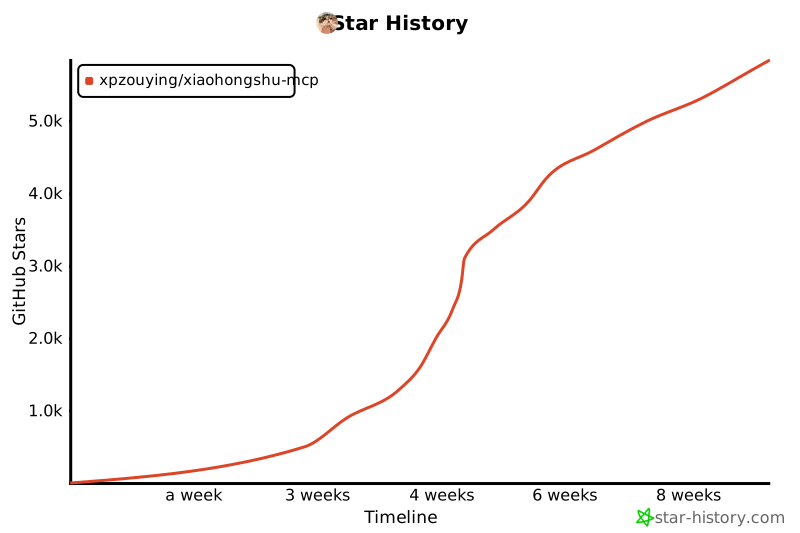](https://www.star-history.com/#xpzouying/xiaohongshu-mcp&Timeline)
|
||
|
||
## 赞赏支持
|
||
|
||
本项目所有的赞赏都会用于慈善捐赠。所有的慈善捐赠记录,请参考 [DONATIONS.md](./DONATIONS.md)。
|
||
|
||
**捐赠时,请备注 MCP 以及名字。**
|
||
如需更正/撤回署名,请开 Issue 或通过邮箱联系。
|
||
|
||
**支付宝(不展示二维码):**
|
||
|
||
通过支付宝向 **xpzouying@gmail.com** 赞赏。
|
||
|
||
**微信:**
|
||
|
||
<img src="donate/wechat@2x.png" alt="WeChat Pay QR" width="260" />
|
||
|
||
## 项目简介
|
||
|
||
**主要功能**
|
||
|
||
> 💡 **提示:** 点击下方功能标题可展开查看视频演示
|
||
|
||
<details>
|
||
<summary><b>1. 登录和检查登录状态</b></summary>
|
||
|
||
第一步必须,小红书需要进行登录。可以检查当前登录状态。
|
||
|
||
**登录演示:**
|
||
|
||
https://github.com/user-attachments/assets/8b05eb42-d437-41b7-9235-e2143f19e8b7
|
||
|
||
**检查登录状态演示:**
|
||
|
||
https://github.com/user-attachments/assets/bd9a9a4a-58cb-4421-b8f3-015f703ce1f9
|
||
|
||
</details>
|
||
|
||
<details>
|
||
<summary><b>2. 发布图文内容</b></summary>
|
||
|
||
支持发布图文内容到小红书,包括标题、内容描述和图片。
|
||
|
||
**图片支持方式:**
|
||
|
||
支持两种图片输入方式:
|
||
|
||
1. **HTTP/HTTPS 图片链接**
|
||
|
||
```
|
||
["https://example.com/image1.jpg", "https://example.com/image2.png"]
|
||
```
|
||
|
||
2. **本地图片绝对路径**(推荐)
|
||
```
|
||
["/Users/username/Pictures/image1.jpg", "/home/user/images/image2.png"]
|
||
```
|
||
|
||
**为什么推荐使用本地路径:**
|
||
|
||
- ✅ 稳定性更好,不依赖网络
|
||
- ✅ 上传速度更快
|
||
- ✅ 避免图片链接失效问题
|
||
- ✅ 支持更多图片格式
|
||
|
||
**发布图文帖子演示:**
|
||
|
||
https://github.com/user-attachments/assets/8aee0814-eb96-40af-b871-e66e6bbb6b06
|
||
|
||
</details>
|
||
|
||
<details>
|
||
<summary><b>3. 发布视频内容</b></summary>
|
||
|
||
支持发布视频内容到小红书,包括标题、内容描述和本地视频文件。
|
||
|
||
**视频支持方式:**
|
||
|
||
仅支持本地视频文件绝对路径:
|
||
|
||
```
|
||
"/Users/username/Videos/video.mp4"
|
||
```
|
||
|
||
**功能特点:**
|
||
|
||
- ✅ 支持本地视频文件上传
|
||
- ✅ 自动处理视频格式转换
|
||
- ✅ 支持标题、内容描述和标签
|
||
- ✅ 等待视频处理完成后自动发布
|
||
|
||
**注意事项:**
|
||
|
||
- 仅支持本地视频文件,不支持 HTTP 链接
|
||
- 视频处理时间较长,请耐心等待
|
||
- 建议视频文件大小不超过 1GB
|
||
|
||
</details>
|
||
|
||
<details>
|
||
<summary><b>4. 搜索内容</b></summary>
|
||
|
||
根据关键词搜索小红书内容。
|
||
|
||
**搜索帖子演示:**
|
||
|
||
https://github.com/user-attachments/assets/03c5077d-6160-4b18-b629-2e40933a1fd3
|
||
|
||
</details>
|
||
|
||
<details>
|
||
<summary><b>5. 获取推荐列表</b></summary>
|
||
|
||
获取小红书首页推荐内容列表。
|
||
|
||
**获取推荐列表演示:**
|
||
|
||
https://github.com/user-attachments/assets/110fc15d-46f2-4cca-bdad-9de5b5b8cc28
|
||
|
||
</details>
|
||
|
||
<details>
|
||
<summary><b>6. 获取帖子详情(包括互动数据和评论)</b></summary>
|
||
|
||
获取小红书帖子的完整详情,包括:
|
||
|
||
- 帖子内容(标题、描述、图片等)
|
||
- 用户信息
|
||
- 互动数据(点赞、收藏、分享、评论数)
|
||
- 评论列表及子评论
|
||
|
||
**⚠️ 重要提示:**
|
||
|
||
- 需要提供帖子 ID 和 xsec_token(两个参数缺一不可)
|
||
- 这两个参数可以从 Feed 列表或搜索结果中获取
|
||
- 必须先登录才能使用此功能
|
||
|
||
**获取帖子详情演示:**
|
||
|
||
https://github.com/user-attachments/assets/76a26130-a216-4371-a6b3-937b8fda092a
|
||
|
||
</details>
|
||
|
||
<details>
|
||
<summary><b>7. 发表评论到帖子</b></summary>
|
||
|
||
支持自动发表评论到小红书帖子。
|
||
|
||
**功能说明:**
|
||
|
||
- 自动定位评论输入框
|
||
- 输入评论内容并发布
|
||
- 支持 HTTP API 和 MCP 工具调用
|
||
|
||
**⚠️ 重要提示:**
|
||
|
||
- 需要先登录才能使用此功能
|
||
- 需要提供帖子 ID、xsec_token 和评论内容
|
||
- 这些参数可以从 Feed 列表或搜索结果中获取
|
||
|
||
**发表评论演示:**
|
||
|
||
https://github.com/user-attachments/assets/cc385b6c-422c-489b-a5fc-63e92c695b80
|
||
|
||
</details>
|
||
|
||
<details>
|
||
<summary><b>8. 获取用户个人主页</b></summary>
|
||
|
||
获取小红书用户的个人主页信息,包括用户基本信息和笔记内容。
|
||
|
||
**功能说明:**
|
||
|
||
- 获取用户基本信息(昵称、简介、头像等)
|
||
- 获取关注数、粉丝数、获赞量统计
|
||
- 获取用户发布的笔记内容列表
|
||
- 支持 HTTP API 和 MCP 工具调用
|
||
|
||
**⚠️ 重要提示:**
|
||
|
||
- 需要先登录才能使用此功能
|
||
- 需要提供用户 ID 和 xsec_token
|
||
- 这些参数可以从 Feed 列表或搜索结果中获取
|
||
|
||
**返回信息包括:**
|
||
|
||
- 用户基本信息:昵称、简介、头像、认证状态
|
||
- 统计数据:关注数、粉丝数、获赞量、笔记数
|
||
- 笔记列表:用户发布的所有公开笔记
|
||
|
||
</details>
|
||
|
||
<details>
|
||
<summary><b>9. 回复评论</b></summary>
|
||
|
||
回复笔记下的指定评论,支持精准回复特定用户的评论。
|
||
|
||
**功能说明:**
|
||
|
||
- 回复指定笔记下的特定评论
|
||
- 支持通过评论 ID 或用户 ID 定位目标评论
|
||
- 需要提供 feed_id、xsec_token、comment_id/user_id 和回复内容
|
||
|
||
**⚠️ 重要提示:**
|
||
|
||
- 需要先登录才能使用此功能
|
||
- comment_id 和 user_id 至少提供一个
|
||
- 这些参数可以从帖子详情的评论列表中获取
|
||
|
||
</details>
|
||
|
||
<details>
|
||
<summary><b>10. 点赞/取消点赞</b></summary>
|
||
|
||
为笔记点赞或取消点赞,智能检测当前状态避免重复操作。
|
||
|
||
**功能说明:**
|
||
|
||
- 为指定笔记点赞或取消点赞
|
||
- 智能检测:已点赞时跳过点赞,未点赞时跳过取消点赞
|
||
- 需要提供 feed_id 和 xsec_token
|
||
|
||
**⚠️ 重要提示:**
|
||
|
||
- 需要先登录才能使用此功能
|
||
- 默认为点赞操作,设置 unlike=true 可取消点赞
|
||
|
||
</details>
|
||
|
||
<details>
|
||
<summary><b>11. 收藏/取消收藏</b></summary>
|
||
|
||
收藏笔记或取消收藏,智能检测当前状态避免重复操作。
|
||
|
||
**功能说明:**
|
||
|
||
- 收藏指定笔记或取消收藏
|
||
- 智能检测:已收藏时跳过收藏,未收藏时跳过取消收藏
|
||
- 需要提供 feed_id 和 xsec_token
|
||
|
||
**⚠️ 重要提示:**
|
||
|
||
- 需要先登录才能使用此功能
|
||
- 默认为收藏操作,设置 unfavorite=true 可取消收藏
|
||
|
||
</details>
|
||
|
||
**小红书基础运营知识**
|
||
|
||
- **标题:(非常重要)小红书要求标题不超过 20 个字**
|
||
- **正文:(非常重要):正文不能超过 1000 个字**
|
||
- 当前支持图文发送以及视频发送:从推荐的角度看,图文的流量会比视频以及纯文字的更好。
|
||
- (低优先级)可以考虑纯文字的支持。1. 个人感觉纯文字会大大增加运营的复杂度;2. 纯文字在我的使用场景的价值较低。
|
||
- Tags:现已支持。添加合适的 Tags 能带来更多的流量。
|
||
- 根据本人实操,小红书每天的发帖量应该是 **50 篇**。
|
||
- **(非常重要)小红书的同一个账号不允许在多个网页端登录**,如果你登录了当前 xiaohongshu-mcp 后,就不要再在其他的网页端登录该账号,否则就会把当前 MCP 的账号“踢出登录”。你可以使用移动 App 端进行查看当前账号信息。
|
||
- 曝光低的话,首先查看内容中是否有违禁词,搜一下有很多第三方免费工具。
|
||
- 一定不要出现引流、纯搬运的情况,属于官方重点打击对象。
|
||
|
||
**风险说明**
|
||
|
||
1. 该项目是在自己的另外一个项目的基础上开源出来的,原来的项目稳定运行一年多,没有出现过封号的情况,只有出现过 Cookies 过期需要重新登录。
|
||
2. 我是使用 Claude Code 接入,稳定自动化运营数周后,验证没有问题后开源。
|
||
3. 如果账号没有实名认证,特别是新号,一般会触发 **实名认证** 的消息提醒(参见下图)。⚠️ 这个不是封号,不用 MCP 也会要求实名认证。实名认证后,账号就正常了。建议使用该项目前就先实名。
|
||
<img width="508" height="306" alt="image" src="https://github.com/user-attachments/assets/34383e1b-f666-409f-9870-002655507dc1" />
|
||
|
||
该项目是基于学习的目的,禁止一切违法行为。
|
||
|
||
**实操结果**
|
||
|
||
第一天点赞/收藏数达到了 999+,
|
||
|
||
<img width="386" height="278" alt="CleanShot 2025-09-05 at 01 31 55@2x" src="https://github.com/user-attachments/assets/4b5a283b-bd38-45b8-b608-8f818997366c" />
|
||
|
||
<img width="350" height="280" alt="CleanShot 2025-09-05 at 01 32 49@2x" src="https://github.com/user-attachments/assets/4481e1e7-3ef6-4bbd-8483-dcee8f77a8f2" />
|
||
|
||
一周左右的成果
|
||
|
||
<img width="1840" height="582" alt="CleanShot 2025-09-05 at 01 33 13@2x" src="https://github.com/user-attachments/assets/fb367944-dc48-4bbd-8ece-934caa86323e" />
|
||
|
||
## 1. 使用教程
|
||
|
||
### 1.1. 快速开始(推荐)
|
||
|
||
**方式一:下载预编译二进制文件**
|
||
|
||
直接从 [GitHub Releases](https://github.com/xpzouying/xiaohongshu-mcp/releases) 下载对应平台的二进制文件:
|
||
|
||
**主程序(MCP 服务):**
|
||
|
||
- **macOS Apple Silicon**: `xiaohongshu-mcp-darwin-arm64`
|
||
- **macOS Intel**: `xiaohongshu-mcp-darwin-amd64`
|
||
- **Windows x64**: `xiaohongshu-mcp-windows-amd64.exe`
|
||
- **Linux x64**: `xiaohongshu-mcp-linux-amd64`
|
||
|
||
**登录工具:**
|
||
|
||
- **macOS Apple Silicon**: `xiaohongshu-login-darwin-arm64`
|
||
- **macOS Intel**: `xiaohongshu-login-darwin-amd64`
|
||
- **Windows x64**: `xiaohongshu-login-windows-amd64.exe`
|
||
- **Linux x64**: `xiaohongshu-login-linux-amd64`
|
||
|
||
使用步骤:
|
||
|
||
```bash
|
||
# 1. 首先运行登录工具
|
||
chmod +x xiaohongshu-login-darwin-arm64
|
||
./xiaohongshu-login-darwin-arm64
|
||
|
||
# 2. 然后启动 MCP 服务
|
||
chmod +x xiaohongshu-mcp-darwin-arm64
|
||
./xiaohongshu-mcp-darwin-arm64
|
||
```
|
||
|
||
**⚠️ 重要提示**:首次运行时会自动下载无头浏览器(约 150MB),请确保网络连接正常。后续运行无需重复下载。
|
||
|
||
**方式二:源码编译**
|
||
|
||
<details>
|
||
<summary>源码编译安装详情</summary>
|
||
|
||
依赖 Golang 环境,安装方法请参考 [Golang 官方文档](https://go.dev/doc/install)。
|
||
|
||
设置 Go 国内源的代理,
|
||
|
||
```bash
|
||
# 配置 GOPROXY 环境变量,以下三选一
|
||
|
||
# 1. 七牛 CDN
|
||
go env -w GOPROXY=https://goproxy.cn,direct
|
||
|
||
# 2. 阿里云
|
||
go env -w GOPROXY=https://mirrors.aliyun.com/goproxy/,direct
|
||
|
||
# 3. 官方
|
||
go env -w GOPROXY=https://goproxy.io,direct
|
||
```
|
||
|
||
</details>
|
||
|
||
**方式三:使用 Docker 容器(最简单)**
|
||
|
||
<details>
|
||
<summary>Docker 部署详情</summary>
|
||
|
||
使用 Docker 部署是最简单的方式,无需安装任何开发环境。
|
||
|
||
**1. 从 Docker Hub 拉取镜像(推荐)**
|
||
|
||
我们提供了预构建的 Docker 镜像,可以直接从 Docker Hub 拉取使用:
|
||
|
||
```bash
|
||
# 拉取最新镜像
|
||
docker pull xpzouying/xiaohongshu-mcp
|
||
```
|
||
|
||
Docker Hub 地址:[https://hub.docker.com/r/xpzouying/xiaohongshu-mcp](https://hub.docker.com/r/xpzouying/xiaohongshu-mcp)
|
||
|
||
**2. 使用 Docker Compose 启动(推荐)**
|
||
|
||
我们提供了配置好的 `docker-compose.yml` 文件,可以直接使用:
|
||
|
||
```bash
|
||
# 下载 docker-compose.yml
|
||
wget https://raw.githubusercontent.com/xpzouying/xiaohongshu-mcp/main/docker/docker-compose.yml
|
||
|
||
# 或者如果已经克隆了项目,进入 docker 目录
|
||
cd docker
|
||
|
||
# 启动服务
|
||
docker compose up -d
|
||
|
||
# 查看日志
|
||
docker compose logs -f
|
||
|
||
# 停止服务
|
||
docker compose stop
|
||
```
|
||
|
||
**3. 自己构建镜像(可选)**
|
||
|
||
```bash
|
||
# 在项目根目录运行
|
||
docker build -t xpzouying/xiaohongshu-mcp .
|
||
```
|
||
|
||
**4. 配置说明**
|
||
|
||
Docker 版本会自动:
|
||
|
||
- 配置 Chrome 浏览器和中文字体
|
||
- 挂载 `./data` 用于存储 cookies
|
||
- 挂载 `./images` 用于存储发布的图片
|
||
- 暴露 18060 端口供 MCP 连接
|
||
|
||
详细使用说明请参考:[Docker 部署指南](./docker/README.md)
|
||
|
||
</details>
|
||
|
||
Windows 遇到问题首先看这里:[Windows 安装指南](./docs/windows_guide.md)
|
||
|
||
### 1.2. 登录
|
||
|
||
第一次需要手动登录,需要保存小红书的登录状态。
|
||
|
||
**使用二进制文件**:
|
||
|
||
```bash
|
||
# 运行对应平台的登录工具
|
||
./xiaohongshu-login-darwin-arm64
|
||
```
|
||
|
||
**使用源码**:
|
||
|
||
```bash
|
||
go run cmd/login/main.go
|
||
```
|
||
|
||
### 1.3. 启动 MCP 服务
|
||
|
||
启动 xiaohongshu-mcp 服务。
|
||
|
||
**使用二进制文件**:
|
||
|
||
```bash
|
||
# 默认:无头模式,没有浏览器界面
|
||
./xiaohongshu-mcp-darwin-arm64
|
||
|
||
# 非无头模式,有浏览器界面
|
||
./xiaohongshu-mcp-darwin-arm64 -headless=false
|
||
```
|
||
|
||
**使用源码**:
|
||
|
||
```bash
|
||
# 默认:无头模式,没有浏览器界面
|
||
go run .
|
||
|
||
# 非无头模式,有浏览器界面
|
||
go run . -headless=false
|
||
```
|
||
|
||
**配置代理(可选)**:
|
||
|
||
如果需要通过代理访问,可以设置 `XHS_PROXY` 环境变量:
|
||
|
||
```bash
|
||
# 设置代理后启动
|
||
XHS_PROXY=http://user:pass@proxy:port ./xiaohongshu-mcp-darwin-arm64
|
||
|
||
# 或使用源码
|
||
XHS_PROXY=http://proxy:port go run .
|
||
```
|
||
|
||
支持 HTTP/HTTPS/SOCKS5 代理,日志中会自动隐藏代理的认证信息。
|
||
|
||
## 1.4. 验证 MCP
|
||
|
||
```bash
|
||
npx @modelcontextprotocol/inspector
|
||
```
|
||
|
||

|
||
|
||
运行后,打开红色标记的链接,配置 MCP inspector,输入 `http://localhost:18060/mcp` ,点击 `Connect` 按钮。
|
||
|
||
<img width="915" height="659" alt="bf9532dd0b7ba423491accf511a467de" src="https://github.com/user-attachments/assets/08bc3cef-73e7-42d2-b923-7ba9e6c8af30" />
|
||
|
||
**注意:** 左侧边框中的选项是否正确。
|
||
|
||
按照上面配置 MCP inspector 后,点击 `List Tools` 按钮,查看所有的 Tools。
|
||
|
||
## 1.5. 使用 MCP 发布
|
||
|
||
### 检查登录状态
|
||
|
||

|
||
|
||
### 发布图文
|
||
|
||
示例中是从 https://unsplash.com/ 中随机找了个图片做测试。
|
||
|
||

|
||
|
||
### 搜索内容
|
||
|
||
使用搜索功能,根据关键词搜索小红书内容:
|
||
|
||

|
||
|
||
## 2. MCP 客户端接入
|
||
|
||
本服务支持标准的 Model Context Protocol (MCP),可以接入各种支持 MCP 的 AI 客户端。
|
||
|
||
### 2.1. 快速开始
|
||
|
||
#### 启动 MCP 服务
|
||
|
||
```bash
|
||
# 启动服务(默认无头模式)
|
||
go run .
|
||
|
||
# 或者有界面模式
|
||
go run . -headless=false
|
||
```
|
||
|
||
服务将运行在:`http://localhost:18060/mcp`
|
||
|
||
#### 验证服务状态
|
||
|
||
```bash
|
||
# 测试 MCP 连接
|
||
curl -X POST http://localhost:18060/mcp \
|
||
-H "Content-Type: application/json" \
|
||
-d '{"jsonrpc":"2.0","method":"initialize","params":{},"id":1}'
|
||
```
|
||
|
||
#### Claude Code CLI 接入
|
||
|
||
```bash
|
||
# 添加 HTTP MCP 服务器
|
||
claude mcp add --transport http xiaohongshu-mcp http://localhost:18060/mcp
|
||
|
||
# 检查 MCP 是否添加成功(确保 MCP 已经启动的前提下,运行下面命令)
|
||
claude mcp list
|
||
```
|
||
|
||
### 2.2. 支持的客户端
|
||
|
||
<details>
|
||
<summary><b>Claude Code CLI</b></summary>
|
||
|
||
官方命令行工具,已在上面快速开始部分展示:
|
||
|
||
```bash
|
||
# 添加 HTTP MCP 服务器
|
||
claude mcp add --transport http xiaohongshu-mcp http://localhost:18060/mcp
|
||
|
||
# 检查 MCP 是否添加成功(确保 MCP 已经启动的前提下,运行下面命令)
|
||
claude mcp list
|
||
```
|
||
|
||
</details>
|
||
|
||
<details>
|
||
<summary><b>Open Code CLI</b></summary>
|
||
|
||
使用交互式命令添加 MCP Server:
|
||
|
||
```bash
|
||
opencode mcp add
|
||
```
|
||
|
||
以添加 `xiaohongshu-mcp` 为例:
|
||
|
||
```
|
||
┌ Add MCP server
|
||
│
|
||
◇ Enter MCP server name
|
||
│ xiaohongshu-mcp
|
||
│
|
||
◇ Select MCP server type
|
||
│ Remote
|
||
│
|
||
◇ Enter MCP server URL
|
||
│ http://localhost:18060/mcp
|
||
│
|
||
◇ Does this server require OAuth authentication?
|
||
│ No
|
||
│
|
||
◆ MCP server "xiaohongshu-mcp" added to C:\Users\admin\.config\opencode\opencode.json
|
||
│
|
||
└ MCP server added successfully
|
||
```
|
||
|
||
验证是否添加成功(确保 MCP 已启动的前提下):
|
||
|
||
```bash
|
||
opencode mcp list
|
||
```
|
||
|
||
```
|
||
┌ MCP Servers
|
||
│
|
||
● ✓ xiaohongshu-mcp connected
|
||
```
|
||
|
||
</details>
|
||
|
||
<details>
|
||
<summary><b>Cursor</b></summary>
|
||
|
||
#### 配置文件的方式
|
||
|
||
创建或编辑 MCP 配置文件:
|
||
|
||
**项目级配置**(推荐):
|
||
在项目根目录创建 `.cursor/mcp.json`:
|
||
|
||
```json
|
||
{
|
||
"mcpServers": {
|
||
"xiaohongshu-mcp": {
|
||
"url": "http://localhost:18060/mcp",
|
||
"description": "小红书内容发布服务 - MCP Streamable HTTP"
|
||
}
|
||
}
|
||
}
|
||
```
|
||
|
||
**全局配置**:
|
||
在用户目录创建 `~/.cursor/mcp.json` (同样内容)。
|
||
|
||
#### 使用步骤
|
||
|
||
1. 确保小红书 MCP 服务正在运行
|
||
2. 保存配置文件后,重启 Cursor
|
||
3. 在 Cursor 聊天中,工具应该自动可用
|
||
4. 可以通过聊天界面的 "Available Tools" 查看已连接的 MCP 工具
|
||
|
||
**Demo**
|
||
|
||
插件 MCP 接入:
|
||
|
||

|
||
|
||
调用 MCP 工具:(以检查登录状态为例)
|
||
|
||

|
||
|
||
</details>
|
||
|
||
<details>
|
||
<summary><b>VSCode</b></summary>
|
||
|
||
#### 方法一:使用命令面板配置
|
||
|
||
1. 按 `Ctrl/Cmd + Shift + P` 打开命令面板
|
||
2. 运行 `MCP: Add Server` 命令
|
||
3. 选择 `HTTP` 方式。
|
||
4. 输入地址: `http://localhost:18060/mcp`,或者修改成对应的 Server 地址。
|
||
5. 输入 MCP 名字: `xiaohongshu-mcp`。
|
||
|
||
#### 方法二:直接编辑配置文件
|
||
|
||
**工作区配置**(推荐):
|
||
在项目根目录创建 `.vscode/mcp.json`:
|
||
|
||
```json
|
||
{
|
||
"servers": {
|
||
"xiaohongshu-mcp": {
|
||
"url": "http://localhost:18060/mcp",
|
||
"type": "http"
|
||
}
|
||
},
|
||
"inputs": []
|
||
}
|
||
```
|
||
|
||
**查看配置**:
|
||
|
||

|
||
|
||
1. 确认运行状态。
|
||
2. 查看 `tools` 是否正确检测。
|
||
|
||
**Demo**
|
||
|
||
以搜索帖子内容为例:
|
||
|
||

|
||
|
||
</details>
|
||
|
||
<details>
|
||
<summary><b>Google Gemini CLI</b></summary>
|
||
|
||
在 `~/.gemini/settings.json` 或项目目录 `.gemini/settings.json` 中配置:
|
||
|
||
```json
|
||
{
|
||
"mcpServers": {
|
||
"xiaohongshu": {
|
||
"httpUrl": "http://localhost:18060/mcp",
|
||
"timeout": 30000
|
||
}
|
||
}
|
||
}
|
||
```
|
||
|
||
更多信息请参考 [Gemini CLI MCP 文档](https://google-gemini.github.io/gemini-cli/docs/tools/mcp-server.html)
|
||
|
||
</details>
|
||
|
||
<details>
|
||
<summary><b>MCP Inspector</b></summary>
|
||
|
||
调试工具,用于测试 MCP 连接:
|
||
|
||
```bash
|
||
# 启动 MCP Inspector
|
||
npx @modelcontextprotocol/inspector
|
||
|
||
# 在浏览器中连接到:http://localhost:18060/mcp
|
||
```
|
||
|
||
使用步骤:
|
||
|
||
- 使用 MCP Inspector 测试连接
|
||
- 测试 Ping Server 功能验证连接
|
||
- 检查 List Tools 是否返回 13 个工具
|
||
|
||
</details>
|
||
|
||
<details>
|
||
<summary><b>Cline</b></summary>
|
||
|
||
Cline 是一个强大的 AI 编程助手,支持 MCP 协议集成。
|
||
|
||
#### 配置方法
|
||
|
||
在 Cline 的 MCP 设置中添加以下配置:
|
||
|
||
```json
|
||
{
|
||
"xiaohongshu-mcp": {
|
||
"url": "http://localhost:18060/mcp",
|
||
"type": "streamableHttp",
|
||
"autoApprove": [],
|
||
"disabled": false
|
||
}
|
||
}
|
||
```
|
||
|
||
#### 使用步骤
|
||
|
||
1. 确保小红书 MCP 服务正在运行(`http://localhost:18060/mcp`)
|
||
2. 在 Cline 中打开 MCP 设置
|
||
3. 添加上述配置到 MCP 服务器列表
|
||
4. 保存配置并重启 Cline
|
||
5. 在对话中可以直接使用小红书相关功能
|
||
|
||
#### 配置说明
|
||
|
||
- `url`: MCP 服务地址
|
||
- `type`: 使用 `streamableHttp` 类型以获得更好的性能
|
||
- `autoApprove`: 可配置自动批准的工具列表(留空表示手动批准)
|
||
- `disabled`: 设置为 `false` 启用此 MCP 服务
|
||
|
||
#### 使用示例
|
||
|
||
配置完成后,可以在 Cline 中直接使用自然语言操作小红书:
|
||
|
||
```
|
||
帮我检查小红书登录状态
|
||
```
|
||
|
||
```
|
||
帮我发布一篇关于春天的图文到小红书,使用这张图片:/path/to/spring.jpg
|
||
```
|
||
|
||
```
|
||
搜索小红书上关于"美食"的内容
|
||
```
|
||
|
||
</details>
|
||
<details>
|
||
<summary><b>OpenClaw(通过 MCPorter)</b></summary>
|
||
|
||
> 使用前请确保 xiaohongshu-mcp 已完成本地部署。**不建议**将 GitHub 链接直接丢给 OpenClaw 让其代为部署。
|
||
|
||
由于 OpenClaw 目前不原生支持 MCP,官方推荐通过 **MCPorter** 来调用 MCP 服务。
|
||
|
||
> 💡 **提示:** MCPorter 并非调用 MCP 的最佳方案,使用过程中可能出现一些兼容性问题,请知悉。
|
||
|
||
#### 安装与配置步骤
|
||
|
||
直接一次性将一下三行命令丢给 OpenClaw(可以是 Control UI、Telegram、Feishu等方式),Openclaw 会代为部署 MCPorter。
|
||
|
||
```
|
||
npm i -g mcporter
|
||
npx mcporter config add xiaohongshu-mcp http://localhost:18060/mcp
|
||
npx mcporter list xiaohongshu-mcp
|
||
```
|
||
|
||
完成上述步骤后,即可在 OpenClaw 中通过自然语言调用 xiaohongshu-mcp 的所有功能。
|
||
|
||
</details>
|
||
<details>
|
||
<summary><b>其他支持 HTTP MCP 的客户端</b></summary>
|
||
|
||
任何支持 HTTP MCP 协议的客户端都可以连接到:`http://localhost:18060/mcp`
|
||
|
||
基本配置模板:
|
||
|
||
```json
|
||
{
|
||
"name": "xiaohongshu-mcp",
|
||
"url": "http://localhost:18060/mcp",
|
||
"type": "http"
|
||
}
|
||
```
|
||
|
||
</details>
|
||
|
||
### 2.3. 可用 MCP 工具
|
||
|
||
连接成功后,可使用以下 MCP 工具:
|
||
|
||
- `check_login_status` - 检查小红书登录状态(无参数)
|
||
- `get_login_qrcode` - 获取登录二维码,返回 Base64 图片和超时时间(无参数)
|
||
- `delete_cookies` - 删除 cookies 文件,重置登录状态,删除后需要重新登录(无参数)
|
||
- `publish_content` - 发布图文内容到小红书(必需:title, content, images)
|
||
- `images`: 图片路径列表(至少1张),支持 HTTP 链接或本地绝对路径,推荐使用本地路径
|
||
- `tags`: 话题标签列表(可选),如 `["美食", "旅行", "生活"]`
|
||
- `schedule_at`: 定时发布时间(可选),ISO8601 格式,支持 1 小时至 14 天内
|
||
- `is_original`: 是否声明原创(可选),默认不声明
|
||
- `visibility`: 可见范围(可选),支持 `公开可见`(默认)、`仅自己可见`、`仅互关好友可见`
|
||
- `publish_with_video` - 发布视频内容到小红书(必需:title, content, video)
|
||
- `video`: 本地视频文件绝对路径(仅支持单个视频文件)
|
||
- `tags`: 话题标签列表(可选),如 `["美食", "旅行", "生活"]`
|
||
- `schedule_at`: 定时发布时间(可选),ISO8601 格式,支持 1 小时至 14 天内
|
||
- `visibility`: 可见范围(可选),支持 `公开可见`(默认)、`仅自己可见`、`仅互关好友可见`
|
||
- `list_feeds` - 获取小红书首页推荐列表(无参数)
|
||
- `search_feeds` - 搜索小红书内容(必需:keyword)
|
||
- `filters`: 筛选选项(可选)
|
||
- `sort_by`: 排序依据 - `综合`(默认)| `最新` | `最多点赞` | `最多评论` | `最多收藏`
|
||
- `note_type`: 笔记类型 - `不限`(默认)| `视频` | `图文`
|
||
- `publish_time`: 发布时间 - `不限`(默认)| `一天内` | `一周内` | `半年内`
|
||
- `search_scope`: 搜索范围 - `不限`(默认)| `已看过` | `未看过` | `已关注`
|
||
- `location`: 位置距离 - `不限`(默认)| `同城` | `附近`
|
||
- `get_feed_detail` - 获取帖子详情,包括互动数据和评论(必需:feed_id, xsec_token)
|
||
- `load_all_comments`: 是否加载全部评论(可选),默认 false 仅返回前 10 条一级评论
|
||
- `limit`: 限制加载的一级评论数量(可选),仅当 load_all_comments=true 时生效,默认 20
|
||
- `click_more_replies`: 是否展开二级回复(可选),仅当 load_all_comments=true 时生效,默认 false
|
||
- `reply_limit`: 跳过回复数过多的评论(可选),仅当 click_more_replies=true 时生效,默认 10
|
||
- `scroll_speed`: 滚动速度(可选),`slow` | `normal` | `fast`,仅当 load_all_comments=true 时生效
|
||
- `post_comment_to_feed` - 发表评论到小红书帖子(必需:feed_id, xsec_token, content)
|
||
- `reply_comment_in_feed` - 回复笔记下的指定评论(必需:feed_id, xsec_token, content,以及 comment_id 或 user_id 至少一个)
|
||
- `like_feed` - 点赞/取消点赞(必需:feed_id, xsec_token)
|
||
- `unlike`: 是否取消点赞(可选),true 为取消点赞,默认为点赞
|
||
- `favorite_feed` - 收藏/取消收藏(必需:feed_id, xsec_token)
|
||
- `unfavorite`: 是否取消收藏(可选),true 为取消收藏,默认为收藏
|
||
- `user_profile` - 获取用户个人主页信息(必需:user_id, xsec_token)
|
||
|
||
### 2.4. 使用示例
|
||
|
||
使用 Claude Code 发布内容到小红书:
|
||
|
||
**示例 1:使用 HTTP 图片链接**
|
||
|
||
```
|
||
帮我写一篇帖子发布到小红书上,
|
||
配图为:https://cn.bing.com/th?id=OHR.MaoriRock_EN-US6499689741_UHD.jpg&w=3840
|
||
图片是:"纽西兰陶波湖的Ngātoroirangi矿湾毛利岩雕(© Joppi/Getty Images)"
|
||
|
||
使用 xiaohongshu-mcp 进行发布。
|
||
```
|
||
|
||
**示例 2:使用本地图片路径(推荐)**
|
||
|
||
```
|
||
帮我写一篇关于春天的帖子发布到小红书上,
|
||
使用这些本地图片:
|
||
- /Users/username/Pictures/spring_flowers.jpg
|
||
- /Users/username/Pictures/cherry_blossom.jpg
|
||
|
||
使用 xiaohongshu-mcp 进行发布。
|
||
```
|
||
|
||
**示例 3:发布视频内容**
|
||
|
||
```
|
||
帮我写一篇关于美食制作的视频发布到小红书上,
|
||
使用这个本地视频文件:
|
||
- /Users/username/Videos/cooking_tutorial.mp4
|
||
|
||
使用 xiaohongshu-mcp 的视频发布功能。
|
||
```
|
||
|
||

|
||
|
||
**发布结果:**
|
||
|
||
<img src="./assets/publish_result.jpeg" alt="xiaohongshu-mcp 发布结果" width="300">
|
||
|
||
### 2.5. 💬 MCP 使用常见问题解答
|
||
|
||
---
|
||
|
||
> ⚠️ 以下是使用 OpenClaw + MCPorter 时的已知风险,使用前请充分了解:
|
||
|
||
- OpenClaw 的 AI 自动部署行为不在本项目的维护范围内,部署结果无法保证
|
||
- MCPorter 作为中间层可能引入额外的兼容性问题,与 xiaohongshu-mcp 本身无关
|
||
- 若遇到连接失败、工具调用异常等问题,请先排查 MCPorter 自身的配置,而非提交 Issue
|
||
- 在提问社区或群组前,请先确认问题是否能在**不使用 OpenClaw** 的情况下复现
|
||
|
||
如果你没有强烈的 OpenClaw 使用需求,强烈建议改用 [Claude Code CLI](#claude-code-cli)、[Cursor](#cursor) 或 [Cline](#cline) 等原生支持 HTTP MCP 的客户端,体验会更稳定。
|
||
|
||
---
|
||
|
||
**Q:** 为什么检查登录用户名显示 `xiaghgngshu-mcp`?
|
||
**A:** 用户名是写死的。
|
||
|
||
---
|
||
|
||
**Q:** 显示发布成功后,但实际上没有显示?
|
||
**A:** 排查步骤如下:
|
||
|
||
1. 使用 **非无头模式** 重新发布一次。
|
||
2. 更换 **不同的内容** 重新发布。
|
||
3. 登录网页版小红书,查看账号是否被 **风控限制网页版发布**。
|
||
4. 检查 **图片大小** 是否过大。
|
||
5. 确认 **图片路径中没有中文字符**。
|
||
6. 若使用网络图片地址,请确认 **图片链接可正常访问**。
|
||
|
||
---
|
||
|
||
**Q:** 在设备上运行 MCP 程序出现闪退如何解决?
|
||
**A:**
|
||
|
||
1. 建议 **从源码安装**。
|
||
2. 或使用 **Docker 安装 xiaohongshu-mcp**,教程参考:
|
||
- [使用 Docker 安装 xiaohongshu-mcp](https://github.com/xpzouying/xiaohongshu-mcp#:~:text=%E6%96%B9%E5%BC%8F%E4%B8%89%EF%BC%9A%E4%BD%BF%E7%94%A8%20Docker%20%E5%AE%B9%E5%99%A8%EF%BC%88%E6%9C%80%E7%AE%80%E5%8D%95%EF%BC%89)
|
||
- [X-MCP 项目页面](https://github.com/xpzouying/x-mcp/)
|
||
|
||
---
|
||
|
||
**Q:** 使用 `http://localhost:18060/mcp` 进行 MCP 验证时提示无法连接?
|
||
**A:**
|
||
|
||
- 在 **Docker 环境** 下,请使用
|
||
👉 [http://host.docker.internal:18060/mcp](http://host.docker.internal:18060/mcp)
|
||
- 在 **非 Docker 环境** 下,请使用 **本机 IPv4 地址** 访问。
|
||
|
||
---
|
||
|
||
## 3. 🌟 实战案例展示 (Community Showcases)
|
||
|
||
> 💡 **强烈推荐查看**:这些都是社区贡献者的真实使用案例,包含详细的配置步骤和实战经验!
|
||
|
||
### 📚 完整教程列表
|
||
|
||
1. **[n8n 完整集成教程](./examples/n8n/README.md)** - 工作流自动化平台集成
|
||
2. **[Cherry Studio 完整配置教程](./examples/cherrystudio/README.md)** - AI 客户端完美接入
|
||
3. **[Claude Code + Kimi K2 接入教程](./examples/claude-code/claude-code-kimi-k2.md)** - Claude Code 门槛太高,那么就接入 Kimi 国产大模型吧~
|
||
4. **[AnythingLLM 完整指南](./examples/anythingLLM/readme.md)** - AnythingLLM 是一款 all-in-one 多模态 AI 客户端,支持 workflow 定义,支持多种大模型和插件扩展。
|
||
|
||
> 🎯 **提示**: 点击上方链接查看详细的图文教程,快速上手各种集成方案!
|
||
>
|
||
> 📢 **欢迎贡献**: 如果你有新的集成案例,欢迎提交 PR 分享给社区!
|
||
|
||
## 4. 小红书 MCP 互助群
|
||
|
||
**重要:在群里问问题之前,请一定要先仔细看完 README 文档以及查看 Issues。**
|
||
|
||
### 微信群
|
||
| 【微信群 17 群】:扫码进入 |
|
||
| :------------------------------------------------------------------------------------------------------------------------: |
|
||
| <img src="https://github.com/user-attachments/assets/2317229c-311e-4339-b659-2a2467aa8c17" alt="WechatIMG119" width="300"> |
|
||
|
||
### 飞书群
|
||
|
||
| 飞书 1 群 | 飞书 2 群 | 飞书 3 群 | 飞书 4 群 |
|
||
| :-----------------------------------------------------------------------------------------------------------------------: | :-----------------------------------------------------------------------------------------------------------------------: | :-----------------------------------------------------------------------------------------------------------------------: | :-----------------------------------------------------------------------------------------------------------------------: |
|
||
| <img src="https://github.com/user-attachments/assets/65579771-3543-4661-9b48-def48eed609b" alt="qr-feishu01" width="260"> | <img src="https://github.com/user-attachments/assets/4983ea42-ce5b-4e26-a8c0-33889093b579" alt="qr-feishu02" width="260"> | <img src="https://github.com/user-attachments/assets/c77b45da-6028-4d3a-b421-ccc6c7210695" alt="qr-feishu03" width="260"> | <img src="https://github.com/user-attachments/assets/c42f5595-71cd-4d9b-b7f8-0c333bd25e2b" alt="qr-feishu04" width="260"> |
|
||
|
||
> **注意:**
|
||
>
|
||
> 1. 微信群的二维码有时间限制,有时候忘记更新,麻烦等待更新或者提交 Issue 催我更新。
|
||
> 2. 飞书群,如果有的群满了,可以尝试扫一下另外一个群,总有坑位。
|
||
|
||
## 🙏 致谢贡献者 ✨
|
||
|
||
感谢以下所有为本项目做出贡献的朋友!(排名不分先后)
|
||
|
||
<!-- ALL-CONTRIBUTORS-LIST:START - Do not remove or modify this section -->
|
||
<!-- prettier-ignore-start -->
|
||
<!-- markdownlint-disable -->
|
||
<table>
|
||
<tbody>
|
||
<tr>
|
||
<td align="center" valign="top" width="14.28%"><a href="https://haha.ai"><img src="https://avatars.githubusercontent.com/u/3946563?v=4?s=100" width="100px;" alt="zy"/><br /><sub><b>zy</b></sub></a><br /><a href="https://github.com/xpzouying/xiaohongshu-mcp/commits?author=xpzouying" title="Code">💻</a> <a href="#ideas-xpzouying" title="Ideas, Planning, & Feedback">🤔</a> <a href="https://github.com/xpzouying/xiaohongshu-mcp/commits?author=xpzouying" title="Documentation">📖</a> <a href="#design-xpzouying" title="Design">🎨</a> <a href="#maintenance-xpzouying" title="Maintenance">🚧</a> <a href="#infra-xpzouying" title="Infrastructure (Hosting, Build-Tools, etc)">🚇</a> <a href="https://github.com/xpzouying/xiaohongshu-mcp/pulls?q=is%3Apr+reviewed-by%3Axpzouying" title="Reviewed Pull Requests">👀</a></td>
|
||
<td align="center" valign="top" width="14.28%"><a href="http://www.hwbuluo.com"><img src="https://avatars.githubusercontent.com/u/1271815?v=4?s=100" width="100px;" alt="clearwater"/><br /><sub><b>clearwater</b></sub></a><br /><a href="https://github.com/xpzouying/xiaohongshu-mcp/commits?author=esperyong" title="Code">💻</a></td>
|
||
<td align="center" valign="top" width="14.28%"><a href="https://github.com/laryzhong"><img src="https://avatars.githubusercontent.com/u/47939471?v=4?s=100" width="100px;" alt="Zhongpeng"/><br /><sub><b>Zhongpeng</b></sub></a><br /><a href="https://github.com/xpzouying/xiaohongshu-mcp/commits?author=laryzhong" title="Code">💻</a></td>
|
||
<td align="center" valign="top" width="14.28%"><a href="https://github.com/DTDucas"><img src="https://avatars.githubusercontent.com/u/105262836?v=4?s=100" width="100px;" alt="Duong Tran"/><br /><sub><b>Duong Tran</b></sub></a><br /><a href="https://github.com/xpzouying/xiaohongshu-mcp/commits?author=DTDucas" title="Code">💻</a></td>
|
||
<td align="center" valign="top" width="14.28%"><a href="https://github.com/Angiin"><img src="https://avatars.githubusercontent.com/u/17389304?v=4?s=100" width="100px;" alt="Angiin"/><br /><sub><b>Angiin</b></sub></a><br /><a href="https://github.com/xpzouying/xiaohongshu-mcp/commits?author=Angiin" title="Code">💻</a></td>
|
||
<td align="center" valign="top" width="14.28%"><a href="https://github.com/muhenan"><img src="https://avatars.githubusercontent.com/u/43441941?v=4?s=100" width="100px;" alt="Henan Mu"/><br /><sub><b>Henan Mu</b></sub></a><br /><a href="https://github.com/xpzouying/xiaohongshu-mcp/commits?author=muhenan" title="Code">💻</a></td>
|
||
<td align="center" valign="top" width="14.28%"><a href="https://github.com/chengazhen"><img src="https://avatars.githubusercontent.com/u/52627267?v=4?s=100" width="100px;" alt="Journey"/><br /><sub><b>Journey</b></sub></a><br /><a href="https://github.com/xpzouying/xiaohongshu-mcp/commits?author=chengazhen" title="Code">💻</a></td>
|
||
</tr>
|
||
<tr>
|
||
<td align="center" valign="top" width="14.28%"><a href="https://github.com/eveyuyi"><img src="https://avatars.githubusercontent.com/u/69026872?v=4?s=100" width="100px;" alt="Eve Yu"/><br /><sub><b>Eve Yu</b></sub></a><br /><a href="https://github.com/xpzouying/xiaohongshu-mcp/commits?author=eveyuyi" title="Code">💻</a></td>
|
||
<td align="center" valign="top" width="14.28%"><a href="https://github.com/CooperGuo"><img src="https://avatars.githubusercontent.com/u/183056602?v=4?s=100" width="100px;" alt="CooperGuo"/><br /><sub><b>CooperGuo</b></sub></a><br /><a href="https://github.com/xpzouying/xiaohongshu-mcp/commits?author=CooperGuo" title="Code">💻</a></td>
|
||
<td align="center" valign="top" width="14.28%"><a href="https://biboyqg.github.io/"><img src="https://avatars.githubusercontent.com/u/125724218?v=4?s=100" width="100px;" alt="Banghao Chi"/><br /><sub><b>Banghao Chi</b></sub></a><br /><a href="https://github.com/xpzouying/xiaohongshu-mcp/commits?author=BiboyQG" title="Code">💻</a></td>
|
||
<td align="center" valign="top" width="14.28%"><a href="https://github.com/varz1"><img src="https://avatars.githubusercontent.com/u/60377372?v=4?s=100" width="100px;" alt="varz1"/><br /><sub><b>varz1</b></sub></a><br /><a href="https://github.com/xpzouying/xiaohongshu-mcp/commits?author=varz1" title="Code">💻</a></td>
|
||
<td align="center" valign="top" width="14.28%"><a href="https://google.meloguan.site"><img src="https://avatars.githubusercontent.com/u/62586556?v=4?s=100" width="100px;" alt="Melo Y Guan"/><br /><sub><b>Melo Y Guan</b></sub></a><br /><a href="https://github.com/xpzouying/xiaohongshu-mcp/commits?author=Meloyg" title="Code">💻</a></td>
|
||
<td align="center" valign="top" width="14.28%"><a href="https://github.com/lmxdawn"><img src="https://avatars.githubusercontent.com/u/21293193?v=4?s=100" width="100px;" alt="lmxdawn"/><br /><sub><b>lmxdawn</b></sub></a><br /><a href="https://github.com/xpzouying/xiaohongshu-mcp/commits?author=lmxdawn" title="Code">💻</a></td>
|
||
<td align="center" valign="top" width="14.28%"><a href="https://github.com/haikow"><img src="https://avatars.githubusercontent.com/u/22428382?v=4?s=100" width="100px;" alt="haikow"/><br /><sub><b>haikow</b></sub></a><br /><a href="https://github.com/xpzouying/xiaohongshu-mcp/commits?author=haikow" title="Code">💻</a></td>
|
||
</tr>
|
||
<tr>
|
||
<td align="center" valign="top" width="14.28%"><a href="https://carlo-blog.aiju.fun/"><img src="https://avatars.githubusercontent.com/u/18513362?v=4?s=100" width="100px;" alt="Carlo"/><br /><sub><b>Carlo</b></sub></a><br /><a href="https://github.com/xpzouying/xiaohongshu-mcp/commits?author=a67793581" title="Code">💻</a></td>
|
||
<td align="center" valign="top" width="14.28%"><a href="https://github.com/hrz394943230"><img src="https://avatars.githubusercontent.com/u/28583005?v=4?s=100" width="100px;" alt="hrz"/><br /><sub><b>hrz</b></sub></a><br /><a href="https://github.com/xpzouying/xiaohongshu-mcp/commits?author=hrz394943230" title="Code">💻</a></td>
|
||
<td align="center" valign="top" width="14.28%"><a href="https://github.com/ctrlz526"><img src="https://avatars.githubusercontent.com/u/143257420?v=4?s=100" width="100px;" alt="Ctrlz"/><br /><sub><b>Ctrlz</b></sub></a><br /><a href="https://github.com/xpzouying/xiaohongshu-mcp/commits?author=ctrlz526" title="Code">💻</a></td>
|
||
<td align="center" valign="top" width="14.28%"><a href="https://github.com/flippancy"><img src="https://avatars.githubusercontent.com/u/6467703?v=4?s=100" width="100px;" alt="flippancy"/><br /><sub><b>flippancy</b></sub></a><br /><a href="https://github.com/xpzouying/xiaohongshu-mcp/commits?author=flippancy" title="Code">💻</a></td>
|
||
<td align="center" valign="top" width="14.28%"><a href="https://github.com/Infinityay"><img src="https://avatars.githubusercontent.com/u/103165980?v=4?s=100" width="100px;" alt="Yuhang Lu"/><br /><sub><b>Yuhang Lu</b></sub></a><br /><a href="https://github.com/xpzouying/xiaohongshu-mcp/commits?author=Infinityay" title="Code">💻</a></td>
|
||
<td align="center" valign="top" width="14.28%"><a href="https://triepod.ai"><img src="https://avatars.githubusercontent.com/u/199543909?v=4?s=100" width="100px;" alt="Bryan Thompson"/><br /><sub><b>Bryan Thompson</b></sub></a><br /><a href="https://github.com/xpzouying/xiaohongshu-mcp/commits?author=triepod-ai" title="Code">💻</a></td>
|
||
<td align="center" valign="top" width="14.28%"><a href="http://www.megvii.com"><img src="https://avatars.githubusercontent.com/u/7806992?v=4?s=100" width="100px;" alt="tan jun"/><br /><sub><b>tan jun</b></sub></a><br /><a href="https://github.com/xpzouying/xiaohongshu-mcp/commits?author=tanxxjun321" title="Code">💻</a></td>
|
||
</tr>
|
||
<tr>
|
||
<td align="center" valign="top" width="14.28%"><a href="https://github.com/coldmountein"><img src="https://avatars.githubusercontent.com/u/95873096?v=4?s=100" width="100px;" alt="coldmountain"/><br /><sub><b>coldmountain</b></sub></a><br /><a href="https://github.com/xpzouying/xiaohongshu-mcp/commits?author=coldmountein" title="Code">💻</a></td>
|
||
<td align="center" valign="top" width="14.28%"><a href="https://blog.litpp.com/"><img src="https://avatars.githubusercontent.com/u/44826388?v=4?s=100" width="100px;" alt="mamage"/><br /><sub><b>mamage</b></sub></a><br /><a href="https://github.com/xpzouying/xiaohongshu-mcp/commits?author=yqdaddy" title="Code">💻</a> <a href="https://github.com/xpzouying/xiaohongshu-mcp/commits?author=yqdaddy" title="Documentation">📖</a></td>
|
||
<td align="center" valign="top" width="14.28%"><a href="https://runyang.vercel.app/"><img src="https://avatars.githubusercontent.com/u/54588936?v=4?s=100" width="100px;" alt="Runyang YOU"/><br /><sub><b>Runyang YOU</b></sub></a><br /><a href="https://github.com/xpzouying/xiaohongshu-mcp/commits?author=YRYangang" title="Code">💻</a> <a href="https://github.com/xpzouying/xiaohongshu-mcp/commits?author=YRYangang" title="Documentation">📖</a></td>
|
||
<td align="center" valign="top" width="14.28%"><a href="https://www.hnfnu.edu.cn/"><img src="https://avatars.githubusercontent.com/u/134906805?v=4?s=100" width="100px;" alt="e0_7"/><br /><sub><b>e0_7</b></sub></a><br /><a href="https://github.com/xpzouying/xiaohongshu-mcp/commits?author=Daily-AC" title="Code">💻</a> <a href="https://github.com/xpzouying/xiaohongshu-mcp/commits?author=Daily-AC" title="Documentation">📖</a></td>
|
||
<td align="center" valign="top" width="14.28%"><a href="https://github.com/prehisle"><img src="https://avatars.githubusercontent.com/u/2081344?v=4?s=100" width="100px;" alt="prehisle"/><br /><sub><b>prehisle</b></sub></a><br /><a href="https://github.com/xpzouying/xiaohongshu-mcp/commits?author=prehisle" title="Code">💻</a> <a href="https://github.com/xpzouying/xiaohongshu-mcp/commits?author=prehisle" title="Documentation">📖</a></td>
|
||
</tr>
|
||
</tbody>
|
||
</table>
|
||
|
||
<!-- markdownlint-restore -->
|
||
<!-- prettier-ignore-end -->
|
||
|
||
<!-- ALL-CONTRIBUTORS-LIST:END -->
|
||
|
||
### ✨ 特别感谢
|
||
|
||
<table>
|
||
<tbody>
|
||
<tr>
|
||
<td align="center" valign="top" width="20%"><a href="https://github.com/wanpengxie"><img src="https://avatars.githubusercontent.com/wanpengxie" width="130px;" alt="wanpengxie"/><br /><sub><b>@wanpengxie</b></sub></a></td>
|
||
<td align="center" valign="top" width="20%"><a href="https://github.com/tanxxjun321"><img src="https://avatars.githubusercontent.com/u/7806992?v=4" width="130px;" alt="tanxxjun321"/><br /><sub><b>@tanxxjun321</b></sub></a></td>
|
||
<td align="center" valign="top" width="20%"><a href="https://github.com/Angiin"><img src="https://avatars.githubusercontent.com/u/17389304?v=4" width="130px;" alt="Angiin"/><br /><sub><b>@Angiin</b></sub></a></td>
|
||
</tr>
|
||
</tbody>
|
||
</table>
|
||
|
||
本项目遵循 [all-contributors](https://github.com/all-contributors/all-contributors) 规范。欢迎任何形式的贡献!
|