 aa09687751
- 新增 SearchFeeds 服务方法,支持关键词搜索小红书内容
- 添加 search_feeds MCP 工具,提供搜索接口
- 新增 /api/v1/feeds/search API 端点
- 实现搜索页面的浏览器自动化操作
- 优化 MCP 协议支持,处理 notifications/initialized 和 notifications/cancelled 通知
- 更新文档,添加搜索功能说明和使用示例
- 重构类型定义,优化数据结构

🤖 Generated with [Claude Code](https://claude.ai/code)

Co-authored-by: Claude <noreply@anthropic.com>
122 lines
2.9 KiB
Markdown
122 lines
2.9 KiB
Markdown
# xiaohongshu-mcp
|
||
|
||
MCP for xiaohongshu.com
|
||
|
||
功能:
|
||
|
||
1. 登录。第一步必须,小红书需要进行登录。
|
||
2. 发布图文。目前只支持发布图文,后续支持更多的发布功能。
|
||
3. 获取推荐列表。
|
||
4. 搜索内容。根据关键词搜索小红书内容。
|
||
|
||
## 1. 使用教程
|
||
|
||
### 1.1. 登录
|
||
|
||
第一次需要手动登录,需要保存小红书的登录状态。
|
||
|
||
运行
|
||
|
||
```bash
|
||
go run cmd/login/main.go
|
||
```
|
||
|
||
### 1.2. 启动 MCP 服务
|
||
|
||
启动 xiaohongshu-mcp 服务。
|
||
|
||
```bash
|
||
|
||
# 默认:无头模式,没有浏览器界面
|
||
go run .
|
||
|
||
# 非无头模式,有浏览器界面
|
||
go run . -headless=false
|
||
```
|
||
|
||
## 1.3. 验证 MCP
|
||
|
||
```bash
|
||
npx @modelcontextprotocol/inspector
|
||
```
|
||
|
||

|
||
|
||
运行后,打开红色标记的链接,配置 MCP inspector,输入 `http://localhost:18060/mcp` ,点击 `Connect` 按钮。
|
||
|
||

|
||
|
||
按照上面配置 MCP inspector 后,点击 `List Tools` 按钮,查看所有的 Tools。
|
||
|
||
## 1.4. 使用 MCP 发布
|
||
|
||
### 检查登录状态
|
||
|
||

|
||
|
||
### 发布图文
|
||
|
||
示例中是从 https://unsplash.com/ 中随机找了个图片做测试。
|
||
|
||

|
||
|
||
### 搜索内容
|
||
|
||
使用搜索功能,根据关键词搜索小红书内容:
|
||
|
||

|
||
|
||
## 2. MCP 客户端接入
|
||
|
||
本服务支持标准的 Model Context Protocol (MCP),可以接入各种支持 MCP 的 AI 客户端。
|
||
|
||
📖 **详细接入指南**:[MCP_README.md](./MCP_README.md)
|
||
|
||
### 2.1. 快速开始
|
||
|
||
```bash
|
||
# 启动 MCP 服务
|
||
go run .
|
||
|
||
# 使用 Claude Code CLI 接入
|
||
claude mcp add --transport http xiaohongshu-mcp http://localhost:18060/mcp
|
||
```
|
||
|
||
### 2.2. 支持的客户端
|
||
|
||
- ✅ **Claude Code CLI** - 官方命令行工具
|
||
- ✅ **Claude Desktop** - 桌面应用
|
||
- ✅ **Cursor** - AI 代码编辑器
|
||
- ✅ **VSCode** - 通过 MCP 扩展支持
|
||
- ✅ **MCP Inspector** - 调试工具
|
||
- ✅ 其他支持 HTTP MCP 的客户端
|
||
|
||
### 2.3. 可用 MCP 工具
|
||
|
||
- `check_login_status` - 检查登录状态
|
||
- `publish_content` - 发布图文内容
|
||
- `list_feeds` - 获取推荐列表
|
||
- `search_feeds` - 搜索小红书内容(前提:用户已登录)
|
||
|
||
### 2.4. 使用示例
|
||
|
||
使用 Claude Code 发布内容到小红书:
|
||
|
||
```
|
||
帮我写一篇帖子发布到小红书上,
|
||
配图为:https://cn.bing.com/th?id=OHR.MaoriRock_EN-US6499689741_UHD.jpg&w=3840
|
||
图片是:"纽西兰陶波湖的Ngātoroirangi矿湾毛利岩雕(© Joppi/Getty Images)"
|
||
|
||
使用 xiaohongshu-mcp 进行发布。
|
||
```
|
||
|
||

|
||
|
||
**发布结果:**
|
||
|
||
<img src="./assets/publish_result.jpeg" alt="xiaohongshu-mcp 发布结果" width="400">
|
||
|
||
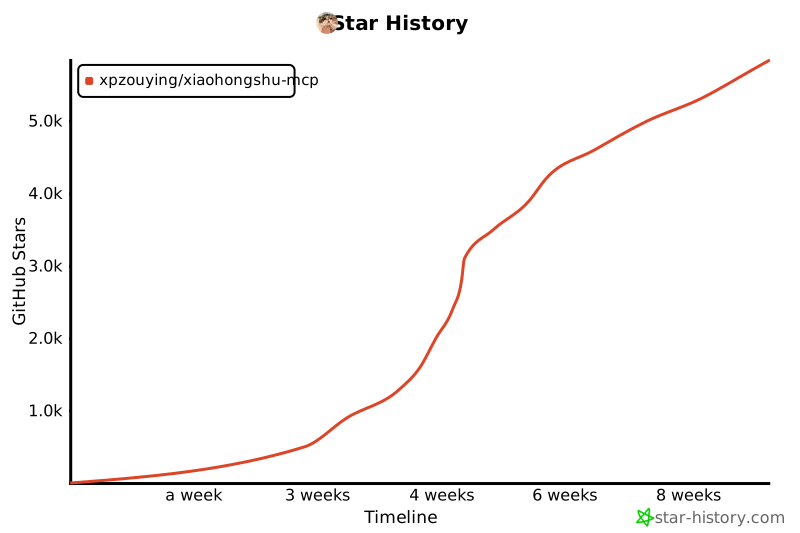
## Star History
|
||
|
||
[](https://www.star-history.com/#xpzouying/xiaohongshu-mcp&Timeline)
|