
809 lines
29 KiB
Markdown
809 lines
29 KiB
Markdown
# xiaohongshu-mcp
|
|
|
|
<!-- ALL-CONTRIBUTORS-BADGE:START - Do not remove or modify this section -->
|
|
[](#contributors-)
|
|
<!-- ALL-CONTRIBUTORS-BADGE:END -->
|
|
|
|
[](./DONATIONS.md)
|
|
[](./DONATIONS.md)
|
|
[](https://hub.docker.com/r/xpzouying/xiaohongshu-mcp)
|
|
|
|
MCP for RedNote (Xiaohongshu) platform.
|
|
|
|
- My blog article: [haha.ai/xiaohongshu-mcp](https://www.haha.ai/xiaohongshu-mcp)
|
|
|
|
**If you encounter any issues, be sure to check [Common Issues and Solutions](https://github.com/xpzouying/xiaohongshu-mcp/issues/56) first.**
|
|
|
|
After checking the **Common Issues** list, if you still can't resolve your deployment problems, we strongly recommend using another tool I've created: [xpzouying/x-mcp](https://github.com/xpzouying/x-mcp). This tool doesn't require deployment - you only need a browser extension to drive your MCP, making it more user-friendly for non-technical users.
|
|
|
|
## Star History
|
|
|
|
[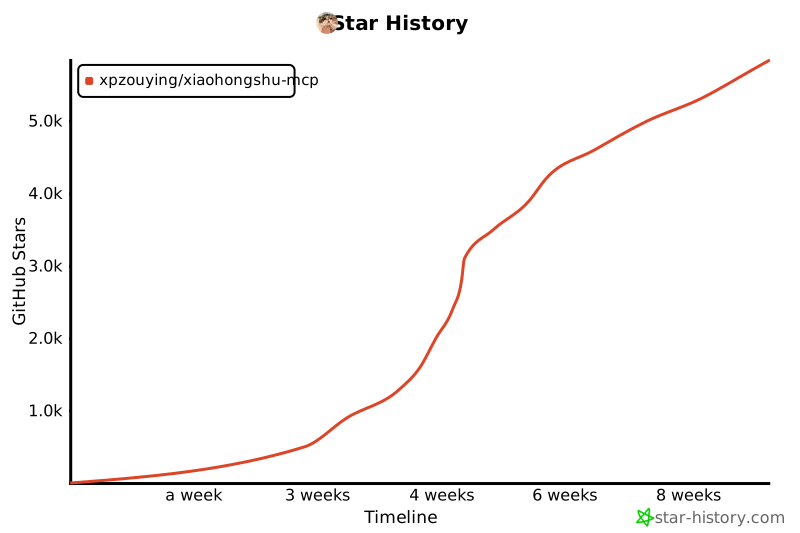](https://www.star-history.com/#xpzouying/xiaohongshu-mcp&Timeline)
|
|
|
|
## Appreciation and Support
|
|
|
|
All donations received for this project will be used for charitable giving. For all charitable donation records, please refer to [DONATIONS.md](./DONATIONS.md).
|
|
|
|
**When donating, please note "MCP" and your name.**
|
|
If you need to correct/withdraw your name attribution, please open an Issue or contact via email.
|
|
|
|
**Alipay (QR code not displayed):**
|
|
|
|
Donate via Alipay to **xpzouying@gmail.com**.
|
|
|
|
**WeChat:**
|
|
|
|
<img src="donate/wechat@2x.png" alt="WeChat Pay QR" width="260" />
|
|
|
|
## Project Overview
|
|
|
|
**Main Features**
|
|
|
|
> 💡 **Tip:** Click on the feature titles below to expand and view video demonstrations
|
|
|
|
<details>
|
|
<summary><b>1. Login and Check Login Status</b></summary>
|
|
|
|
The first step is required - RedNote needs to be logged in. You can check current login status.
|
|
|
|
**Login Demo:**
|
|
|
|
https://github.com/user-attachments/assets/8b05eb42-d437-41b7-9235-e2143f19e8b7
|
|
|
|
**Check Login Status Demo:**
|
|
|
|
https://github.com/user-attachments/assets/bd9a9a4a-58cb-4421-b8f3-015f703ce1f9
|
|
|
|
</details>
|
|
|
|
<details>
|
|
<summary><b>2. Publish Image and Text Content</b></summary>
|
|
|
|
Supports publishing image and text content to RedNote, including title, content description, and images.
|
|
|
|
**Image Support Methods:**
|
|
|
|
Supports two image input methods:
|
|
|
|
1. **HTTP/HTTPS Image Links**
|
|
|
|
```
|
|
["https://example.com/image1.jpg", "https://example.com/image2.png"]
|
|
```
|
|
|
|
2. **Local Image Absolute Paths** (Recommended)
|
|
```
|
|
["/Users/username/Pictures/image1.jpg", "/home/user/images/image2.png"]
|
|
```
|
|
|
|
**Why Local Paths are Recommended:**
|
|
|
|
- ✅ Better stability, not dependent on network
|
|
- ✅ Faster upload speed
|
|
- ✅ Avoid image link expiration issues
|
|
- ✅ Support more image formats
|
|
|
|
**Publish Image-Text Post Demo:**
|
|
|
|
https://github.com/user-attachments/assets/8aee0814-eb96-40af-b871-e66e6bbb6b06
|
|
|
|
</details>
|
|
|
|
<details>
|
|
<summary><b>3. Publish Video Content</b></summary>
|
|
|
|
Supports publishing video content to RedNote, including title, content description, and local video files.
|
|
|
|
**Video Support Methods:**
|
|
|
|
Only supports local video file absolute paths:
|
|
|
|
```
|
|
"/Users/username/Videos/video.mp4"
|
|
```
|
|
|
|
**Features:**
|
|
|
|
- ✅ Supports local video file upload
|
|
- ✅ Automatic video format processing
|
|
- ✅ Supports title, content description, and tags
|
|
- ✅ Automatically publishes after video processing is complete
|
|
|
|
**Important Notes:**
|
|
|
|
- Only supports local video files, not HTTP links
|
|
- Video processing takes longer, please be patient
|
|
- Recommended video file size should not exceed 1GB
|
|
|
|
</details>
|
|
|
|
<details>
|
|
<summary><b>4. Search Content</b></summary>
|
|
|
|
Search RedNote content by keywords.
|
|
|
|
**Search Posts Demo:**
|
|
|
|
https://github.com/user-attachments/assets/03c5077d-6160-4b18-b629-2e40933a1fd3
|
|
|
|
</details>
|
|
|
|
<details>
|
|
<summary><b>5. Get Recommendation List</b></summary>
|
|
|
|
Get RedNote homepage recommendation content list.
|
|
|
|
**Get Recommendation List Demo:**
|
|
|
|
https://github.com/user-attachments/assets/110fc15d-46f2-4cca-bdad-9de5b5b8cc28
|
|
|
|
</details>
|
|
|
|
<details>
|
|
<summary><b>6. Get Post Details (Including Interaction Data and Comments)</b></summary>
|
|
|
|
Get complete details of RedNote posts, including:
|
|
|
|
- Post content (title, description, images, etc.)
|
|
- User information
|
|
- Interaction data (likes, favorites, shares, comment count)
|
|
- Comment list and sub-comments
|
|
|
|
**⚠️ Important Note:**
|
|
|
|
- Both post ID and xsec_token are required (both parameters are essential)
|
|
- These two parameters can be obtained from Feed list or search results
|
|
- Must login first to use this feature
|
|
|
|
**Get Post Details Demo:**
|
|
|
|
https://github.com/user-attachments/assets/76a26130-a216-4371-a6b3-937b8fda092a
|
|
|
|
</details>
|
|
|
|
<details>
|
|
<summary><b>7. Post Comments to Posts</b></summary>
|
|
|
|
Supports automatically posting comments to RedNote posts.
|
|
|
|
**Feature Description:**
|
|
|
|
- Automatically locate comment input box
|
|
- Input comment content and publish
|
|
- Supports HTTP API and MCP tool calls
|
|
|
|
**⚠️ Important Note:**
|
|
|
|
- Must login first to use this feature
|
|
- Need to provide post ID, xsec_token, and comment content
|
|
- These parameters can be obtained from Feed list or search results
|
|
|
|
**Post Comment Demo:**
|
|
|
|
https://github.com/user-attachments/assets/cc385b6c-422c-489b-a5fc-63e92c695b80
|
|
|
|
</details>
|
|
|
|
<details>
|
|
<summary><b>8. Get User Profile</b></summary>
|
|
|
|
Get RedNote user's personal profile information, including basic user information and note content.
|
|
|
|
**Feature Description:**
|
|
|
|
- Get user basic information (nickname, bio, avatar, etc.)
|
|
- Get follower count, following count, likes count statistics
|
|
- Get user's published note content list
|
|
- Supports HTTP API and MCP tool calls
|
|
|
|
**⚠️ Important Note:**
|
|
|
|
- Must login first to use this feature
|
|
- Need to provide user ID and xsec_token
|
|
- These parameters can be obtained from Feed list or search results
|
|
|
|
**Returned Information Includes:**
|
|
|
|
- User basic info: nickname, bio, avatar, verification status
|
|
- Statistics: following count, follower count, likes count, note count
|
|
- Note list: all public notes published by the user
|
|
|
|
</details>
|
|
|
|
**RedNote Basic Operation Knowledge**
|
|
|
|
- **Title: (Very Important) RedNote requires titles to not exceed 20 characters**
|
|
- **Content: (Very Important) Content cannot exceed 1000 characters**
|
|
- Currently supports both image-text and video posting: From a recommendation perspective, image-text posts get better traffic than video or pure text.
|
|
- (Low priority) Pure text support can be considered. 1. I personally feel pure text would greatly increase operation complexity; 2. Pure text has low value in my use scenarios.
|
|
- Tags: Now supported. Adding appropriate tags can bring more traffic.
|
|
- According to my practical experience, RedNote should allow **50 posts** per day.
|
|
- **(Very Important) RedNote does not allow the same account to login on multiple web platforms**. If you login to the current xiaohongshu-mcp, don't login to that account on other web platforms, otherwise it will "kick out" the current MCP account login. You can use the mobile app to check current account information.
|
|
|
|
**Risk Explanation**
|
|
|
|
1. This project is open-sourced based on another project of mine. The original project has been running stably for over a year without any account bans, only occasional cookie expiration requiring re-login.
|
|
2. I used Claude Code CLI integration and verified stable automated operation for several weeks before open-sourcing.
|
|
|
|
This project is for learning purposes only. All illegal activities are prohibited.
|
|
|
|
**Practical Results**
|
|
|
|
First day likes/favorites reached 999+,
|
|
|
|
<img width="386" height="278" alt="CleanShot 2025-09-05 at 01 31 55@2x" src="https://github.com/user-attachments/assets/4b5a283b-bd38-45b8-b608-8f818997366c" />
|
|
|
|
<img width="350" height="280" alt="CleanShot 2025-09-05 at 01 32 49@2x" src="https://github.com/user-attachments/assets/4481e1e7-3ef6-4bbd-8483-dcee8f77a8f2" />
|
|
|
|
Results after about a week
|
|
|
|
<img width="1840" height="582" alt="CleanShot 2025-09-05 at 01 33 13@2x" src="https://github.com/user-attachments/assets/fb367944-dc48-4bbd-8ece-934caa86323e" />
|
|
|
|
## 1. Usage Tutorial
|
|
|
|
### 1.1. Quick Start (Recommended)
|
|
|
|
**Method 1: Download Pre-compiled Binaries**
|
|
|
|
Download pre-compiled binaries for your platform directly from [GitHub Releases](https://github.com/xpzouying/xiaohongshu-mcp/releases):
|
|
|
|
**Main Program (MCP Service):**
|
|
|
|
- **macOS Apple Silicon**: `xiaohongshu-mcp-darwin-arm64`
|
|
- **macOS Intel**: `xiaohongshu-mcp-darwin-amd64`
|
|
- **Windows x64**: `xiaohongshu-mcp-windows-amd64.exe`
|
|
- **Linux x64**: `xiaohongshu-mcp-linux-amd64`
|
|
|
|
**Login Tool:**
|
|
|
|
- **macOS Apple Silicon**: `xiaohongshu-login-darwin-arm64`
|
|
- **macOS Intel**: `xiaohongshu-login-darwin-amd64`
|
|
- **Windows x64**: `xiaohongshu-login-windows-amd64.exe`
|
|
- **Linux x64**: `xiaohongshu-login-linux-amd64`
|
|
|
|
Usage Steps:
|
|
|
|
```bash
|
|
# 1. First run the login tool
|
|
chmod +x xiaohongshu-login-darwin-arm64
|
|
./xiaohongshu-login-darwin-arm64
|
|
|
|
# 2. Then start the MCP service
|
|
chmod +x xiaohongshu-mcp-darwin-arm64
|
|
./xiaohongshu-mcp-darwin-arm64
|
|
```
|
|
|
|
**⚠️ Important Note**: The headless browser will be automatically downloaded on first run (about 150MB), please ensure a stable network connection. Subsequent runs will not require re-downloading.
|
|
|
|
**Method 2: Build from Source**
|
|
|
|
<details>
|
|
<summary>Build from Source Details</summary>
|
|
|
|
Requires Golang environment. For installation instructions, please refer to [Golang Official Documentation](https://go.dev/doc/install).
|
|
|
|
Set Go domestic proxy source:
|
|
|
|
```bash
|
|
# Configure GOPROXY environment variable, choose one of the following three
|
|
|
|
# 1. Qiniu CDN
|
|
go env -w GOPROXY=https://goproxy.cn,direct
|
|
|
|
# 2. Alibaba Cloud
|
|
go env -w GOPROXY=https://mirrors.aliyun.com/goproxy/,direct
|
|
|
|
# 3. Official
|
|
go env -w GOPROXY=https://goproxy.io,direct
|
|
```
|
|
|
|
</details>
|
|
|
|
**Method 3: Using Docker Container (Simplest)**
|
|
|
|
<details>
|
|
<summary>Docker Deployment Details</summary>
|
|
|
|
Using Docker deployment is the simplest method, requiring no development environment installation.
|
|
|
|
**1. Pull Image from Docker Hub (Recommended)**
|
|
|
|
We provide pre-built Docker images that can be directly pulled from Docker Hub:
|
|
|
|
```bash
|
|
# Pull the latest image
|
|
docker pull xpzouying/xiaohongshu-mcp
|
|
```
|
|
|
|
Docker Hub URL: [https://hub.docker.com/r/xpzouying/xiaohongshu-mcp](https://hub.docker.com/r/xpzouying/xiaohongshu-mcp)
|
|
|
|
**2. Start with Docker Compose (Recommended)**
|
|
|
|
We provide a pre-configured `docker-compose.yml` file that can be used directly:
|
|
|
|
```bash
|
|
# Download docker-compose.yml
|
|
wget https://raw.githubusercontent.com/xpzouying/xiaohongshu-mcp/main/docker/docker-compose.yml
|
|
|
|
# Or if you've already cloned the project, enter the docker directory
|
|
cd docker
|
|
|
|
# Start service
|
|
docker compose up -d
|
|
|
|
# View logs
|
|
docker compose logs -f
|
|
|
|
# Stop service
|
|
docker compose stop
|
|
```
|
|
|
|
**3. Build Image Yourself (Optional)**
|
|
|
|
If you need to customize or modify the code, you can build the image yourself:
|
|
|
|
```bash
|
|
# Run in project root directory
|
|
docker build -t xpzouying/xiaohongshu-mcp .
|
|
```
|
|
|
|
**4. Configuration Notes**
|
|
|
|
The Docker version automatically:
|
|
- Configures Chrome browser and Chinese fonts
|
|
- Mounts `./data` for storing cookies
|
|
- Mounts `./images` for storing publish images
|
|
- Exposes port 18060 for MCP connection
|
|
|
|
For detailed instructions, please refer to: [Docker Deployment Guide](./docker/README.md)
|
|
|
|
</details>
|
|
|
|
For Windows issues, check here first: [Windows Installation Guide](./docs/windows_guide.md)
|
|
|
|
### 1.2. Login
|
|
|
|
First time requires manual login to save RedNote login status.
|
|
|
|
**Using Binary Files:**
|
|
|
|
```bash
|
|
# Run the login tool for your platform
|
|
./xiaohongshu-login-darwin-arm64
|
|
```
|
|
|
|
**Using Source Code:**
|
|
|
|
```bash
|
|
go run cmd/login/main.go
|
|
```
|
|
|
|
### 1.3. Start MCP Service
|
|
|
|
Start xiaohongshu-mcp service.
|
|
|
|
**Using Binary Files:**
|
|
|
|
```bash
|
|
# Default: Headless mode, no browser interface
|
|
./xiaohongshu-mcp-darwin-arm64
|
|
|
|
# Non-headless mode, with browser interface
|
|
./xiaohongshu-mcp-darwin-arm64 -headless=false
|
|
```
|
|
|
|
**Using Source Code:**
|
|
|
|
```bash
|
|
# Default: Headless mode, no browser interface
|
|
go run .
|
|
|
|
# Non-headless mode, with browser interface
|
|
go run . -headless=false
|
|
```
|
|
|
|
## 1.4. Verify MCP
|
|
|
|
```bash
|
|
npx @modelcontextprotocol/inspector
|
|
```
|
|
|
|

|
|
|
|
After running, open the red-marked link, configure MCP inspector, enter `http://localhost:18060/mcp`, and click the `Connect` button.
|
|
|
|

|
|
|
|
After configuring MCP inspector as above, click the `List Tools` button to view all Tools.
|
|
|
|
## 1.5. Use MCP for Publishing
|
|
|
|
### Check Login Status
|
|
|
|

|
|
|
|
### Publish Image-Text
|
|
|
|
The example uses a random image from https://unsplash.com/ for testing.
|
|
|
|

|
|
|
|
### Search Content
|
|
|
|
Use search functionality to search RedNote content by keywords:
|
|
|
|

|
|
|
|
## 2. MCP Client Integration
|
|
|
|
This service supports the standard Model Context Protocol (MCP) and can integrate with various AI clients that support MCP.
|
|
|
|
### 2.1. Quick Start
|
|
|
|
#### Start MCP Service
|
|
|
|
```bash
|
|
# Start service (default headless mode)
|
|
go run .
|
|
|
|
# Or with interface mode
|
|
go run . -headless=false
|
|
```
|
|
|
|
Service will run at: `http://localhost:18060/mcp`
|
|
|
|
#### Verify Service Status
|
|
|
|
```bash
|
|
# Test MCP connection
|
|
curl -X POST http://localhost:18060/mcp \
|
|
-H "Content-Type: application/json" \
|
|
-d '{"jsonrpc":"2.0","method":"initialize","params":{},"id":1}'
|
|
```
|
|
|
|
#### Claude Code CLI Integration
|
|
|
|
```bash
|
|
# Add HTTP MCP server
|
|
claude mcp add --transport http xiaohongshu-mcp http://localhost:18060/mcp
|
|
```
|
|
|
|
### 2.2. Supported Clients
|
|
|
|
<details>
|
|
<summary><b>Claude Code CLI</b></summary>
|
|
|
|
Official command line tool, already shown in the quick start section above:
|
|
|
|
```bash
|
|
# Add HTTP MCP server
|
|
claude mcp add --transport http xiaohongshu-mcp http://localhost:18060/mcp
|
|
```
|
|
|
|
</details>
|
|
|
|
<details>
|
|
<summary><b>Cursor</b></summary>
|
|
|
|
#### Configuration File Method
|
|
|
|
Create or edit MCP configuration file:
|
|
|
|
**Project-level configuration** (recommended):
|
|
Create `.cursor/mcp.json` in project root directory:
|
|
|
|
```json
|
|
{
|
|
"mcpServers": {
|
|
"xiaohongshu-mcp": {
|
|
"url": "http://localhost:18060/mcp",
|
|
"description": "RedNote content publishing service - MCP Streamable HTTP"
|
|
}
|
|
}
|
|
}
|
|
```
|
|
|
|
**Global configuration**:
|
|
Create `~/.cursor/mcp.json` in user directory (same content).
|
|
|
|
#### Usage Steps
|
|
|
|
1. Ensure RedNote MCP service is running
|
|
2. Save configuration file and restart Cursor
|
|
3. In Cursor chat, tools should be automatically available
|
|
4. You can view connected MCP tools through "Available Tools" in the chat interface
|
|
|
|
**Demo**
|
|
|
|
Plugin MCP integration:
|
|
|
|

|
|
|
|
Call MCP tools: (using check login status as example)
|
|
|
|

|
|
|
|
</details>
|
|
|
|
<details>
|
|
<summary><b>VSCode</b></summary>
|
|
|
|
#### Method 1: Configure using Command Palette
|
|
|
|
1. Press `Ctrl/Cmd + Shift + P` to open command palette
|
|
2. Run `MCP: Add Server` command
|
|
3. Select `HTTP` method.
|
|
4. Enter address: `http://localhost:18060/mcp`, or modify to corresponding Server address.
|
|
5. Enter MCP name: `xiaohongshu-mcp`.
|
|
|
|
#### Method 2: Direct Configuration File Edit
|
|
|
|
**Workspace configuration** (recommended):
|
|
Create `.vscode/mcp.json` in project root directory:
|
|
|
|
```json
|
|
{
|
|
"servers": {
|
|
"xiaohongshu-mcp": {
|
|
"url": "http://localhost:18060/mcp",
|
|
"type": "http"
|
|
}
|
|
},
|
|
"inputs": []
|
|
}
|
|
```
|
|
|
|
**View Configuration**:
|
|
|
|

|
|
|
|
1. Confirm running status.
|
|
2. Check if `tools` are correctly detected.
|
|
|
|
**Demo**
|
|
|
|
Using search post content as example:
|
|
|
|

|
|
|
|
</details>
|
|
|
|
<details>
|
|
<summary><b>Google Gemini CLI</b></summary>
|
|
|
|
Configure in `~/.gemini/settings.json` or project directory `.gemini/settings.json`:
|
|
|
|
```json
|
|
{
|
|
"mcpServers": {
|
|
"xiaohongshu": {
|
|
"httpUrl": "http://localhost:18060/mcp",
|
|
"timeout": 30000
|
|
}
|
|
}
|
|
}
|
|
```
|
|
|
|
For more information, please refer to [Gemini CLI MCP Documentation](https://google-gemini.github.io/gemini-cli/docs/tools/mcp-server.html)
|
|
|
|
</details>
|
|
|
|
<details>
|
|
<summary><b>MCP Inspector</b></summary>
|
|
|
|
Debug tool for testing MCP connections:
|
|
|
|
```bash
|
|
# Start MCP Inspector
|
|
npx @modelcontextprotocol/inspector
|
|
|
|
# Connect in browser to: http://localhost:18060/mcp
|
|
```
|
|
|
|
Usage steps:
|
|
|
|
- Use MCP Inspector to test connection
|
|
- Test Ping Server functionality to verify connection
|
|
- Check if List Tools returns 6 tools
|
|
|
|
</details>
|
|
|
|
<details>
|
|
<summary><b>Cline</b></summary>
|
|
|
|
Cline is a powerful AI programming assistant that supports MCP protocol integration.
|
|
|
|
#### Configuration Method
|
|
|
|
Add the following configuration to Cline's MCP settings:
|
|
|
|
```json
|
|
{
|
|
"xiaohongshu-mcp": {
|
|
"url": "http://localhost:18060/mcp",
|
|
"type": "streamableHttp",
|
|
"autoApprove": [],
|
|
"disabled": false
|
|
}
|
|
}
|
|
```
|
|
|
|
#### Usage Steps
|
|
|
|
1. Ensure RedNote MCP service is running (`http://localhost:18060/mcp`)
|
|
2. Open MCP settings in Cline
|
|
3. Add the above configuration to the MCP server list
|
|
4. Save configuration and restart Cline
|
|
5. You can directly use RedNote-related features in conversations
|
|
|
|
#### Configuration Explanation
|
|
|
|
- `url`: MCP service address
|
|
- `type`: Use `streamableHttp` type for better performance
|
|
- `autoApprove`: Configurable auto-approve tool list (empty means manual approval)
|
|
- `disabled`: Set to `false` to enable this MCP service
|
|
|
|
#### Usage Examples
|
|
|
|
After configuration, you can use natural language to operate RedNote directly in Cline:
|
|
|
|
```
|
|
Help me check RedNote login status
|
|
```
|
|
|
|
```
|
|
Help me publish a spring-themed image-text post to RedNote, using this image: /path/to/spring.jpg
|
|
```
|
|
|
|
```
|
|
Search for content about "food" on RedNote
|
|
```
|
|
|
|
</details>
|
|
|
|
<details>
|
|
<summary><b>Other HTTP MCP Supporting Clients</b></summary>
|
|
|
|
Any client supporting HTTP MCP protocol can connect to: `http://localhost:18060/mcp`
|
|
|
|
Basic configuration template:
|
|
|
|
```json
|
|
{
|
|
"name": "xiaohongshu-mcp",
|
|
"url": "http://localhost:18060/mcp",
|
|
"type": "http"
|
|
}
|
|
```
|
|
|
|
</details>
|
|
|
|
### 2.3. Available MCP Tools
|
|
|
|
After successful connection, you can use the following MCP tools:
|
|
|
|
- `check_login_status` - Check RedNote login status (no parameters)
|
|
- `publish_content` - Publish image-text content to RedNote (required: title, content, images)
|
|
- `images`: Supports HTTP links or local absolute paths, local paths recommended
|
|
- `publish_with_video` - Publish video content to RedNote (required: title, content, video)
|
|
- `video`: Only supports local video file absolute paths
|
|
- `list_feeds` - Get RedNote homepage recommendation list (no parameters)
|
|
- `search_feeds` - Search RedNote content (required: keyword)
|
|
- `get_feed_detail` - Get post details (required: feed_id, xsec_token)
|
|
- `post_comment_to_feed` - Post comments to RedNote posts (required: feed_id, xsec_token, content)
|
|
- `user_profile` - Get user profile information (required: user_id, xsec_token)
|
|
|
|
### 2.4. Usage Examples
|
|
|
|
Using Claude Code to publish content to RedNote:
|
|
|
|
**Example 1: Using HTTP Image Links**
|
|
|
|
```
|
|
Help me write a post to publish on RedNote,
|
|
with image: https://cn.bing.com/th?id=OHR.MaoriRock_EN-US6499689741_UHD.jpg&w=3840
|
|
The image is: "Maori rock carving at Ngātoroirangi Mine Bay, Lake Taupo, New Zealand (© Joppi/Getty Images)"
|
|
|
|
Use xiaohongshu-mcp for publishing.
|
|
```
|
|
|
|
**Example 2: Using Local Image Paths (Recommended)**
|
|
|
|
```
|
|
Help me write a post about spring to publish on RedNote,
|
|
using these local images:
|
|
- /Users/username/Pictures/spring_flowers.jpg
|
|
- /Users/username/Pictures/cherry_blossom.jpg
|
|
|
|
Use xiaohongshu-mcp for publishing.
|
|
```
|
|
|
|
**Example 3: Publishing Video Content**
|
|
|
|
```
|
|
Help me write a video post about cooking tutorials to publish on RedNote,
|
|
using this local video file:
|
|
- /Users/username/Videos/cooking_tutorial.mp4
|
|
|
|
Use xiaohongshu-mcp's video publishing feature.
|
|
```
|
|
|
|

|
|
|
|
**Publishing Result:**
|
|
|
|
<img src="./assets/publish_result.jpeg" alt="xiaohongshu-mcp publishing result" width="300">
|
|
|
|
## 3. 🌟 Community Showcases
|
|
|
|
> 💡 **Highly Recommended**: These are real-world use cases from community contributors, featuring detailed configuration steps and practical experiences!
|
|
|
|
### 📚 Complete Tutorial List
|
|
|
|
1. **[n8n Complete Integration Tutorial](./examples/n8n/README.md)** - Workflow automation platform integration
|
|
2. **[Cherry Studio Complete Configuration Tutorial](./examples/cherrystudio/README.md)** - Perfect AI client integration
|
|
3. **[Claude Code + Kimi K2 Integration Tutorial](./examples/claude-code/claude-code-kimi-k2.md)** - If Claude Code's barrier is too high, then integrate with Kimi domestic LLM!
|
|
4. **[AnythingLLM Complete Guide](./examples/anythingLLM/readme.md)** - AnythingLLM is an all-in-one multimodal AI client that supports workflow definition, multiple LLMs, and plugin extensions.
|
|
|
|
> 🎯 **Tip**: Click the links above to view detailed step-by-step tutorials for quick setup of various integration solutions!
|
|
>
|
|
> 📢 **Contributions Welcome**: If you have new integration cases, feel free to submit a PR to share with the community!
|
|
|
|
## 4. RedNote MCP Community Group
|
|
|
|
**Important: Before asking questions in the group, please make sure to read the README documentation thoroughly and check Issues first.**
|
|
|
|
<!-- Two-column layout: Feishu Group 3 | WeChat Group 10 -->
|
|
|
|
| 【Feishu Group 3】: Scan to join | 【WeChat Group 10】: Scan to join |
|
|
| -------------------------------------------------------------------------------------------------------------------------- | --------------------------------------------------------------------------------------------------------------------------- |
|
|
| <img src="https://github.com/user-attachments/assets/9a0ec41a-cb65-4f4e-a0f7-31658a49512d" alt="qrcode_2qun" width="300"> | <img src="https://github.com/user-attachments/assets/a5f8fc69-e37a-4404-a611-4a601ba0b42f" alt="WechatIMG119" width="300"> |
|
|
|
|
## 🙏 Thanks to Contributors ✨
|
|
|
|
Thanks to all friends who have contributed to this project! (In no particular order)
|
|
|
|
<!-- ALL-CONTRIBUTORS-LIST:START - Do not remove or modify this section -->
|
|
<!-- prettier-ignore-start -->
|
|
<!-- markdownlint-disable -->
|
|
<table>
|
|
<tbody>
|
|
<tr>
|
|
<td align="center" valign="top" width="14.28%"><a href="https://haha.ai"><img src="https://avatars.githubusercontent.com/u/3946563?v=4?s=100" width="100px;" alt="zy"/><br /><sub><b>zy</b></sub></a><br /><a href="https://github.com/xpzouying/xiaohongshu-mcp/commits?author=xpzouying" title="Code">💻</a> <a href="#ideas-xpzouying" title="Ideas, Planning, & Feedback">🤔</a> <a href="https://github.com/xpzouying/xiaohongshu-mcp/commits?author=xpzouying" title="Documentation">📖</a> <a href="#design-xpzouying" title="Design">🎨</a> <a href="#maintenance-xpzouying" title="Maintenance">🚧</a> <a href="#infra-xpzouying" title="Infrastructure (Hosting, Build-Tools, etc)">🚇</a> <a href="https://github.com/xpzouying/xiaohongshu-mcp/pulls?q=is%3Apr+reviewed-by%3Axpzouying" title="Reviewed Pull Requests">👀</a></td>
|
|
<td align="center" valign="top" width="14.28%"><a href="http://www.hwbuluo.com"><img src="https://avatars.githubusercontent.com/u/1271815?v=4?s=100" width="100px;" alt="clearwater"/><br /><sub><b>clearwater</b></sub></a><br /><a href="https://github.com/xpzouying/xiaohongshu-mcp/commits?author=esperyong" title="Code">💻</a></td>
|
|
<td align="center" valign="top" width="14.28%"><a href="https://github.com/laryzhong"><img src="https://avatars.githubusercontent.com/u/47939471?v=4?s=100" width="100px;" alt="Zhongpeng"/><br /><sub><b>Zhongpeng</b></sub></a><br /><a href="https://github.com/xpzouying/xiaohongshu-mcp/commits?author=laryzhong" title="Code">💻</a></td>
|
|
<td align="center" valign="top" width="14.28%"><a href="https://github.com/DTDucas"><img src="https://avatars.githubusercontent.com/u/105262836?v=4?s=100" width="100px;" alt="Duong Tran"/><br /><sub><b>Duong Tran</b></sub></a><br /><a href="https://github.com/xpzouying/xiaohongshu-mcp/commits?author=DTDucas" title="Code">💻</a></td>
|
|
<td align="center" valign="top" width="14.28%"><a href="https://github.com/Angiin"><img src="https://avatars.githubusercontent.com/u/17389304?v=4?s=100" width="100px;" alt="Angiin"/><br /><sub><b>Angiin</b></sub></a><br /><a href="https://github.com/xpzouying/xiaohongshu-mcp/commits?author=Angiin" title="Code">💻</a></td>
|
|
<td align="center" valign="top" width="14.28%"><a href="https://github.com/muhenan"><img src="https://avatars.githubusercontent.com/u/43441941?v=4?s=100" width="100px;" alt="Henan Mu"/><br /><sub><b>Henan Mu</b></sub></a><br /><a href="https://github.com/xpzouying/xiaohongshu-mcp/commits?author=muhenan" title="Code">💻</a></td>
|
|
<td align="center" valign="top" width="14.28%"><a href="https://github.com/chengazhen"><img src="https://avatars.githubusercontent.com/u/52627267?v=4?s=100" width="100px;" alt="Journey"/><br /><sub><b>Journey</b></sub></a><br /><a href="https://github.com/xpzouying/xiaohongshu-mcp/commits?author=chengazhen" title="Code">💻</a></td>
|
|
</tr>
|
|
<tr>
|
|
<td align="center" valign="top" width="14.28%"><a href="https://github.com/eveyuyi"><img src="https://avatars.githubusercontent.com/u/69026872?v=4?s=100" width="100px;" alt="Eve Yu"/><br /><sub><b>Eve Yu</b></sub></a><br /><a href="https://github.com/xpzouying/xiaohongshu-mcp/commits?author=eveyuyi" title="Code">💻</a></td>
|
|
<td align="center" valign="top" width="14.28%"><a href="https://github.com/CooperGuo"><img src="https://avatars.githubusercontent.com/u/183056602?v=4?s=100" width="100px;" alt="CooperGuo"/><br /><sub><b>CooperGuo</b></sub></a><br /><a href="https://github.com/xpzouying/xiaohongshu-mcp/commits?author=CooperGuo" title="Code">💻</a></td>
|
|
<td align="center" valign="top" width="14.28%"><a href="https://biboyqg.github.io/"><img src="https://avatars.githubusercontent.com/u/125724218?v=4?s=100" width="100px;" alt="Banghao Chi"/><br /><sub><b>Banghao Chi</b></sub></a><br /><a href="https://github.com/xpzouying/xiaohongshu-mcp/commits?author=BiboyQG" title="Code">💻</a></td>
|
|
<td align="center" valign="top" width="14.28%"><a href="https://github.com/varz1"><img src="https://avatars.githubusercontent.com/u/60377372?v=4?s=100" width="100px;" alt="varz1"/><br /><sub><b>varz1</b></sub></a><br /><a href="https://github.com/xpzouying/xiaohongshu-mcp/commits?author=varz1" title="Code">💻</a></td>
|
|
<td align="center" valign="top" width="14.28%"><a href="https://google.meloguan.site"><img src="https://avatars.githubusercontent.com/u/62586556?v=4?s=100" width="100px;" alt="Melo Y Guan"/><br /><sub><b>Melo Y Guan</b></sub></a><br /><a href="https://github.com/xpzouying/xiaohongshu-mcp/commits?author=Meloyg" title="Code">💻</a></td>
|
|
<td align="center" valign="top" width="14.28%"><a href="https://github.com/lmxdawn"><img src="https://avatars.githubusercontent.com/u/21293193?v=4?s=100" width="100px;" alt="lmxdawn"/><br /><sub><b>lmxdawn</b></sub></a><br /><a href="https://github.com/xpzouying/xiaohongshu-mcp/commits?author=lmxdawn" title="Code">💻</a></td>
|
|
<td align="center" valign="top" width="14.28%"><a href="https://github.com/haikow"><img src="https://avatars.githubusercontent.com/u/22428382?v=4?s=100" width="100px;" alt="haikow"/><br /><sub><b>haikow</b></sub></a><br /><a href="https://github.com/xpzouying/xiaohongshu-mcp/commits?author=haikow" title="Code">💻</a></td>
|
|
</tr>
|
|
<tr>
|
|
<td align="center" valign="top" width="14.28%"><a href="https://carlo-blog.aiju.fun/"><img src="https://avatars.githubusercontent.com/u/18513362?v=4?s=100" width="100px;" alt="Carlo"/><br /><sub><b>Carlo</b></sub></a><br /><a href="https://github.com/xpzouying/xiaohongshu-mcp/commits?author=a67793581" title="Code">💻</a></td>
|
|
<td align="center" valign="top" width="14.28%"><a href="https://github.com/hrz394943230"><img src="https://avatars.githubusercontent.com/u/28583005?v=4?s=100" width="100px;" alt="hrz"/><br /><sub><b>hrz</b></sub></a><br /><a href="https://github.com/xpzouying/xiaohongshu-mcp/commits?author=hrz394943230" title="Code">💻</a></td>
|
|
<td align="center" valign="top" width="14.28%"><a href="https://github.com/ctrlz526"><img src="https://avatars.githubusercontent.com/u/143257420?v=4?s=100" width="100px;" alt="Ctrlz"/><br /><sub><b>Ctrlz</b></sub></a><br /><a href="https://github.com/xpzouying/xiaohongshu-mcp/commits?author=ctrlz526" title="Code">💻</a></td>
|
|
</tr>
|
|
</tbody>
|
|
</table>
|
|
|
|
<!-- markdownlint-restore -->
|
|
<!-- prettier-ignore-end -->
|
|
|
|
<!-- ALL-CONTRIBUTORS-LIST:END -->
|
|
|
|
### ✨ Special Thanks
|
|
|
|
| Contributors |
|
|
| --------------------------------------------------------------------------------------------------------------------------- |
|
|
| [<img src="https://avatars.githubusercontent.com/wanpengxie" width="100px;"><br>@wanpengxie](https://github.com/wanpengxie) |
|
|
|
|
This project follows the [all-contributors](https://github.com/all-contributors/all-contributors) specification. Contributions of any kind welcome!
|